Sharp LC-32LB150U Guida Utente Pagina 28
- Pagina / 82
- Indice
- RISOLUZIONE PROBLEMI
- SEGNALIBRI

- Contents 2
- CHILD SAFETY 5
- Important Safety 6
- Instructions 6
- Sharp 32" LED TV 8
- Introduction 8
- Installing the stand 9
- TV components 12
- Remote control 14
- What connection should I 15
- Using HDMI (best) 16
- Using composite video (good) 19
- Using coaxial (good) 20
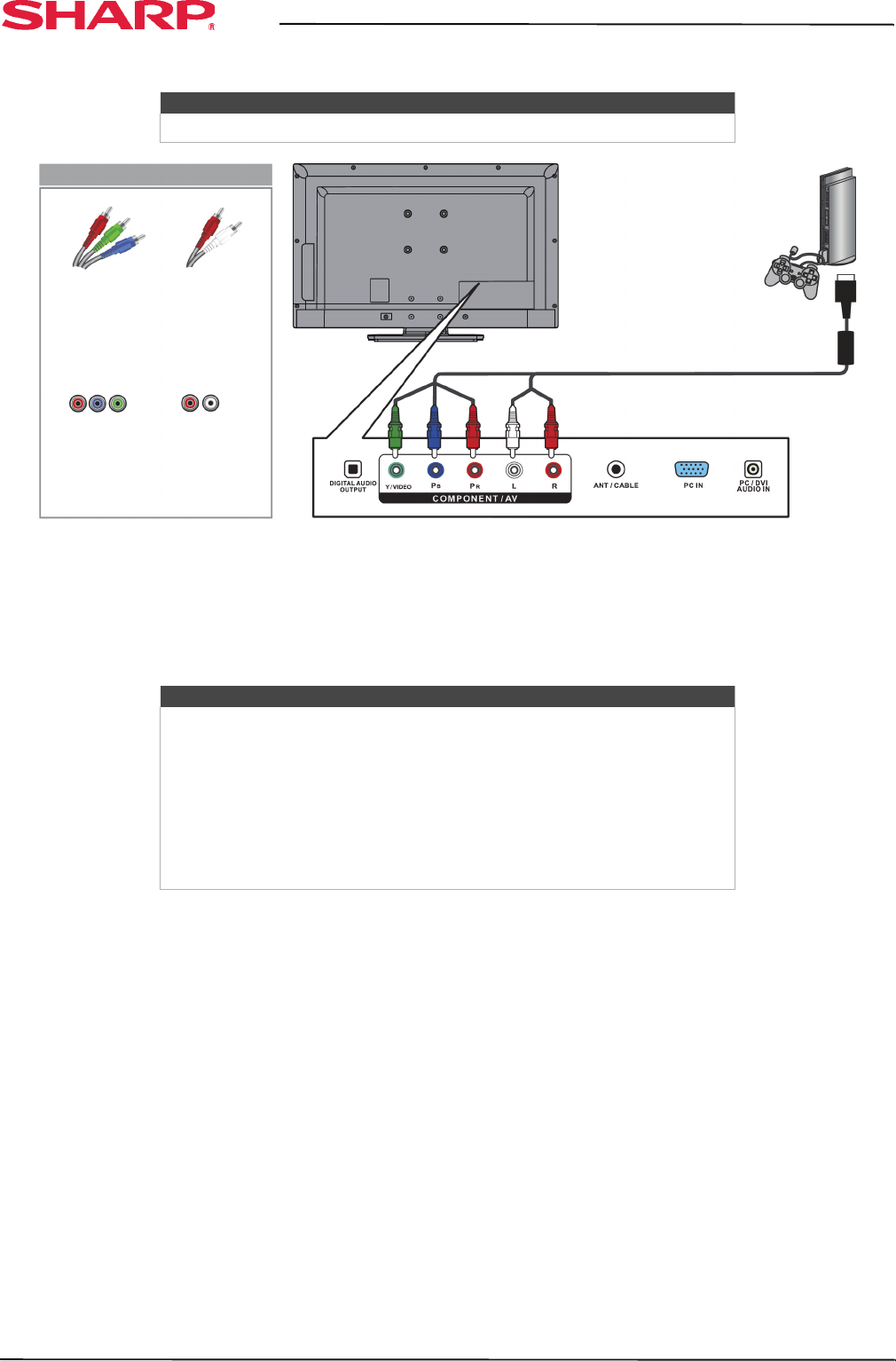
- Connecting a game console 27
- Connecting a computer 30
- Connecting a USB flash drive 33
- Connecting headphones 34
- Using digital audio 35
- Using analog audio 36
- Connecting power 38
- Using the remote control 39
- Turning on your TV for the 40
- Understanding the basics 42
- On-screen menu overview 43
- Navigating the menus 43
- Selecting a channel 44
- Adjusting the volume 44
- Viewing channel information 44
- Adjusting the picture 45
- Adjusting the sound 47
- Selecting the audio out mode 48
- Changing channel settings 49
- Hiding channels 51
- Viewing a favorite channel 51
- Setting parental controls 53
- Locking control buttons 54
- Blocking unrated TV 54
- Using closed captioning 57
- Adjusting time settings 60
- Adjusting menu settings 61
- Using CEC Control 62
- Waking CEC-compatible devices 65
- Using an MHL-enabled 66
- Using a Roku Streaming Stick 67
- Using a USB flash drive 68
- Viewing favorite photos 69
- Viewing photos in a slideshow 69
- Maintaining 70
- Troubleshooting 71
- Video and audio 72
- CEC-compatible device 76
- Specifications 78
- Programming universal 79
- Legal notices 80
- One-year limited warranty 81
- Sharp Televisions 81
- V1 ENGLISH 82
Prodotti e manuali riguardandi TV a LED Sharp LC-32LB150U

 (24 pagine)
LG HT355SD manuels
Manuels d'utilisation et guides de l'utilisateur pour Systèmes de cinéma à domicile LG HT355SD.
Nous fournissons des manuels en pdf 1 LG HT355SD à télécharger gratuitement par type de document : Manuel du propriétaire
Lg HT355SD Manuel du propriétaire (32 pages)
marque: Lg | Catégorie: Home cinema systems | Taille: 2.28 MB |
Table des matières
Plus de produits et de manuels pour Systèmes de cinéma à domicile LG
| Modèles | Type de document |
|---|---|
| DH3130S |
Manuel du propriétaire
LG DH3130S Owner's manual,
36 pages
|
| BH6220C |
Manuel du propriétaire
LG BH6220C Owner's manual,
66 pages
|
| BH9430PW |
Manuel du propriétaire
LG BH9430PW home cinema system,
84 pages
|
| BH7520TW |
Manuel du propriétaire
LG BH7520TW Owner's manual,
74 pages
|
| DH6520T |
Manuel de l'utilisateur
LG DH6520T Owner's manual,
48 pages
|
| HX806SG |
Manuel de l'utilisateur
LG HX806SG Owner's manual,
60 pages
|
| BH6220S |
Manuel de l'utilisateur
LG BH6320H Owner's manual,
75 pages
|
| BH7540TW |
Manuel de l'utilisateur
LG BH7540TW Owner's manual,
80 pages
|
| HT905TA |
Manuel de l'utilisateur
LG HT905TA Owner's manual,
50 pages
|
| HX806SG |
Manuel de l'utilisateur
LG HX806SG Owner's manual,
60 pages
|
| BH7535TW |
Manuel de l'utilisateur
LG BH7530TW Owner's manual,
80 pages
|
| HX806SH |
Manuel de l'utilisateur
LG HX806SH Owner's manual,
60 pages
|
| BH9530TW |
Manuel de l'utilisateur
LG BH9530TW Owner's manual,
82 pages
|
| BH7540TW |
Manuel de l'utilisateur
LG BH7540TW Owner's manual,
80 pages
|
| BH6330H |
Manuel de l'utilisateur
LG BH6330H Owner’s Manual [en] ,
72 pages
|
| HX806PH |
Manuel de l'utilisateur
LG HX806PH Owner's manual,
62 pages
|
| BH6420P |
Manuel de l'utilisateur
LG BH6420P Owner’s Manual [en] ,
74 pages
|
| DH4430P |
Manuel de l'utilisateur
LG DH4430P Owner’s Manual,
46 pages
|
| HB806PE |
Manuel de l'utilisateur
LG HB806PE Owner's manual,
62 pages
|
| BH6340H |
Manuel de l'utilisateur
LG BH6340H Owner’s Manual,
76 pages
|
© 2020, manymanuals.it. Tutti i diritti riservati | 0.034 s |
 Manymanuals.com
 Manymanuals.de
 Manymanuals.fr
 Manymanuals.it
 Manymanuals.pl
 Manymanuals.cz
 Manymanuals.es
 Manymanuals-pt.com
Commenti su questo manuale