Sharp AR-M236 Manuale Utente Pagina 20
- Pagina / 100
- Indice
- RISOLUZIONE PROBLEMI
- SEGNALIBRI

- With the RSPF installed 1
- CONTENTS 3
- APPENDIX 4
- CAUTIONS 5
- CAUTIONS ON LASER 6
- USING THE MANUAL 7
- INDICATIONS 8
- MAIN FEATURES 9
- BEFORE USING THE MACHINE 10
- Interior 11
- The indicators of the 12
- COMPLETE 13
- 4 5 6 7 8 14
- POWER ON AND OFF 15
- POWER SAVE MODES 16
- INITIAL SETTINGS 16
- LOADING PAPER 17
- Special papers 18
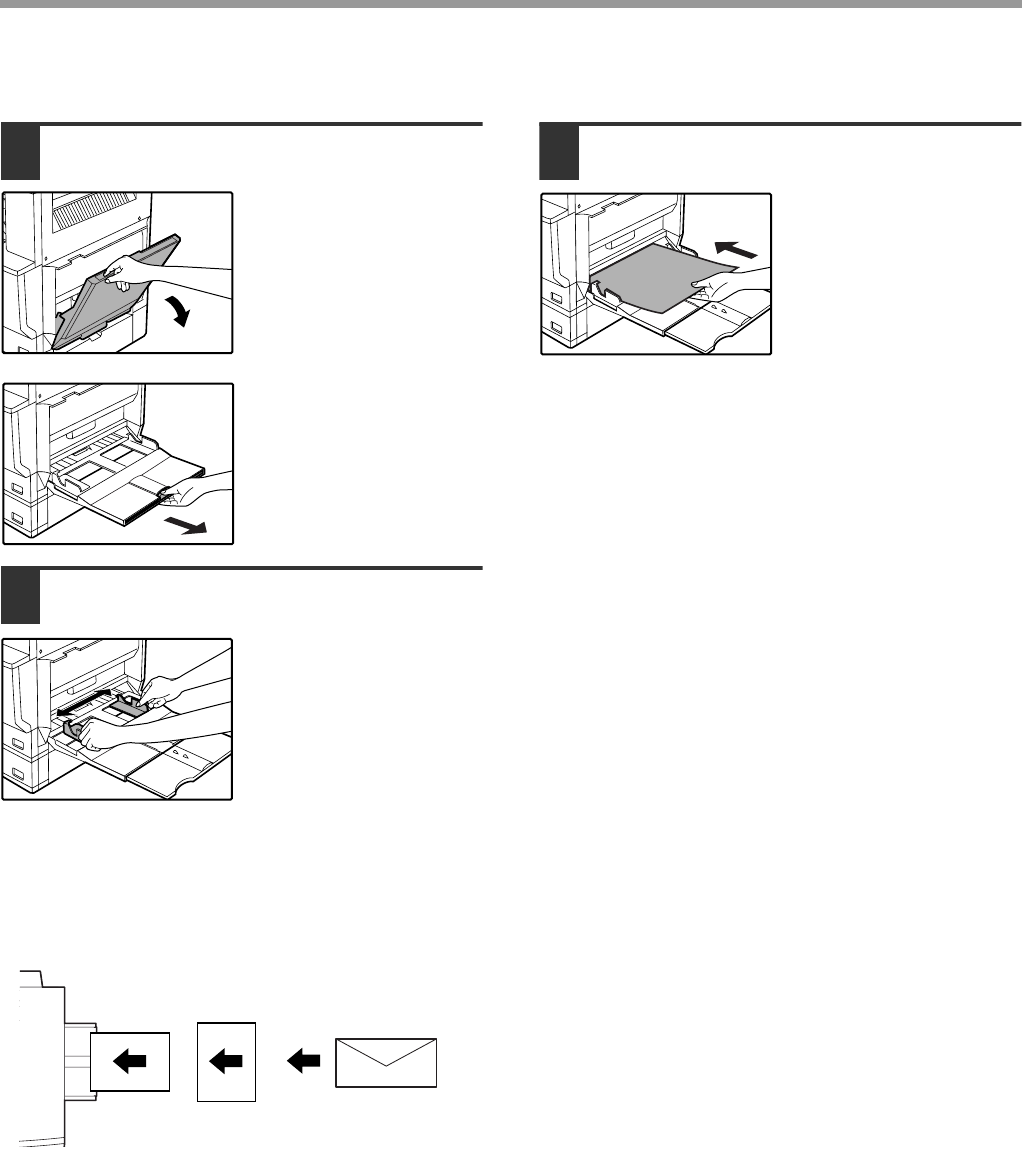
- Landscape 20
- Portrait 20
- SETTINGS 21
- From the [PAPER SELECT] key 22
- COPY FUNCTIONS 23
- Original scale Original scale 24
- COPYING FROM THE RSPF 25
- Document glass and RSPF 26
- Removing the document cover 26
- 2-SIDED COPY 27
- SPECIAL MODES 27
- BYPASS FEED (special paper) 28
- AUTOMATIC TWO-SIDED COPYING 29
- USING THE RSPF 30
- EXPOSURE ADJUSTMENT 31
- REDUCTION/ENLARGEMENT/ZOOM 32
- MANUAL RATIO SELECTION 33
- PAPER SELECT 34
- COPY RATIO 34
- EXPOSURE 35
- AUTO A4 35
- X-50% Y-70% 35
- INTERRUPTING A COPY RUN 36
- CONVENIENT COPY FUNCTIONS 37
- STAPLE SORT 39
- POSITIONS 39
- FUNCTIONS 42
- RIGHT LEFT DOWN 43
- CANCEL OK 44
- This page 45
- PAMPHLET COPY 46
- JOB BUILD MODE 47
- MULTI SHOT COPY 48
- ORIGINAL SIZE 49
- COVER COPY 50
- USER SETTINGS 52
- B STATUS 53
- CUSTOM SETTINGS 53
- JOB PROGRAM MEMORY 55
- EXECUTING A JOB PROGRAM 56
- DELETING A STORED JOB PROGRAM 56
- AUDITING MODE 57
- Chapter 5 58
- DISPLAY MESSAGES 59
- TROUBLESHOOTING 61
- Paper feeding problems 63
- Image quality problems 64
- A MISFEED HAS OCCURRED 65
- MISFEED IN THE RSPF 66
- Roller rotating knob 67
- Fusing unit release levers 68
- MISFEED IN THE CENTRE TRAY 69
- tray is being used, remove 72
- REPLACING THE TONER CARTRIDGE 73
- STAPLE CARTRIDGE REPLACEMENT 74
- CHECKING THE TONER QUANTITY 75
- AND TOTAL OUTPUT COUNT 75
- Scanning glass for RSPF 76
- PERIPHERAL DEVICES 77
- FINISHER (AR-FN5N) 78
- 500-SHEET PAPER FEED UNIT/ 79
- 2 x 500-SHEET PAPER FEED UNIT 79
- STORAGE OF SUPPLIES 80
- MATERIAL SAFETY DATA SHEET 83
- 10. STABILITY AND REACTIVITY 85
- 11. TOXICOLOGICAL INFORMATION 85
- INDEX BY PURPOSE 94
- LASER PRODUCT 98
- LASER KLASSE 1 98
- AR-M236/AR-M276 (for copier) 100
Commenti su questo manuale
Prodotti e manuali riguardandi Stampanti per fotografie Sharp AR-M236
 (178 pagine)
(104 pagine)
(311 pagine)
(178 pagine)
(104 pagine)
(311 pagine)
© 2020, manymanuals.it. Tutti i diritti riservati | 0.032 s |
 Manymanuals.com
 Manymanuals.de
 Manymanuals.fr
 Manymanuals.it
 Manymanuals.pl
 Manymanuals.cz
 Manymanuals.es
 Manymanuals-pt.com
Help