Sharp MX-C401 Manuale Utente Pagina 416
- Pagina / 849
- Indice
- RISOLUZIONE PROBLEMI
- SEGNALIBRI

- OPERATION GUIDE 1
- Please read first 2
- Notice for Users in U.S.A 3
- Cautions 6
- Warnings 7
- Fusing unit 7
- For North America 8
- Laser information 9
- INSTALLATION REQUIREMENTS 10
- SUPPLIES 12
- REPLACING SUPPLIES AND 13
- MAINTENANCE 13
- Open the front cover 14
- Protective 15
- Close the front cover 17
- Open the main charger cover 22
- Turn on the power 28
- Replacing the drum cartridge 29
- Open the cover 31
- Replace the staple case 33
- Close the cover 33
- Regular maintenance 34
- Scanning area 35
- Remove the charger cleaner 36
- Clean the main charger 37
- Main charger 38
- Cleaning the laser unit 46
- Remove the dirty cleaner 49
- Clean the laser unit 50
- Replace the cleaning tool 51
- Clean the PT charger 54
- SPECIFICATIONS 56
- (Continued) 57
- Continuous copying speeds* 60
- Ambient environment 60
- ISO7779) 61
- RAL-UZ122: Edition Jun. 2006) 62
- Finisher specifications 65
- Maximum 66
- Printer specifications 67
- specifications 68
- Facsimile specifications 70
- TO THE ADMINISTRATOR OF 73
- THE MACHINE 73
- Important safety instructions 74
- FCC Notice to users: 75
- NOTICE for users in the USA 76
- NOTICE FOR USERS IN 77
- AVIS POUR NOS 77
- UTILISATEURS AU CANADA 77
- Trademark acknowledgments 78
- DIGITAL 81
- MX-C311/MXC-401 82
- Software Setup Guide 82
- SOFTWARE LICENSE 83
- TABLE OF CONTENTS 84
- CD-ROMS AND SOFTWARE 85
- BEFORE INSTALLING THE 85
- SOFTWARE 85
- OTHER CD-ROMS 87
- VERIFYING SYSTEM REQUIREMENTS 88
- SOFTWARE REQUIREMENTS 89
- CONNECTING THE MACHINE 90
- SCREEN (FOR ALL SOFTWARE) 91
- DRIVER / PC-FAX DRIVER 93
- X Standard installation 94
- [Address] and [Port number] 103
- WHEN THE MACHINE WILL BE 105
- CONNECTED WITH A USB CABLE 105
- ☞ CHANGING THE PORT (page 45) 112
- (Windows 98/Me) 117
- (2) Click the [OK] button 119
- [Printer] 121
- (2) Select [Properties] 121
- (3) Click the [OK] button 122
- INSTALLING THE PRINTER 123
- STATUS MONITOR 123
- INSTALLING THE SCANNER 125
- INSTALLING THE SCANNER DRIVER 126
- Select the IP address of the 127
- Click the [OK] button 127
- CHANGING THE PORT 128
- TCP/IP Port" 130
- MAC OS X 131
- SETUP IN A MACINTOSH 131
- ENVIRONMENT 131
- Installation begins 133
- Click [Add] 134
- Configure the printer driver 135
- (4) Click the [Add] button 135
- (1) Select [AppleTalk] 136
- MAC OS 9.0 - 9.2.2 141
- WHEN INSTALLATION WAS NOT 145
- SUCCESSFUL 145
- TROUBLESHOOTING 145
- ☞ CONNECTING TO A NETWORK 146
- (Windows 2000/XP/Server 2003) 149
- REMOVING THE SOFTWARE 150
- X Mac OS X 151
- X Mac OS 9.0 - 9.2.2 151
- SofSoftware Setup GuideSof 153
- MAKE A COPY 154
- Conserve 155
- Reduce copy mistakes 156
- Envelopes and other 158
- Transparency film 158
- Add the date or page numbers 159
- Create a pamphlet 160
- Staple output 160
- Create a blank margin for 160
- Other convenient functions 161
- PRINT A DOCUMENT 162
- Print without a computer 164
- Print attractive output 165
- Print on this type of paper 167
- Add text or an image 168
- SEND A FAX 170
- Send this type of document 172
- Send a clear document 174
- Save trouble 175
- Security is important 176
- Send a clear image 179
- Check the result of 181
- Check the log of previous 181
- Send a smaller file 182
- SAVE A JOB AND REUSE IT LATER 185
- Search for a file 186
- Organize my files 187
- ABOUT OPERATION GUIDE 188
- HOW TO USE THIS MANUAL 189
- Manual name Contents 190
- ABOUT OPERATION MANUAL 191
- CHAPTER 1 192
- BEFORE USING THE MACHINE 192
- PART NAMES AND FUNCTIONS 193
- Contents 194
- \Drum cartridges 195
- SIDE AND BACK 197
- OPERATION PANEL 198
- TOUCH PANEL 200
- STATUS DISPLAY 202
- SYSTEM BAR 203
- TURNING THE POWER ON AND OFF 205
- ENERGY SAVE FUNCTIONS 206
- [POWER SAVE] KEY 206
- USER AUTHENTICATION 207
- HOME SCREEN 212
- ITEMS RECORDED IN THE JOB LOG 214
- IMPORTANT POINTS ABOUT PAPER 217
- LOADING PAPER 217
- Paper that cannot be used 219
- Non-recommended paper 219
- TRAY SETTINGS FOR TRAY 1 TO 4 220
- Inserting paper 223
- Inserting transparency film 223
- Loading envelopes 224
- PLACING THE ORIGINAL 225
- ORIGINALS 225
- 5-1/2" x 8-1/2" 227
- 8-1/2" x 11" (A4) 227
- Placing a thick book 228
- PERIPHERAL DEVICES 229
- FINISHER 230
- BUSINESS CARD FEEDER 231
- SHARP OSA 232
- FUNCTIONS OF THE MAIN KEYS 235
- ENTERING TEXT 235
- CHAPTER 2 237
- CONVENIENT COPY FUNCTIONS 238
- BASE SCREEN OF COPY MODE 239
- Tray during paper feeding 240
- Customizing displayed keys 241
- COPYING SEQUENCE 242
- Special Modes 243
- 2-Sided Copy 243
- PAPER TRAYS 245
- BASIC PROCEDURE FOR MAKING 246
- AUTOMATIC 2-SIDED COPYING 251
- COLOR COPY MODES 257
- Selecting 2 color copying 258
- IMAGE TYPE 259
- REDUCTION/ENLARGEMENT/ZOOM 261
- SEPARATELY (XY Zoom) 264
- ORIGINAL SIZES 265
- (1~8 1/2) 266
- OUTPUT MODES 271
- Staple sort function 272
- (5 1/2~14) 275
- (5 1/2~8 1/2) 275
- SPECIAL MODES 276
- [OK] key and [Cancel] key 278
- ADDING MARGINS (Margin Shift) 279
- (Pamphlet Copy) 283
- COPYING A LARGE NUMBER OF 285
- ORIGINALS AT ONCE (Job Build) 285
- TRANSPARENCY FILM 287
- (Transparency Inserts) 287
- ONE SHEET (2in1) 289
- SHEET OF PAPER (Card Shot) 291
- COPIES (Stamp) 294
- STAMPING COPIES (Stamp) 299
- (Page Numbering) 301
- [Image Edit] KEY 310
- [Color Adjustments] KEY 318
- Background) 321
- (Proof Copy) 327
- (Mixed Size Original) 330
- (Business Card Scan) 334
- JOB STATUS SCREEN 338
- Job key display 340
- IN THE QUEUE 343
- CHAPTER 3 347
- PRINTING WITHOUT THE PRINTER 348
- CHECKING THE PRINT STATUS 348
- APPENDIX 348
- BASIC PRINTING PROCEDURE 350
- PRINTING FROM WINDOWS 350
- SELECTING THE PAPER 352
- PRINTING ON ENVELOPES 353
- PRINTING WHEN THE USER 354
- VIEWING PRINTER DRIVER HELP 356
- SAVING FREQUENTLY USED PRINT 357
- SETTINGS 357
- USING SAVED SETTINGS 359
- CHANGING THE PRINTER DRIVER 360
- DEFAULT SETTINGS 360
- PRINTING FROM A MACINTOSH 362
- PRINTING 363
- SELECTING THE COLOR MODE 369
- FREQUENTLY USED FUNCTIONS 369
- BLACK AND WHITE PRINTING 370
- Macintosh 370
- TWO-SIDED PRINTING 372
- STAPLING OUTPUT 377
- PAMPHLETS AND POSTERS 379
- CONVENIENT PRINTING FUNCTIONS 379
- ORIENTATION OF THE IMAGE 383
- (Zoom/XY-Zoom) 384
- (Line Width Settings) 385
- THE IMAGE (Color Adjustment) 387
- ABCD ABCD 388
- TYPE (Advanced Color) 389
- (Watermark) 391
- (Image Stamp) 392
- PRINT FUNCTIONS FOR SPECIAL 394
- PURPOSES 394
- CONVENIENT PRINTER FUNCTIONS 399
- IMAGE SEND 402
- DOCUMENT 402
- SUBMIT PRINT JOB 408
- FTP PRINT 408
- E-MAIL PRINT 409
- JOB SCREEN 411
- GIVING A PRINT JOB 414
- CANCELING A PRINT JOB 415
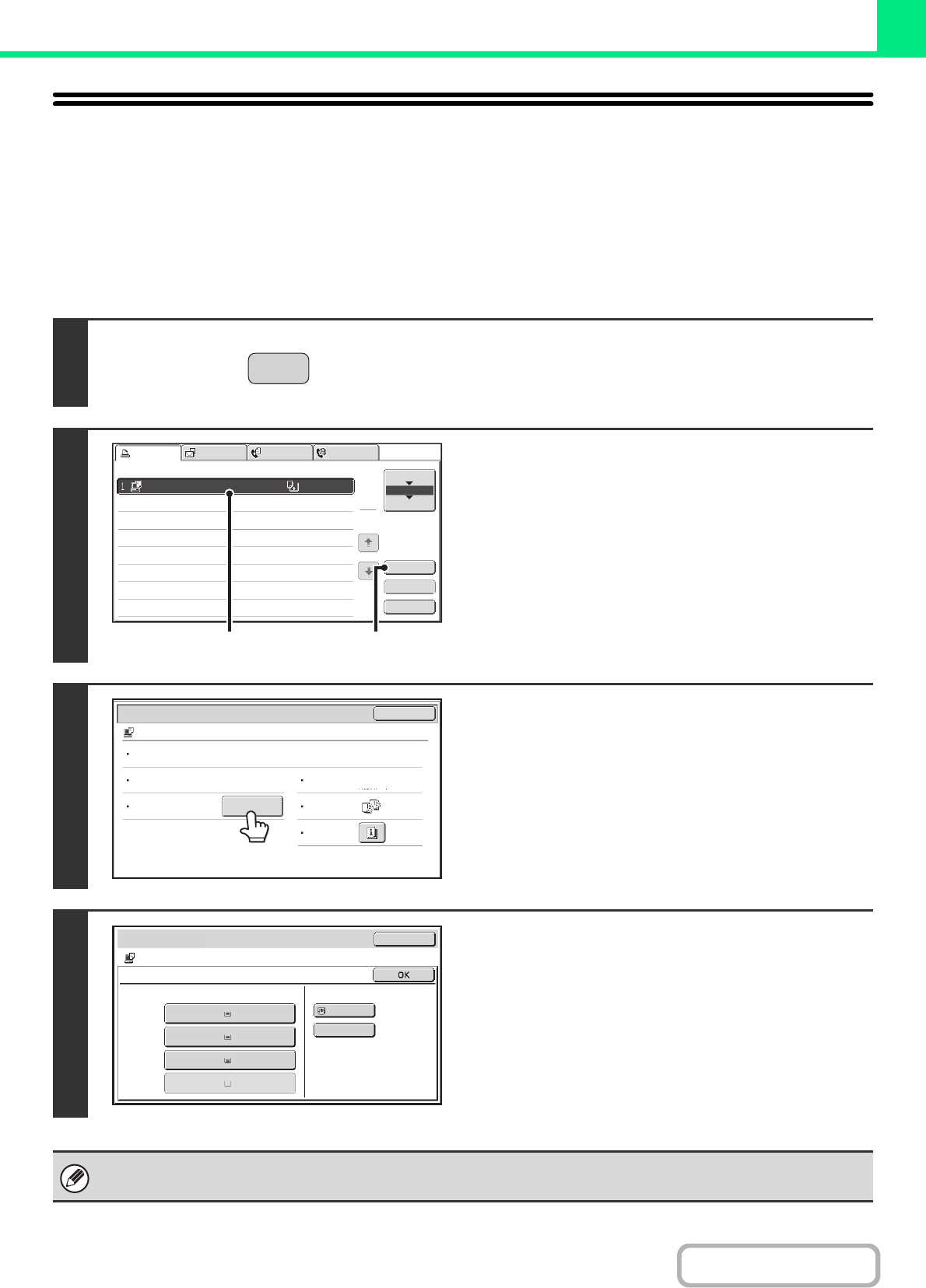
- PRINTING WHEN PAPER RUNS OUT 416
- CHAPTER 4 419
- FACSIMILE 419
- FAX RECEPTION 420
- USING AN EXTENSION PHONE 421
- PREPARATIONS FOR FAX 422
- "ON" POSITION 423
- CHECKING THE DATE AND TIME 424
- STORING THE SENDER FAX NUMBER 424
- BASE SCREEN OF FAX MODE 425
- ADDRESS BOOK SCREEN 428
- THE ADDRESS BOOK SCREEN 429
- Index display 430
- FAX TRANSMISSION SEQUENCE 431
- NUMERIC KEYS 434
- ENTERING DESTINATIONS 434
- ADDRESS BOOK 435
- A DESTINATION 438
- GLOBAL ADDRESS BOOK 439
- USING THE RESEND FUNCTION 441
- CHAIN DIALING 442
- TRANSMISSION METHODS 443
- BASIC TRANSMISSION METHODS 443
- WHEN THE LINE IS BUSY 445
- Functions that cannot be used 446
- USING THE AUTOMATIC DOCUMENT 447
- FEEDER FOR TRANSMISSION 447
- COMPUTER (PC-Fax) 460
- IMAGE SETTINGS 461
- ORIGINAL (2-Sided Original) 462
- (1 8 1/2) 467
- CHANGING THE EXPOSURE 470
- CHANGING THE RESOLUTION 471
- RECEIVING FAXES 472
- RECEIVING A FAX 473
- RECEIVING A FAX MANUALLY 474
- IMAGE CHECK SCREEN 477
- FORWARDING RECEIVED FAXES 478
- (Fax Data Forward) 478
- IMAGE (Erase) 486
- SINGLE PAGE (Card Shot) 490
- (Job Build) 493
- SENDING BUSINESS CARDS 497
- TRANSACTION REPORT 498
- (Transaction Report) 498
- FAXES (Own number sending) 500
- INFORMATION (Own Name Select) 501
- RECEPTION (Polling) 502
- SENDING A FAX WHEN ANOTHER 505
- MACHINE POLLS YOUR MACHINE 505
- (Polling Memory) 505
- F-CODE COMMUNICATION 510
- PERFORMING F-CODE 510
- COMMUNICATION 510
- XXXXXXXX 511
- CONFIDENTIAL RECEPTION 514
- F-CODE POLLING TRANSMISSION 518
- POLLING BOX 521
- POLLING TRANSMISSION 522
- RELAY BROADCAST TRANSMISSION 525
- USING F-CODES 525
- CHECKING THE STATUS OF FAX 528
- COMPLETED 532
- PROGRESS 533
- CHECKING COMPLETED JOBS 534
- RESERVED FAX 535
- CHECKING THE ACTIVITY LOG 537
- CHAPTER 5 539
- SCANNER/INTERNET FAX 539
- NETWORK SCANNER FUNCTION 541
- NETWORK SCANNER 541
- USB memory mode 542
- Internet fax mode 542
- PC scan mode 542
- Data entry mode 542
- STORING SENDER INFORMATION 543
- SCAN MODE IN THE ADDRESS BOOK 544
- ADDING DESTINATIONS 545
- If the destination is busy 546
- BASE SCREEN 547
- SCAN SEND SEQUENCE 553
- RETRIEVING A DESTINATION 556
- DESTINATIONS 557
- ENTERING AN ADDRESS MANUALLY 559
- SENDING AN IMAGE IN SCAN MODE 563
- TRANSMITTING AN IMAGE 563
- AND BODY TEXT 567
- ENTERING A FILE NAME 574
- INTERNET FAX DESTINATIONS 584
- COMPUTER (PC-I-Fax) 586
- CHANGING THE FILE FORMAT 598
- CHANGING THE COLOR MODE 602
- (Timer Transmission) 609
- A SINGLE PAGE (Card Shot) 611
- SCANNING THIN ORIGINALS 616
- (Slow Scan Mode) 616
- SCANNING BUSINESS CARDS 618
- (Suppress Background) 619
- CHECKING THE STATUS OF 623
- TRANSMISSION/RECEPTION JOBS 623
- STOPPING A SCAN JOB BEING 629
- TRANSMITTED OR WAITING TO BE 629
- TRANSMITTED 629
- GIVING PRIORITY TO A SCAN 630
- TRANSMISSION JOB 630
- IMAGE SENDING ACTIVITY REPORT 631
- RECEIVING AN INTERNET FAX 632
- FORWARDING RECEIVED INTERNET 637
- FAXES TO A NETWORK ADDRESS 637
- (Inbound Routing Settings) 637
- BASIC SCANNING PROCEDURE 640
- SCANNING FROM A COMPUTER 640
- (PC Scan Mode) 640
- [At your computer] 641
- [At the machine] 644
- METADATA DELIVERY 645
- PREPARATIONS FOR METADATA 646
- TRANSMISSION 646
- TRANSMITTING METADATA 647
- METADATA FIELDS 649
- CHAPTER 6 650
- DOCUMENT FILING 650
- Hard drive 651
- USES OF DOCUMENT FILING 652
- BEFORE USING DOCUMENT FILING 653
- Automatic deletion of files 655
- Copy mode 657
- Image Send mode 657
- SAVING FILES WITH DOCUMENT 660
- FILE INFORMATION 664
- Assigning a file name 665
- Specifying the folder 665
- [Original] key 668
- [Exposure] key 668
- [Color Mode] key 669
- USING STORED FILES 673
- FOLDER SELECTION SCREEN 675
- FILE SELECTION SCREEN 676
- SELECTING A FILE 678
- JOB SETTINGS SCREEN 679
- PRINTING A STORED FILE 680
- (1 999) 680
- MULTI-FILE PRINTING 682
- Batch printing 684
- SENDING A STORED FILE 686
- SEND SETTINGS SCREEN 687
- PROPERTIES OF STORED FILES 688
- MOVING A STORED FILE 690
- DELETING A STORED FILE 692
- SEARCHING FOR A STORED FILE 696
- CHAPTER 7 702
- SYSTEM SETTINGS 702
- SYSTEM SETTINGS FOR FAX 703
- System Settings 704
- Common Operation Methods 705
- SYSTEM SETTINGS (GENERAL) 706
- Total Count 711
- Default Settings 712
- List Print (User) 713
- Paper Tray Settings 714
- Tray Settings 715
- Paper Type Registration 716
- Auto Tray Switching 716
- Address Control 717
- Settings 718
- Custom Index 719
- Storing a program 720
- Editing and deleting programs 720
- Fax Data Receive/Forward 721
- Printer Condition Settings 722
- PCL Settings 723
- PostScript Setting 724
- Document Filing Control 725
- USB-Device Check 726
- User Control 726
- (ADMINISTRATOR) 727
- Login by user number 729
- Other Settings 747
- User List 748
- Page Limit Group List 750
- Authority Group List 751
- Favorite Operation Group List 754
- Home Screen List 755
- User Count 756
- Resetting user counts 757
- Energy Save 758
- Operation Settings 759
- MFP Display Pattern Setting 760
- Customize Key Setting 760
- Home Screen Settings 760
- Preview Setting 761
- Remote Operation Settings 761
- Device Control 762
- Optimization of a Hard Disk 763
- Clear All Job Log Data 763
- Disabling of Devices 764
- Fusing Control Settings 764
- Copy Function Settings 765
- Color Adjustments 768
- Network Settings 769
- Printer Settings 770
- Interface Settings 771
- Auto Color Calibration 772
- Image Send Settings 773
- Sender Data Registration 776
- Own Name and Destination Set 776
- Scan Settings 777
- I-Fax Settings 779
- Document Filing Settings 783
- Document Output Options 785
- List Print (Administrator) 786
- Security Settings 787
- Enable/Disable Settings 788
- Change Administrator Password 791
- Product Key 791
- Data Backup 792
- Restore Factory Defaults 793
- Store Current Configuration 793
- Restore Configuration 793
- Sharp OSA Settings 794
- F-Code Memory Box 798
- Fax Output Settings 807
- Allow/Reject Number Setting 807
- Fax Polling Security 807
- CHAPTER 8 810
- REMOVING MISFEEDS 811
- HOW TO REMOVE MISFEEDS 812
- REMOVING STAPLE JAMS 815
- PROBLEMS RELATED TO RECEPTION 829
- PROBLEMS RELATED TO TELEPHONE 830
- KEYS / GROUP KEYS 831
- SCANNING / INTERNET FAX 832
- GENERAL PROBLEMS 840
- OTHER PROBLEMS 847
- SHARP ELECTRONICS CORPORATION 849
Prodotti e manuali riguardandi Stampanti per fotografie Sharp MX-C401
 (130 pagine)
LG HT355SD manuels
Manuels d'utilisation et guides de l'utilisateur pour Systèmes de cinéma à domicile LG HT355SD.
Nous fournissons des manuels en pdf 1 LG HT355SD à télécharger gratuitement par type de document : Manuel du propriétaire
Lg HT355SD Manuel du propriétaire (32 pages)
marque: Lg | Catégorie: Home cinema systems | Taille: 2.28 MB |

Table des matières
Plus de produits et de manuels pour Systèmes de cinéma à domicile LG
| Modèles | Type de document |
|---|---|
| DH3130S |
Manuel du propriétaire
LG DH3130S Owner's manual,
36 pages
|
| BH6220C |
Manuel du propriétaire
LG BH6220C Owner's manual,
66 pages
|
| BH9430PW |
Manuel du propriétaire
LG BH9430PW home cinema system,
84 pages
|
| BH7520TW |
Manuel du propriétaire
LG BH7520TW Owner's manual,
74 pages
|
| DH6520T |
Manuel de l'utilisateur
LG DH6520T Owner's manual,
48 pages
|
| HX806SG |
Manuel de l'utilisateur
LG HX806SG Owner's manual,
60 pages
|
| BH6220S |
Manuel de l'utilisateur
LG BH6320H Owner's manual,
75 pages
|
| BH7540TW |
Manuel de l'utilisateur
LG BH7540TW Owner's manual,
80 pages
|
| HT905TA |
Manuel de l'utilisateur
LG HT905TA Owner's manual,
50 pages
|
| HX806SG |
Manuel de l'utilisateur
LG HX806SG Owner's manual,
60 pages
|
| BH7535TW |
Manuel de l'utilisateur
LG BH7530TW Owner's manual,
80 pages
|
| HX806SH |
Manuel de l'utilisateur
LG HX806SH Owner's manual,
60 pages
|
| BH9530TW |
Manuel de l'utilisateur
LG BH9530TW Owner's manual,
82 pages
|
| BH7540TW |
Manuel de l'utilisateur
LG BH7540TW Owner's manual,
80 pages
|
| BH6330H |
Manuel de l'utilisateur
LG BH6330H Owner’s Manual [en] ,
72 pages
|
| HX806PH |
Manuel de l'utilisateur
LG HX806PH Owner's manual,
62 pages
|
| BH6420P |
Manuel de l'utilisateur
LG BH6420P Owner’s Manual [en] ,
74 pages
|
| DH4430P |
Manuel de l'utilisateur
LG DH4430P Owner’s Manual,
46 pages
|
| HB806PE |
Manuel de l'utilisateur
LG HB806PE Owner's manual,
62 pages
|
| BH6340H |
Manuel de l'utilisateur
LG BH6340H Owner’s Manual,
76 pages
|
© 2020, manymanuals.it. Tutti i diritti riservati | 0.077 s |
 Manymanuals.com
 Manymanuals.de
 Manymanuals.fr
 Manymanuals.it
 Manymanuals.pl
 Manymanuals.cz
 Manymanuals.es
 Manymanuals-pt.com
Commenti su questo manuale