Sharp R-520E Specifiche Pagina 52
- Pagina / 136
- Indice
- RISOLUZIONE PROBLEMI
- SEGNALIBRI

- Handycam Handbook 1
- HDR-XR500/XR500V/XR520/ 1
- Using the Handycam Handbook 2
- Table of contents 3
- Utilizing recording media 4
- Customizing your camcorder 5
- Troubleshooting 5
- Additional information 5
- Useful recording techniques 6
- Parts and controls 7
- Wireless Remote Commander 9
- Screen indicators 10
- “ HOME” and “ 12
- OPTION” - Taking 12
- Menu lists 13
- List of the OPTION MENU 14
- Read this before 15
- Handycam 16
- Getting started 18
- Charging time 19
- To remove the battery pack 19
- Notes on the battery pack 19
- Notes on the AC Adaptor 20
- Your camcorder is turned on 21
- The clock starts 21
- Changing the language setting 22
- Recording/Playback 23
- Easy Handycam Operation) 24
- Shooting photos 25
- Playing movies 26
- Press (VIEW IMAGES) 27
- Touch the 27
- Viewing photos 28
- 90 degrees (max.) 31
- 180 degrees (max.) 31
- 90 degrees to the camcorder 31
- Built-in microphone 34
- HDR-XR500/XR520 35
- Recording in mirror mode 36
- Press START/STOP 37
- Triangulating 40
- Playback on the camcorder 41
- XR500V/XR520V) 44
- Touch (HIGHLIGHT PLAYBACK) 47
- Using PB zoom with photos 49
- To stop the slide show 50
- To restart the slide show 50
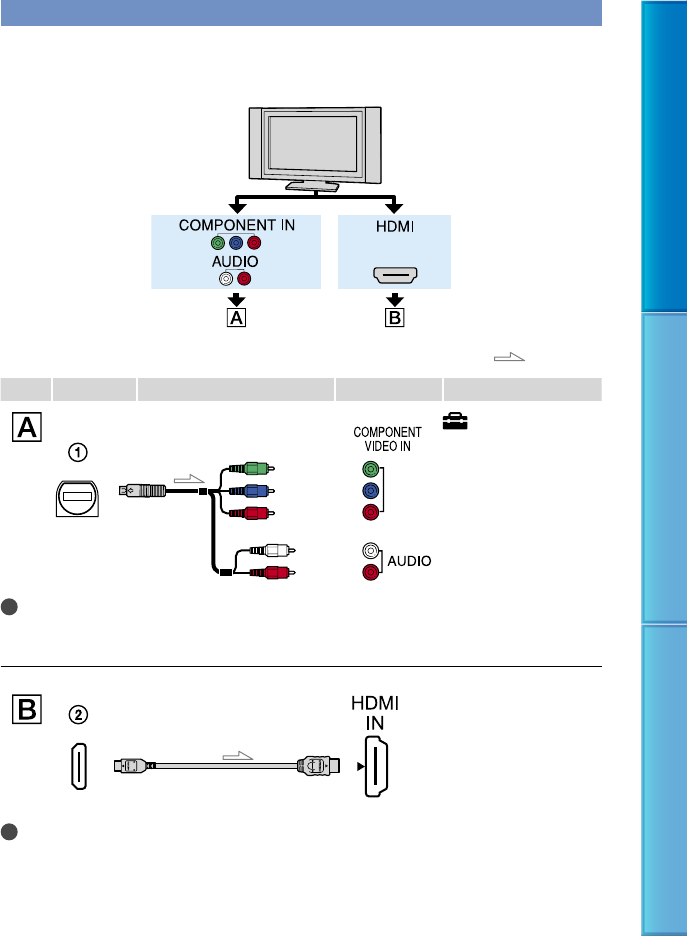
- Playing images on a TV 51
- Using “BRAVIA” Sync 55
- Deleting movies and 57
- Acquiring the current 59
- (HDR-XR500V/XR520V) 59
- Capturing a photo 60
- Dubbing/copying 61
- PRO Duo” media 61
- Copying photos 62
- Protecting recorded 63
- (Protect) 63
- Dividing a movie 64
- Using the Playlist of 65
- Playing the Playlist 66
- Creating a disc with a 67
- DVD writer, recorder 67
- Checking the battery 69
- Changing the 70
- Access lamp 71
- Checking the media 72
- Deleting all movies 72
- Preventing data on the 73
- AUDIO MODE 75
- AE SHIFT 75
- WIDE SELECT 76
- DIGITAL ZOOM 76
- NIGHTSHOT LIGHT 76
- STEADYSHOT 77
- X.V.COLOR 77
- GUIDEFRAME 78
- REMAINING SET 78
- FLASH MODE 79
- FLASH LEVEL 79
- DIAL SETTING 80
- CONVERSION LENS 80
- (Items for recording photos) 81
- (Items to set face function) 86
- SMILE SHUTTER 87
- DATA CODE 88
- CAMERA DATA 89
- DATE/TIME 89
- COORDINATES 90
- LCD BRIGHT 91
- LCD COLOR 92
- DISP OUTPUT (Display output) 94
- COMPONENT 94
- HDMI RESOLUTION 94
- SD CONTENTS 95
- CLOCK SET 96
- AREA SET 96
- DST SET/SUMMERTIME 97
- LANGUAGE SET 97
- (Other setup items) 98
- CALIBRATION 99
- A.SHUT OFF (Auto shut off ) 99
- REMOTE CTRL (Remote control) 99
- DROP SENSOR 99
- SPOT MTR/FCS 101
- SPOT FOCUS 102
- TELE MACRO 102
- EXPOSURE 103
- SCENE SELECTION 104
- WHITE BAL. (White balance) 105
- SELF-TIMER 107
- Troubleshooting 108
- Batteries/power sources 109
- LCD screen/viewfinder 110
- “Memory Stick PRO Duo” media 110
- Recording 110
- Playback 112
- Dubbing/Connecting to other 114
- Recording media 116
- Data protected 118
- Recording time of 119
- Internal hard disk 120
- Using your camcorder 122
- Setting to the local time 123
- HDR-XR500V/XR520V 123
- World time difference 123
- Maintenance and 125
- About GPS (HDR-XR500V/XR520V) 126
- About “Memory Stick” media 127
- C to 30 C 129
- C (50 F) or below 129
- About x.v.Color 130
Prodotti e manuali riguardandi Videocamera Sharp R-520E
 (120 pagine)
 (63 pagine)
(112 pagine)
(63 pagine)
(112 pagine)
 (49 pagine)
(129 pagine)
(49 pagine)
(129 pagine)
 (67 pagine)
(72 pagine)
(75 pagine)
(67 pagine)
(96 pagine)
(172 pagine)
(91 pagine)
(80 pagine)
(72 pagine)
(140 pagine)
(123 pagine)
(76 pagine)
(92 pagine)
(103 pagine)
(72 pagine)
(67 pagine)
(72 pagine)
(75 pagine)
(67 pagine)
(96 pagine)
(172 pagine)
(91 pagine)
(80 pagine)
(72 pagine)
(140 pagine)
(123 pagine)
(76 pagine)
(92 pagine)
(103 pagine)
(72 pagine)
© 2020, manymanuals.it. Tutti i diritti riservati | 0.042 s |
 Manymanuals.com
 Manymanuals.de
 Manymanuals.fr
 Manymanuals.it
 Manymanuals.pl
 Manymanuals.cz
 Manymanuals.es
 Manymanuals-pt.com
Commenti su questo manuale