Sharp AR-207 Specifiche Pagina 11
- Pagina / 35
- Indice
- RISOLUZIONE PROBLEMI
- SEGNALIBRI

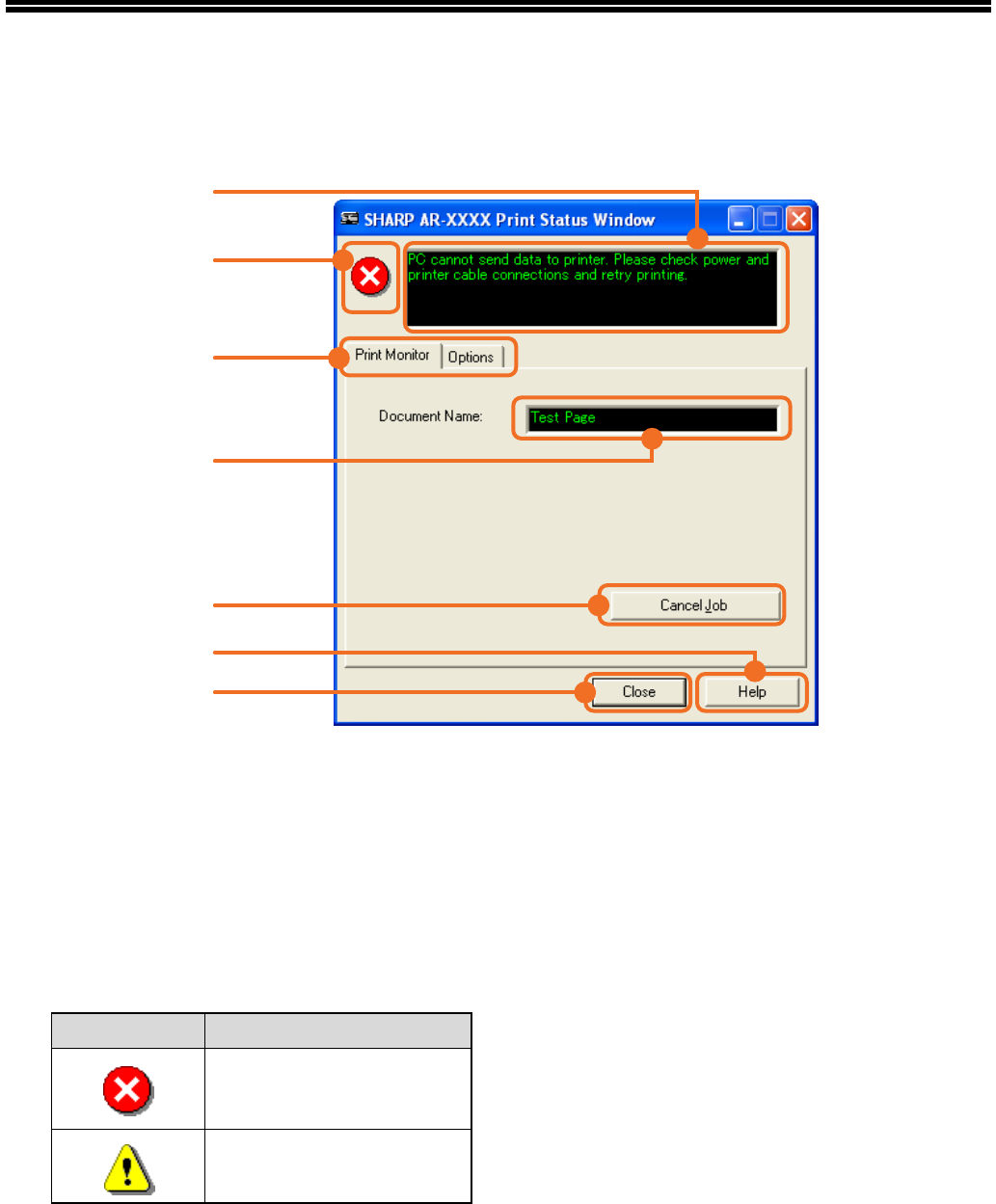
- OPERATION 1
- (for printer and scanner) 1
- INTRODUCTION 2
- CONTENTS 3
- BASIC PRINTING 4
- Windows 95/98/Me/NT 4.0) 5
- THE [START] BUTTON 6
- PRINTER DRIVER SETTINGS 7
- SUPPORT TWO-SIDED PRINTING) 8
- (page 7) 9
- PRINTING A WATERMARK 10
- PRINTER SHARING 12
- Settings in Windows NT 4.0 15
- SCANNING OVERVIEW 16
- APPLICATION 17
- When you are ready to begin 18
- SCANNER DRIVER SETTINGS 19
- Preview screen 20
- APPLICATION (WINDOWS XP) 21
- BUTTON MANAGER 25
- KEY OPERATOR PROGRAMS 27
- ACC. #-C 28
- READ-END 28
- TROUBLESHOOTING 29
- SCANNING PROBLEMS 31
- SPECIFICATIONS 33
- Scanner specifications 34
- SHARP CORPORATION 35
Prodotti e manuali riguardandi Fotocopiatrice Sharp AR-207
 (12 pagine)
(8 pagine)
(116 pagine)
 (44 pagine)
(12 pagine)
 (32 pagine) (125 pagine)
(111 pagine)
(33 pagine)
(8 pagine)
(8 pagine)
 (80 pagine)
(148 pagine)
(12 pagine)
(8 pagine)
(8 pagine)
(4 pagine)
LG HT355SD manuels
Manuels d'utilisation et guides de l'utilisateur pour Systèmes de cinéma à domicile LG HT355SD.
Nous fournissons des manuels en pdf 1 LG HT355SD à télécharger gratuitement par type de document : Manuel du propriétaire
Lg HT355SD Manuel du propriétaire (32 pages)
marque: Lg | Catégorie: Home cinema systems | Taille: 2.28 MB |

Table des matières
Plus de produits et de manuels pour Systèmes de cinéma à domicile LG
| Modèles | Type de document |
|---|---|
| DH3130S |
Manuel du propriétaire
LG DH3130S Owner's manual,
36 pages
|
| BH6220C |
Manuel du propriétaire
LG BH6220C Owner's manual,
66 pages
|
| BH9430PW |
Manuel du propriétaire
LG BH9430PW home cinema system,
84 pages
|
| BH7520TW |
Manuel du propriétaire
LG BH7520TW Owner's manual,
74 pages
|
| DH6520T |
Manuel de l'utilisateur
LG DH6520T Owner's manual,
48 pages
|
| HX806SG |
Manuel de l'utilisateur
LG HX806SG Owner's manual,
60 pages
|
| BH6220S |
Manuel de l'utilisateur
LG BH6320H Owner's manual,
75 pages
|
| BH7540TW |
Manuel de l'utilisateur
LG BH7540TW Owner's manual,
80 pages
|
| HT905TA |
Manuel de l'utilisateur
LG HT905TA Owner's manual,
50 pages
|
| HX806SG |
Manuel de l'utilisateur
LG HX806SG Owner's manual,
60 pages
|
| BH7535TW |
Manuel de l'utilisateur
LG BH7530TW Owner's manual,
80 pages
|
| HX806SH |
Manuel de l'utilisateur
LG HX806SH Owner's manual,
60 pages
|
| BH9530TW |
Manuel de l'utilisateur
LG BH9530TW Owner's manual,
82 pages
|
| BH7540TW |
Manuel de l'utilisateur
LG BH7540TW Owner's manual,
80 pages
|
| BH6330H |
Manuel de l'utilisateur
LG BH6330H Owner’s Manual [en] ,
72 pages
|
| HX806PH |
Manuel de l'utilisateur
LG HX806PH Owner's manual,
62 pages
|
| BH6420P |
Manuel de l'utilisateur
LG BH6420P Owner’s Manual [en] ,
74 pages
|
| DH4430P |
Manuel de l'utilisateur
LG DH4430P Owner’s Manual,
46 pages
|
| HB806PE |
Manuel de l'utilisateur
LG HB806PE Owner's manual,
62 pages
|
| BH6340H |
Manuel de l'utilisateur
LG BH6340H Owner’s Manual,
76 pages
|
© 2020, manymanuals.it. Tutti i diritti riservati | 0.020 s |
 Manymanuals.com
 Manymanuals.de
 Manymanuals.fr
 Manymanuals.it
 Manymanuals.pl
 Manymanuals.cz
 Manymanuals.es
 Manymanuals-pt.com
Commenti su questo manuale