4
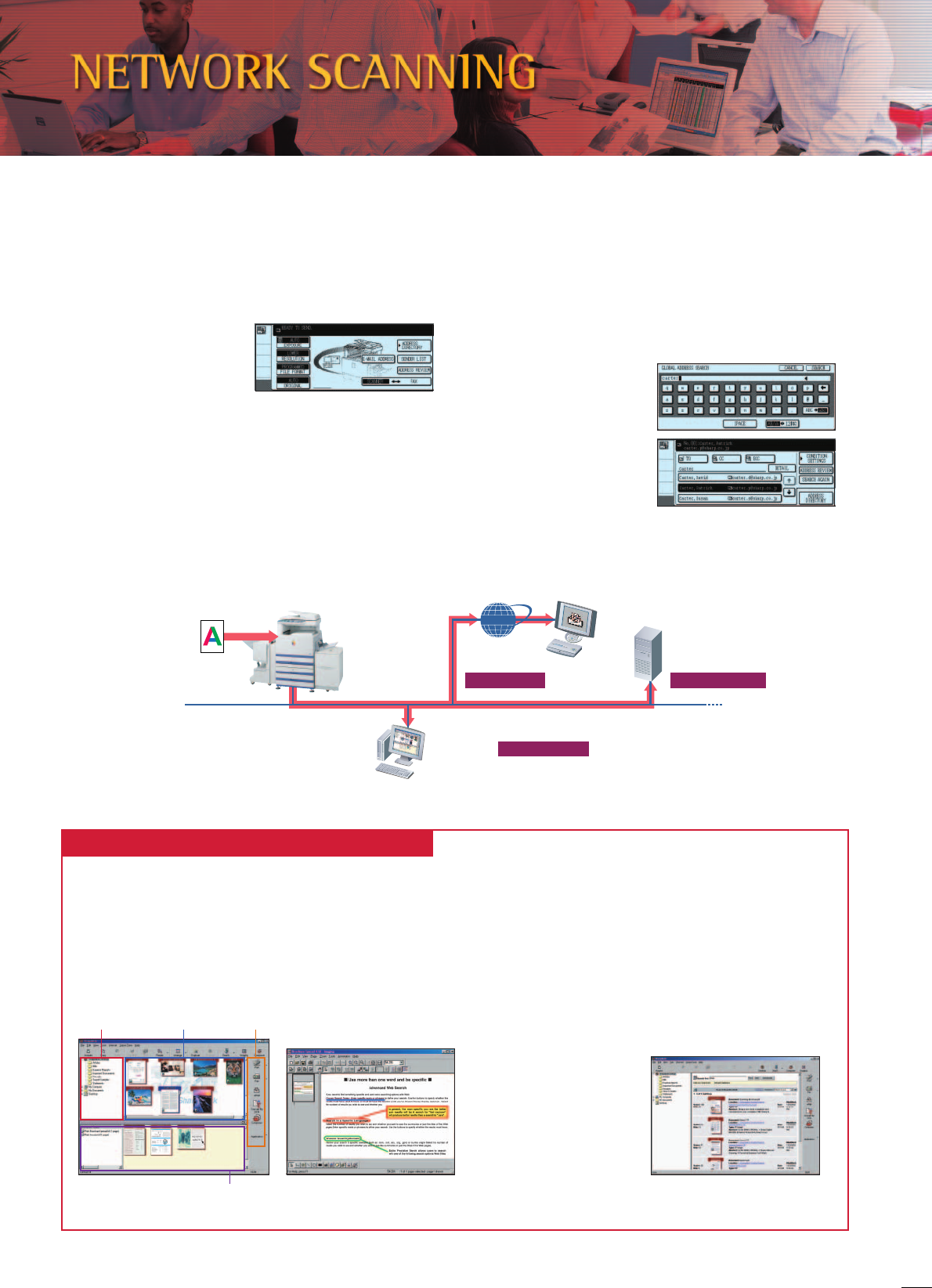
Folder window View/work area Output zone
Composer
Annotation functionSharpdesk™ 3.1 screen
Search screen
Send as e-mail
attachment
Scan to e-mail
Send to
designated PC
Scan to desktop
Store and share
as digital data
Scan to FTP server
File server
Client PCs
Internet
AR-C172M with
optional AR-NS2
Scan
Document
Scan to Desktop, E-Mail or FTP Server
Files scanned with the AR-C172M can be sent directly to your PC*
(scan to desktop), sent as an attachment to any e-mail address
over the Internet (scan to e-mail) or stored on a file server where
they can be easily accessed from any PC on the network (scan to
FTP server).
*Sharpdesk™ document management software must be installed on the
PC.
Convert paper-based documents into digital files for easy editing, filing, and sharing.
Sharp’s original Sharpdesk™ application enables easy, integrated document management.
Sharpdesk™ is an original Sharp application that provides
integrated desktop management of documents in over 200 file
formats, including scanned paper-based documents and those
created with popular applications such as Word. It allows you to
organise, edit, search, and distribute your documents, all with
simple drag-and-drop operation.
Sharpdesk™ for Total Document Management
LDAP Compatibility for Network Scanning
Built-in LDAP (lightweight directory access protocol) support
eliminates the need to enter or register an entire e-mail address.
Simply enter the first few letters of the recipient’s name and the
AR-C172M displays a list of possible matches from names and e-
mail addresses on your company’s LDAP server. This feature saves
precious time and lets you avoid errors when typing e-mail
addresses. After searching, selected addresses can be stored to the
AR-C172M’s address book.
And the integrated User
Authentication function
(see page 6) blocks
unauthorised access by
requiring the user to log in
before searching for an
address.
A3 Colour Network Scanning
The optional AR-NS2 Scanner Expansion Kit turns the AR-C172M
into a full-colour network scanner that can be used with any
Windows PC on the network. Converting any type of paper-based
document, up to A3 (11" x 17") in size, into an editable digital file
is as easy as making a copy. Seamlessly integrating paper-based
documents and digital files
makes it easy to share data
and improve workflow.
Note: Optional AR-SM5 also
required.
• Intuitive desktop display features thumbnail viewing
• Sharpdesk Imaging provides annotation tools for paper-free
proofreading
• Sharpdesk Composer combines different types of files into a
single document
• Optical character recognition converts documents into
editable text files
• Output zone distributes files to e-mail, printers, and other
applications
• File search allows
searching by file name,
keyword, or thumbnail

 (116 pagine)
 (44 pagine)
 (80 pagine)


 Manymanuals.com
 Manymanuals.de
 Manymanuals.fr
 Manymanuals.it
 Manymanuals.pl
 Manymanuals.cz
 Manymanuals.es
 Manymanuals-pt.com
Commenti su questo manuale