Sharp PC-A500 Manuale Utente Pagina 83
- Pagina / 269
- Indice
- RISOLUZIONE PROBLEMI
- SEGNALIBRI

- Intelligent BTv4.0 Dual-Mode 0
- Americas: +1-800-492-2320 1
- Europe: +44-1628-858-940 1
- Hong Kong: +852 2923 0610 1
- 47 GND 3
- 3.3.4 OTA (Over the Air) 8
- BASIC application download 8
- OWER CONSUMPTION 9
- Revision Date 11
- Change History 11
- Version 11
- 5.2.1 Clocks 12
- 5.2.2 Timers 13
- 5.6 SPI Bus 14
- 5.8.1 GPIO 15
- 5.8.2 ADC 15
- Wake-up BT900 16
- 5.13 Low Power Modes 17
- 6.1 Circuit 18
- Antenna Keepout 21
- ONTENTS 22
- ECHANICAL DETAILS 23
- 8.1 Introduction 25
- 8.2 Shipping 25
- 8.3 Reflow Parameters 26
- 9.2 OEM Responsibilities 28
- 10.1 Antenna Information 30
- 11.1 Antenna Information 31
- 12.1 BT900-SA / BT900-SC 32
- 13.1 General Comments 34
- Additional Assistance 35
- 1.1 Features & Benefits 37
- 1.2 Application Areas 37
- 2.1 Specification Summary 38
- ARDWARE SPECIFICATIONS 40
- 3.2 Pin Definitions 41
- AY -AP18DR 42
- AY -AP24DR 42
- AH-AP18DR 42
- AH-AP24DR 42
- FAN TIMER 43
- ΠΡΟΣΟΧΗ ΚΑΤΑ ΤΗ ΧΡΗΣΗ 44
- ΕΛΛΗΝΙΚΑ 45
- ΕΣΩΤΕΡΙΚΗ ΜΟΝΑ∆Α 46
- ΕΞΩΤΕΡΙΚΗ ΜΟΝΑ∆Α 46
- ΕΙΣΑΓΩΓΗ ΜΠΑΤΑΡΙΩΝ 48
- ΧΡΗΣΗ ΤΟΥ ΤΗΛΕΧΕΙΡΙΣΤΗΡΙΟΥ 48
- ΛΕΙΤΟΥΡΓΙΑ ΑΥΤΟΜΑΤΗ/ΑΦΥΓΡΑΝΣΗ 50
- ΛΕΙΤΟΥΡΓΙΑ ΨΥΞΗΣ (ΘΕΡΜΑΝΣΗΣ 50
- για τα AY-AP18DR/AY-AP24DR 50
- ΛΕΙΤΟΥΡΓΙΑ ΜΟΝΟ ΑΝΕΜΙΣΤΗΡΑΣ 50
- ΤΑΧΥΤΗΤΑΣ ΑΝΕΜΙΣΤΗΡΑ 51
- ΚΑΘΕΤΗ ΚΑΤΕΥΘΥΝΣΗ ΡΟΗΣ ΑΕΡΑ 52
- MODE TEMP 53
- TIPS ABOUT AUTO MODE 54
- TIPS ABOUT FAN SPEED LAMP 54
- 0.5h 1.0h 1.5h 10h 11h 12h 56
- ΣΥΝΤΗΡΗΣΗ 57
- ΒΟΗΘΗΤΙΚΗ ΛΕΙΤΟΥΡΓΙΑ 57
- ΚΑΘΑΡΙΣΜΟΣ ΤΩΝ ΦΙΛΤΡΩΝ 58
- (Μοντέλα AY-AP18DR/AY-AP24DR) 59
- NEDERLANDS 60
- VOORZORGSMAATREGELEN 61
- BUITEN-UNIT 63
- BINNEN-UNIT 63
- VERTICAL AIR FLOW DIRECTION 65
- HORIZONTAL AIR FLOW DIRECTION 65
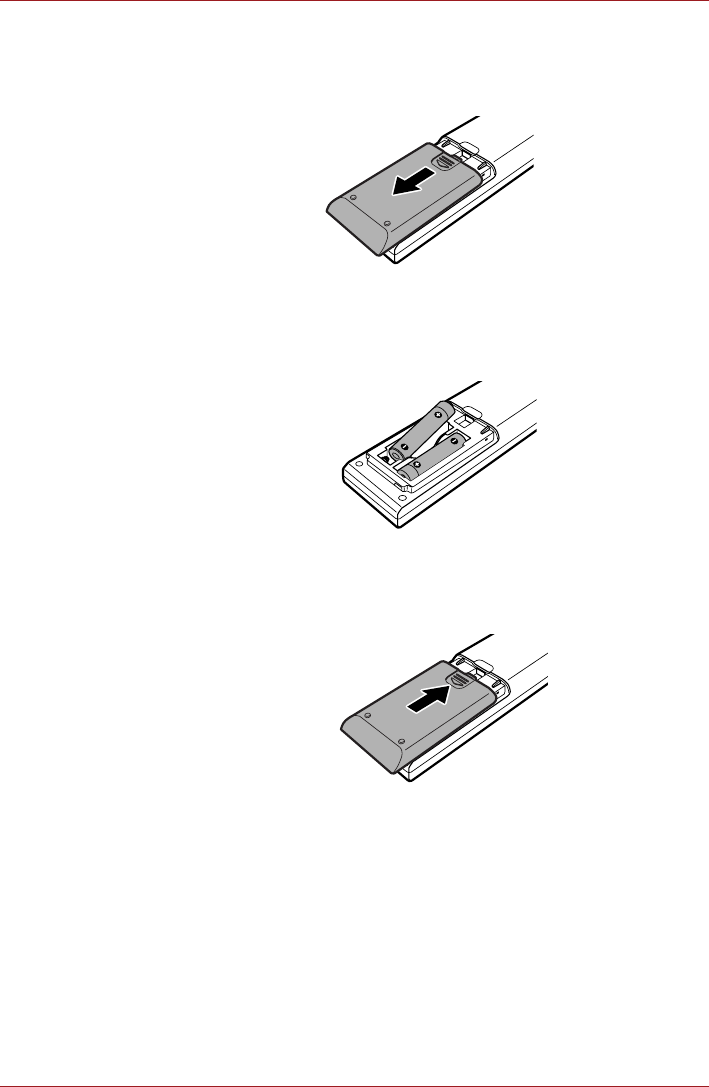
- Batterijendeksel 66
- TIPS VOOR DE AUTO FUNCTIE 69
- VERTICALE LUCHTSTROOMRICHTING 70
- AUTOMATISCH UITSCHAKELEN 72
- DISPLAY MODE 73
- ONDERHOUD 74
- HELP-FUNCTIE 74
- ONE-HOUR OFF TIMER 76
- PLASMACLUSTER OPERATION 76
- SHARP CORPORATION 79
- TIMER OFF 80
- MAINTENANCE 82
- AUXILIARY MODE 82
- Air Purifying Filter 83
- (Models AY-AP18DR/AY-AP24DR) 84
- WARNHINWEISE 85
- ZUM AUSBAU / ZUR REPARATUR 85
- INSTALLATION 87
- ENERGIESPARTIPPS 88
- AUSSENGERÄT 89
- ZIMMERGERÄT 89
- Batterieabdeckung 91
- Ionisator 92
- Cluster-Ionen 92
- Schimmelpilze 92
- AUTOM./TROCKENBETRIEB 93
- KÜHLEN (HEIZEN 93
- NUR LÜFTER-BETRIEB 93
- TIPPS ZUR BETRIEBSART AUTOM 94
- VERTIKALER LUFTSTROM 95
- HORIZONTALER LUFTSTROM 95
- PLASMACLUSTER-BETRIEB 96
- WARNINGS FOR USE 97
- HILFSBETRIEB 100
- Luftreinigungsfilter 101
- DAS GERÄT ARBEITET NICHT 102
- PRECAUTIONS D’EMPLOI 103
- FRANÇAIS 105
- UNITE EXTERIEURE 106
- UNITE INTERIEURE 106
- TELECOMMANDE 107
- CAUTIONS FOR USE 108
- Couvercle des piles 109
- MODE AUTO/SEC 111
- FRAIS (CHAUFFAGE 111
- AY-AP18DR/AY-AP24DR) 111
- VENTILATEUR UNIQUEMENT 111
- MINUTERIE DESACTIVEE 115
- ETRETIEN 117
- MODE AUXILIAIRE 117
- ADDITIONAL NOTES ON OPERATION 119
- TIPS ON SAVING ENERGY 119
- (Modèles AY-AP18DR/AY-AP24DR) 120
- PRECAUCIONES PARA EL USO 121
- REPARACIÓN 121
- ADVERTENCIAS PARA EL USO 122
- (Sólo AY-AP18DR/ 123
- AY-AP24DR) 123
- UNIDAD EXTERIOR 124
- UNIDAD INTERIOR 124
- FORMA DE COLOCAR LAS PILAS 126
- FORMA DE USAR EL TELEMANDO 126
- Ionizador 127
- Grupo de iones 127
- Hongos de moho 127
- NOTAS SOBRE LA LÁMPARA 129
- DE VELOCIDAD DE VENTILADOR 129
- OUTDOOR UNIT 130
- INDOOR UNIT 130
- CORRIENTE DE AIRE VERTICAL 131
- FUNCIONAMIENTO DEL PLASMA 132
- MANTENIMIENTO 135
- MODO AUXILIAR 135
- Filtro Purificador de Aire 136
- (Modelos AY-AP18DR/AY-AP24DR) 137
- AVVERTIMENTI PER L’USO 138
- PRECAUZIONI PER L’USO 139
- ITALIANO 140
- UNITÀ INTERNA 142
- UNITÀ ESTERNA 142
- INSERIMENTO DELLE BATTERIE 144
- COME USARE IL TELECOMANDO 144
- (AUTO/DRY) 146
- MODO VENTILATORE SOLAMENTE 146
- VELOCITÀ DEL VENTILATORE 147
- HOW TO USE THE REMOTE CONTROL 152
- MANUTENZIONE 153
- MODO AUSILIARIO 153
- FUNZIONAMENTO e quella TIMER 155
- ATENÇÃO PARA A SUA UTILIZAÇÃO 156
- PRECAUÇÕES COM A UTILIZAÇÃO 157
- PORTUGUÊS 158
- UNIDADE EXTERIOR 159
- UNIDADE INTERIOR 159
- Tampa das pilhas 161
- Cluster ions 163
- Mold fungus 163
- DA VENTOINHA 165
- LIGAR TEMPORIZADOR 169
- MANUTENÇÃO 170
- SE A UNIDADE NÃO FUNCIONA 172
- How to save energy 176
- Normal energy 177
- Switching on 178
- Switching off 178
- Switching off for longer 178
- . . . in the freezer section 179
- Setting the temperature 180
- Winter setting (for ambient 180
- The correct temperature 181
- Different storage zones 182
- Food which should not be 183
- Storing food correctly 183
- Moving the shelves 184
- Bottle rack 184
- Adjusting the door shelves 184
- Contents 185
- Freezer section 186
- Storing frozen food 186
- Home freezing 186
- Freezing and storing food 187
- Freezer calendar 188
- Defrosting 188
- Ice cubes 188
- Cooling drinks 188
- Refrigerator section 189
- Before cleaning 191
- Ventilation gaps 191
- Door seals 192
- After cleaning 192
- Problem solving guide 193
- After sales service 197
- Electrical connection U.K 198
- Location 199
- Ventilation 199
- Installation 199
- Aligning the appliance 200
- Changing the door hinging 201
- Refitting the appliance doors 202
- Changing over the door 202
- KD 1211 S, KD 1411 S 207
- M.-Nr. 06 805 570 / 00 208
- KT 2011 S, KT 2211 S 209
- Disposal of the packing 210
- Correct use 211
- Technical safety 211
- USER MANUAL 214
- 9.0 MODES 220
- 10.0 CABLING 221
- 12.0 WARRANTY 222
- 13.0 TECHNICAL SPECIFICATIONS 222
- 14.0 DESIGN CRITERIA 223
- 2.0 GENERAL DESCRIPTION 230
- 3.0 UNPACKING 230
- 4.0 INSTALLATION 230
- M-1 Mobile Fogger 240
- Danger of Explosion 241
- Unpacking & Inspection 241
- Performance Notes 244
- M-1 ͘೩ёᙳ፟(ᄊё)ֹϡᄲځ३ 245
- ᔖҺ፼፵۞щБֹϡ͞ё 246
- ᔖҺᘕࠓ۞щБֹϡ͞ё 246
- ٵੵΒ྅̈́ᑭෛ፟ጡ! 246
- 充完電後約能連續使用 10~12 分鐘。 247
- User’s Manual x 249
- User’s Manual 3-13 250
- Getting Started 250
- User’s Manual 3-14 251
- User’s Manual 3-15 252
- User’s Manual 4-1 253
- User’s Manual 4-2 254
- Operating Basics 254
- User’s Manual 4-3 255
- User’s Manual 4-4 256
- User’s Manual 4-5 257
- User’s Manual 4-6 258
- User’s Manual 4-7 259
- User’s Manual xi 260
- User’s Manual 4-8 261
- User’s Manual 4-9 262
- User’s Manual 4-10 263
- User’s Manual 4-11 264
- User’s Manual 4-12 265
- User’s Manual 4-13 266
- User’s Manual 4-14 267
- User’s Manual 4-15 268
- User’s Manual 4-16 269
- User’s Manual 4-17 270
- User’s Manual xii 271
- User’s Manual 4-18 272
- User’s Manual 4-19 273
- Figure 4-8 Function button 273
- User’s Manual 4-20 274
- User’s Manual 4-21 275
- User’s Manual 4-22 276
- User’s Manual 4-23 277
- User’s Manual 4-24 278
- User’s Manual 4-25 279
- User’s Manual 4-26 280
- User’s Manual 4-27 281
- User’s Manual xiii 282
- User’s Manual 4-28 283
- User’s Manual 4-29 284
- User’s Manual 4-30 285
- User’s Manual 4-31 286
- User’s Manual 4-32 287
- User’s Manual 4-33 288
- User’s Manual 4-34 289
- User’s Manual 4-35 290
- User’s Manual 4-36 291
- User’s Manual 4-37 292
- Figure 4-9 Web Camera 292
- User’s Manual xiv 293
- User’s Manual 4-38 294
- User’s Manual 4-39 295
- User’s Manual 4-40 296
- User’s Manual 4-41 297
- User’s Manual 4-42 298
- User’s Manual 4-43 299
- User’s Manual 4-44 300
- User’s Manual 4-45 301
- User’s Manual 4-46 302
- User’s Manual 4-47 303
- User’s Manual xv 304
- User’s Manual 4-48 305
- User’s Manual 4-49 306
- User’s Manual 4-50 307
- User’s Manual 4-51 308
- User’s Manual 4-52 309
- User’s Manual 4-53 310
- User’s Manual 4-54 311
- User’s Manual 4-55 312
- User’s Manual 4-56 313
- User’s Manual 5-1 314
- User’s Manual xvi 315
- User’s Manual 5-2 316
- The Keyboard 316
- User’s Manual 5-3 317
- User’s Manual 5-4 318
- User’s Manual 5-5 319
- User’s Manual 6-1 320
- Table 6-1 Power conditions 320
- User’s Manual 6-2 321
- Power and Power-up Modes 321
- User’s Manual 6-3 322
- Real Time Clock battery 323
- User’s Manual 6-5 324
- User’s Manual 6-6 325
- User’s Manual xvii 326
- User’s Manual 6-7 327
- User’s Manual 6-8 328
- User’s Manual 6-9 329
- User’s Manual 6-10 330
- User’s Manual 6-11 331
- User’s Manual 6-12 332
- User’s Manual 6-13 333
- User’s Manual 7-1 334
- User’s Manual 7-2 335
- HW Setup and Passwords 335
- User’s Manual 7-3 336
- User’s Manual xviii 337
- User’s Manual 7-4 338
- User’s Manual 7-5 339
- User’s Manual 8-1 340
- User’s Manual 8-2 341
- Optional Devices 341
- User’s Manual 8-3 342
- User’s Manual 8-4 343
- User’s Manual 8-5 344
- User’s Manual 8-6 345
- User’s Manual 8-7 346
- User’s Manual 8-8 347
- User’s Manual xix 348
- User’s Manual 8-9 349
- User’s Manual 8-10 350
- User’s Manual 8-11 351
- User’s Manual 8-12 352
- User’s Manual 8-13 353
- User’s Manual 8-14 354
- User’s Manual 8-15 355
- User’s Manual 8-16 356
- User’s Manual 8-17 357
- User’s Manual 8-18 358
- User’s Manual ii 359
- User’s Manual xx 360
- User’s Manual 8-19 361
- Figure 8-10 Security lock 361
- User’s Manual 9-1 362
- User’s Manual 9-2 363
- Troubleshooting 363
- User’s Manual 9-3 364
- User’s Manual 9-4 365
- User’s Manual 9-5 366
- User’s Manual 9-6 367
- User’s Manual 9-7 368
- User’s Manual 9-8 369
- User’s Manual 9-9 370
- User’s Manual xxi 371
- User’s Manual 9-10 372
- User’s Manual 9-11 373
- User’s Manual 9-12 374
- User’s Manual 9-13 375
- User’s Manual 9-14 376
- User’s Manual 9-15 377
- User’s Manual 9-16 378
- User’s Manual 9-17 379
- User’s Manual 9-18 380
- User’s Manual 9-19 381
- User’s Manual xxii 382
- Chapter 1 Introduction 382
- User’s Manual 9-20 383
- User’s Manual 9-21 384
- User’s Manual 9-22 385
- User’s Manual 9-23 386
- User’s Manual 9-24 387
- User’s Manual 9-25 388
- User’s Manual 9-26 389
- User’s Manual 9-27 390
- User’s Manual 9-28 391
- User’s Manual 9-29 392
- User’s Manual xxiii 393
- Chapter 2 The Grand Tour 393
- Chapter 3 Getting Started 393
- Chapter 4 Operating Basics 393
- User’s Manual 10-1 394
- User’s Manual 10-2 395
- Disclaimers 395
- User’s Manual 10-3 396
- User’s Manual 10-4 397
- User’s Manual 10-5 398
- Appendixes 399
- Table of Contents 399
- User’s Manual A-1 400
- User’s Manual A-2 401
- User’s Manual B-1 402
- User’s Manual C-1 403
- User’s Manual C-2 405
- User’s Manual C-3 406
- User’s Manual D-1 407
- User’s Manual D-2 408
- User’s Manual D-3 409
- User’s Manual D-4 410
- User’s Manual D-5 411
- User’s Manual E-1 412
- User’s Manual E-2 413
- User’s Manual E-3 414
- User’s Manual F-1 416
- User’s Manual F-2 417
- User’s Manual Glossary-1 418
- User’s Manual Glossary-2 419
- Glossary 419
- User’s Manual Glossary-3 420
- User’s Manual Glossary-4 421
- User’s Manual Glossary-5 422
- User’s Manual Glossary-6 423
- User’s Manual Glossary-7 424
- User’s Manual Glossary-8 425
- User’s Manual xxvi 426
- User’s Manual Glossary-9 427
- User’s Manual Glossary-10 428
- User’s Manual Glossary-11 429
- User’s Manual Glossary-12 430
- User’s Manual Glossary-13 431
- User’s Manual Glossary-14 432
- User’s Manual Index-1 433
- User’s Manual Index-2 434
- User’s Manual Index-3 435
- User’s Manual Index-4 436
- User’s Manual xxvii 437
- User’s Manual xxviii 438
- User’s Manual xxix 439
- User’s Manual iii 440
- User’s Manual xxx 441
- General Precautions 441
- User’s Manual xxxi 442
- User’s Manual 1-1 443
- User’s Manual 1-2 444
- Introduction 444
- User’s Manual 1-3 445
- User’s Manual 1-4 446
- User’s Manual 1-5 447
- User’s Manual 1-6 448
- User’s Manual 1-7 449
- User’s Manual 1-8 450
- User’s Manual iv 451
- User’s Manual 1-9 452
- User’s Manual 1-10 453
- User’s Manual 1-11 454
- User’s Manual 1-12 455
- User’s Manual 1-13 456
- User’s Manual 1-14 457
- User’s Manual 1-15 458
- User’s Manual 1-16 459
- User’s Manual 1-17 460
- User’s Manual 1-18 461
- User’s Manual v 462
- User’s Manual 1-19 463
- User’s Manual 1-20 464
- User’s Manual 1-21 465
- User’s Manual 1-22 466
- User’s Manual 2-1 467
- User’s Manual 2-2 468
- The Grand Tour 468
- User’s Manual 2-3 469
- User’s Manual 2-4 470
- User’s Manual 2-5 471
- User’s Manual 2-6 472
- User’s Manual vi 473
- User’s Manual 2-7 474
- User’s Manual 2-8 475
- User’s Manual 2-9 476
- User’s Manual 2-10 477
- User’s Manual 2-11 478
- User’s Manual 2-12 479
- User’s Manual 2-13 480
- User’s Manual 2-14 481
- User’s Manual 2-15 482
- Figure 2-7 System indicators 482
- User’s Manual 2-16 483
- Figure 2-8 Keypad indicators 483
- Pakistan Telecom Authority 484
- User’s Manual 2-17 485
- User’s Manual 2-18 486
- User’s Manual 2-19 487
- User’s Manual 2-20 488
- User’s Manual 2-21 489
- User’s Manual 2-22 490
- User’s Manual 2-23 491
- User’s Manual 2-24 492
- User’s Manual 2-25 493
- User’s Manual 2-26 494
- User’s Manual viii 495
- User’s Manual 2-27 496
- User’s Manual 2-28 497
- User’s Manual 2-29 498
- User’s Manual 2-30 499
- User’s Manual 2-31 500
- User’s Manual 2-32 501
- User’s Manual 2-33 502
- User’s Manual 2-34 503
- User’s Manual 3-1 504
- User’s Manual 3-2 505
- User’s Manual ix 506
- User’s Manual 3-3 507
- User’s Manual 3-4 508
- User’s Manual 3-5 509
- User’s Manual 3-6 510
- User’s Manual 3-7 511
- User’s Manual 3-8 512
- User’s Manual 3-9 513
- User’s Manual 3-10 514
- User’s Manual 3-11 515
- User’s Manual 3-12 516
Prodotti e manuali riguardandi Notebook Sharp PC-A500
 (158 pagine)
(6 pagine)
(11 pagine)
(185 pagine)
(8 pagine)
(14 pagine)
(136 pagine)
(64 pagine)
(139 pagine)
(7 pagine)
(32 pagine)
(107 pagine)
(86 pagine)
(158 pagine)
(6 pagine)
(11 pagine)
(185 pagine)
(8 pagine)
(14 pagine)
(136 pagine)
(64 pagine)
(139 pagine)
(7 pagine)
(32 pagine)
(107 pagine)
(86 pagine)
 (116 pagine)
(160 pagine)
(188 pagine)
(37 pagine)
(80 pagine)
(116 pagine)
(160 pagine)
(188 pagine)
(37 pagine)
(80 pagine)
 (100 pagine)
(103 pagine)
(100 pagine)
(103 pagine)
© 2020, manymanuals.it. Tutti i diritti riservati | 0.055 s |
 Manymanuals.com
 Manymanuals.de
 Manymanuals.fr
 Manymanuals.it
 Manymanuals.pl
 Manymanuals.cz
 Manymanuals.es
 Manymanuals-pt.com
Commenti su questo manuale