Sharp PC-A820 Specifiche Pagina 15

  • Scaricare
  • Aggiungi ai miei manuali
  • Stampa
  • Pagina
    / 33
  • Indice
  • SEGNALIBRI
  • Valutato. / 5. Basato su recensioni clienti
Vedere la pagina 14
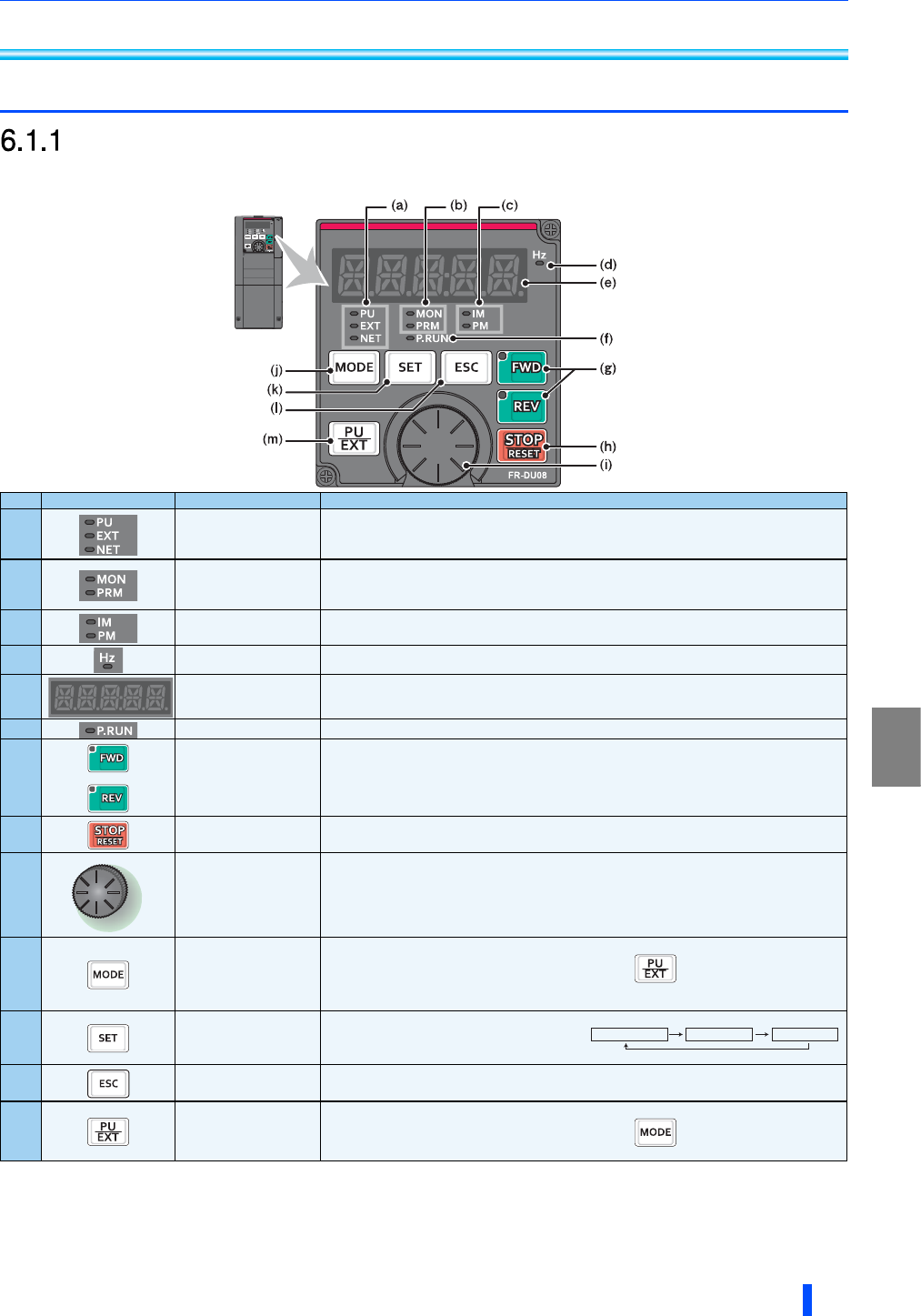
Operation panel (FR-DU08)
DRIVE THE MOTOR
15
6 DRIVE THE MOTOR
6.1 Operation panel (FR-DU08)
Components of the operation panel (FR-DU08)
No. Component Name Description
(a)
Operation mode indicator
PU: ON to indicate the PU operation mode.
EXT: ON to indicate the External operation mode. (ON at power-ON in the initial setting.)
NET: ON to indicate the Network operation mode.
PU and EXT: ON to indicate the External/PU combined operation mode 1 or 2.
(b)
Operation panel status
indicator
MON: ON to indicate the monitoring mode. Quickly flickers twice intermittently while the protective function is
activated.
Slowly flickers in the display-off mode.
PRM: ON to indicate the parameter setting mode.
(c)
Control motor indicator
IM: ON to indicate the induction motor control.
PM: ON to indicate the PM sensorless vector control.
The indicator flickers when test operation is selected.
(d)
Frequency unit indicator ON to indicate frequency. (Flickers when the set frequency is displayed in the monitor.)
(e)
Monitor (5-digit LED)
Shows the frequency, parameter number, etc.
(Using Pr.52, Pr.774 to Pr.776, the monitored item can be changed.)
(f)
PLC function indicator ON to indicate that the sequence program can be executed.
(g)
FWD key, REV key
FWD key: Starts forward rotation. The LED is on during forward operation.
REV key: Starts reverse rotation. The LED is on during reverse operation.
The LED flickers under the following conditions.
! When the frequency command is not given even if the forward/reverse command is given.
! When the frequency command is the starting frequency or lower.
! When the MRS signal is being input.
(h)
STOP/RESET key
Stops the operation commands.
Resets the inverter when the protection function is activated.
(i)
Setting dial
The setting dial of the Mitsubishi inverters. The setting dial is used to change the frequency and parameter
settings.
Press the setting dial to perform the following operations:
! To display a set frequency in the monitoring mode (the setting can be changed using Pr.992.)
! To display the present setting during calibration
! To display a fault history number in the faults history mode
(j)
MODE key
Switches to different modes.
Switches to the easy setting mode by pressing simultaneously with .
Holding this key for 2 seconds locks the operation. The key lock is invalid when Pr.161="0 (initial setting)". (Refer
to the Instruction Manual (Detailed).)
(k)
SET key
Enters each setting.
If pressed during operation, the monitored item changes.
(Using Pr.52 and Pr.774-Pr.776, the monitored item
can be changed.)
(l)
ESC key
Goes back to the previous display.
Holding this key for a longer time changes the mode back to the monitor mode.
(m)
PU/EXT key
Switches between the PU mode and the External operation mode.
Switches to the easy setting mode by pressing simultaneously with .
Cancels the PU stop also.
Ñ«¬°«¬ º®»¯«»²½§
ɸ»² ¬¸» ·²·¬·¿´ -»¬¬·²¹ ·- -»¬
Ñ«¬°«¬ ½«®®»²¬ Ñ«¬°«¬ ª±´¬¿¹»
Vedere la pagina 14
1 2 ... 10 11 12 13 14 15 16 17 18 19 20 ... 32 33

Commenti su questo manuale

Nessun commento

Nexcom NSA 5150 manuels

Manuels d'utilisation et guides de l'utilisateur pour Matériel Nexcom NSA 5150.
Nous fournissons des manuels en pdf 1 Nexcom NSA 5150 à télécharger gratuitement par type de document : Manuel de l'utilisateur


Nexcom NSA 5150 Manuel de l'utilisateur (84 pages)


marque: Nexcom | Catégorie: Hardware | Taille: 8.04 MB |


Table des matières

Network Security Appliance

1

NSA 5150

1

User Manual

1

Contents

2

Chapter 3: System Setup

3

Chapter 4: BIOS Setup

3

Appendix A: Bypass Register

3

Copyright

4

Disclaimer

4

Acknowledgements

4

Declaration of Conformity

4

RoHS Compliance

5

Warranty and RMA

6

Warnings

7

Cautions

7

Installation Recommendations

8

Safety Information

8

Safety Precautions

9

CAUTION!

10

CAUTION!CAUTION!

10

Headquarters

11

NSA 5150 User Manual

12

Package Contents

13

Ordering Information

14

Key Features

15

Overview

15

Hardware Specifications

16

Knowing Your NSA 5150

17

Rear Panel

18

Before You Begin

19

Precautions

19

Jumper Settings

20

RTC Clear

22

ATX/AT Select

22

Console Pin Header

23

WDTO Pin Header

23

Connector Pin Definitions

24

Dual USB 3.0 Ports

25

LAN Ports

26

USB2 Box Header

29

HW Reset Pin Header

30

Power Button Pin Header

30

Bypass LED Pin Header

31

NMI Pin Header

31

Power LED Pin Header

32

HDD LED Pin Header

32

GAL Programming Connector

33

BMC Programming Connector

33

BMC Reset Pin Header

34

System Fan Connector (4-Pin)

34

System Fan Connectors (3-Pin)

35

Intrusion Detect Connector

35

Internal MO-297 Connector

36

SATA Connectors

36

SATA DOM Power Port

37

Keyboard/Mouse Connector

37

VGA Connector

38

Keypad Pin Header

39

PSMI Connector

40

Power Connector

40

PCIe x4 Slot

42

LAN Module Slot

43

Installing a SATA DOM

48

Mounting screw

52

Installing a SO DIMM

53

Installing a LAN Module

58

Default Configuration

61

Entering Setup

61

Scroll Bar

62

BIOS Setup Utility

63

Advanced

64

PCI Subsystem Settings

65

ACPI Settings

66

Trusted Computing

66

CPU Configuration

67

Network Configuration

68

SATA Configuration

68

USB Configuration

70

Super IO Configuration

71

H/W Monitor

72

Network Stack

73

PCH-IO Configuration

74

Enables or disables the VT-d

75

Security

77

Save & Exit

77

Server Mgmt

79

BMC Network Configuration

81

Register Map

82

Register Bit Definitions

83


Plus de produits et de manuels pour Matériel Nexcom

Modèles Type de document
Aucun