Sharp LL-T17A3 Manuale Utente Pagina 10
- Pagina / 132
- Indice
- SEGNALIBRI

- LL-T17A3 1
- Notice for Users in Europe 3
- Notice for Users in the UK 4
- Notice for Users in Australia 4
- Notice for Users in the USA 5
- Table of Contents 7
- Tips and safety precautions 8
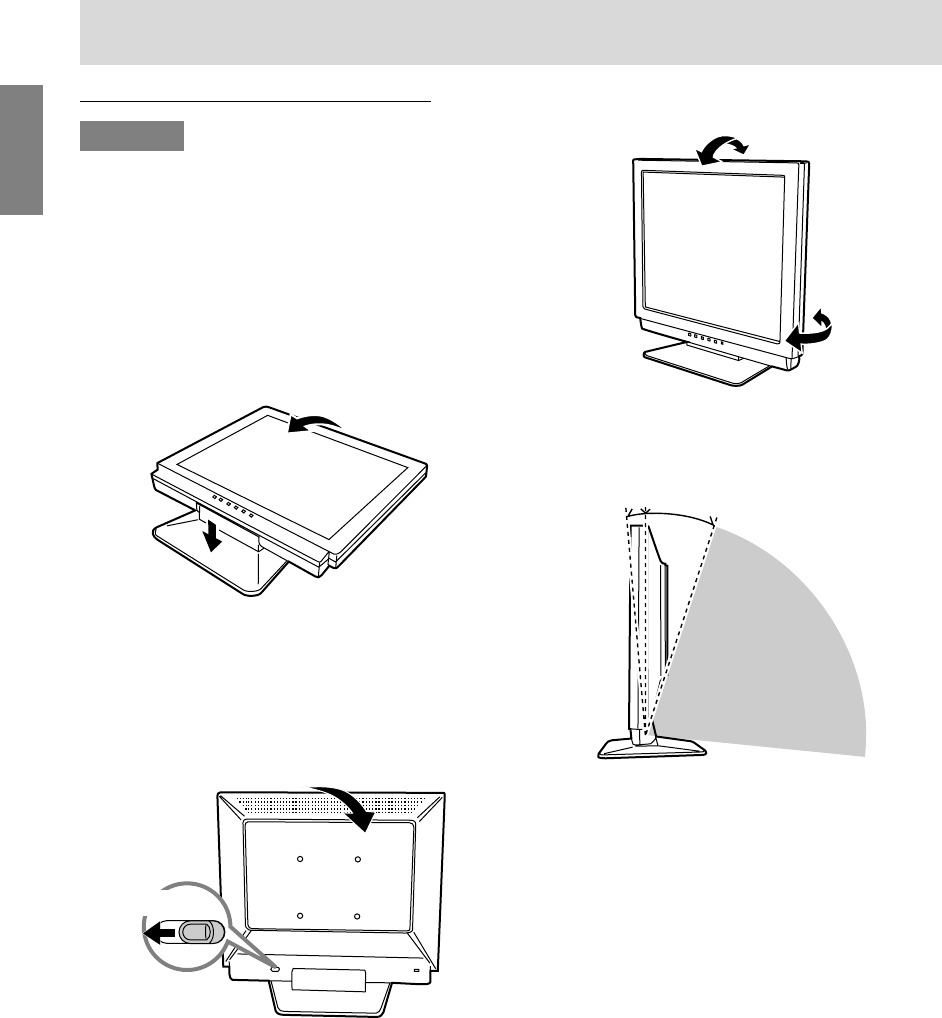
- Product description 10
- Turning the power on 12
- Turning the power off 12
- ICC profile (for Windows) 12
- Installing the ICC profile 14
- Adjusting the backlight 16
- Adjusting the speaker volume 17
- Setting color mode 17
- Automatic screen adjustment 17
- Manual screen adjustment 18
- ADJUSTMENT Menu 19
- GAIN CONTROL Menu 19
- WHITE BALANCE Menu 20
- MODE SELECT Menu 20
- Monitor care and repair 21
- Specifications 22
- Inhaltsverzeichnis 27
- Produktbeschreibung 29
- Computer 31
- Stromquelle 31
- Einschalten des Monitors 32
- Ausschalten des Monitors 32
- (für MacOS) 35
- Lautsprecher-Lautstärke 36
- Einstellen der Lautsprecher 37
- Lautstärke 37
- Einstellen des Farbmodus 37
- Menü ADJUSTMENT 39
- Menü GAIN CONTROL 39
- Menü WHITE BALANCE 40
- Menü MODE SELECT 40
- Pflege des Monitors 41
- Lagerung 41
- Fehlersuche 41
- Technische Daten 42
- Table des matières 47
- Description du produit 49
- Raccordement du moniteur à un 51
- Activation de l’alimentation 52
- ICC (pour Windows) 52
- Installation du profile ICC 54
- (pour MacOS) 55
- Réglage du rétro-éclairage 56
- Réglage du mode couleur 57
- Réglage manuel de l’image 58
- Menu ADJUSTMENT (REGLAGE) 59
- Menu GAIN CONTROL 59
- (REGLAGE DES COULEURS) 59
- Presser le bouton MENU 60
- Entretien du moniteur 61
- Stockage 61
- Dépannage 61
- Caractéristiques techniques 62
- Descrizione del prodotto 69
- e spegnimento del monitor 71
- Accensione 72
- Spegnimento 72
- Installazione del profilo ICC 74
- (per MacOS) 75
- e volume dell’altoparlante 76
- Predisposizione 77
- Menu ADJUSTMENT (REGOLAZIONE) 79
- (CONTROLLO DEL GUADAGNO) 79
- Menu WHITE BALANCE 80
- (BILANCIAMENTO DEL BIANCO) 80
- Menu MODE SELECT 80
- Cura del monitor 81
- Immagazzinamento 81
- Ricerca ed eliminazione di 81
- Specifiche 82
- Descripción del producto 89
- Encendido 92
- (para Win dows) 92
- Instalación del perfil ICC 94
- Información acerca del perfil 95
- ColorSync (para MacOS) 95
- Función de bloqueo de ajustes 96
- Forma de ajustar 97
- Ajuste manual de la pantalla 98
- Menú ADJUSTMENT 99
- Menú GAIN CONTROL 99
- Menú WHITE BALANCE 100
- Menú MODE SELECT 100
- Conservación del monitor 101
- Almacenamiento 101
- Solución de problemas 101
- Especificaciones 102
- 7 - 10mm 105
- Français 107
- Italiano 107
- !"#$%&'( 108
- !"#$%&'()* 110
- !"#$% 111
- 111
- !"# 112
- ColorSync !" ! 115
- !"#$MacOS 115
- !"#$%& 116
- ! !"#$ 122
- 15 11121314 123
- DDCPlug & Play ! 124
- !VESA !"#$ 125
- SHARP CORPORATION 132
Prodotti e manuali riguardandi Monitor Sharp LL-T17A3
 (62 pagine)
(71 pagine)
(62 pagine)
(71 pagine)

 (40 pagine)
(73 pagine)
(40 pagine)
(40 pagine)
(73 pagine)

 (148 pagine)
(156 pagine)
(28 pagine)
(152 pagine)
(128 pagine)
(2 pagine)
(2 pagine)
(140 pagine)
(148 pagine)
(148 pagine)
(156 pagine)
(28 pagine)
(152 pagine)
(128 pagine)
(2 pagine)
(2 pagine)
(140 pagine)
(148 pagine)
 (0 pagine)
(4 pagine)
(2 pagine)
(7 pagine)
(0 pagine)
(0 pagine)
(4 pagine)
(2 pagine)
(7 pagine)
© 2020, manymanuals.it. Tutti i diritti riservati | 0.050 s |
 Manymanuals.com
 Manymanuals.de
 Manymanuals.fr
 Manymanuals.it
 Manymanuals.pl
 Manymanuals.cz
 Manymanuals.es
 Manymanuals-pt.com
Commenti su questo manuale