Sharp MX-M362N Specifiche Pagina 45: REMOVING MISFEEDS
 1
 2
 3
 4
 5
 6
 7
 8
 9
 10
 11
 12
 13
 14
 15
 16
 17
 18
 19
 20
 21
 22
 23
 24
 25
 26
 27
 28
 29
 30
 31
 32
 33
 34
 35
 36
 37
 38
 39
 40
 41
 42
 43
 44
 45
 46
 47
 48
 49
 50
 51
 52
 53
 54
 55
 56
43
REMOVING MISFEEDS
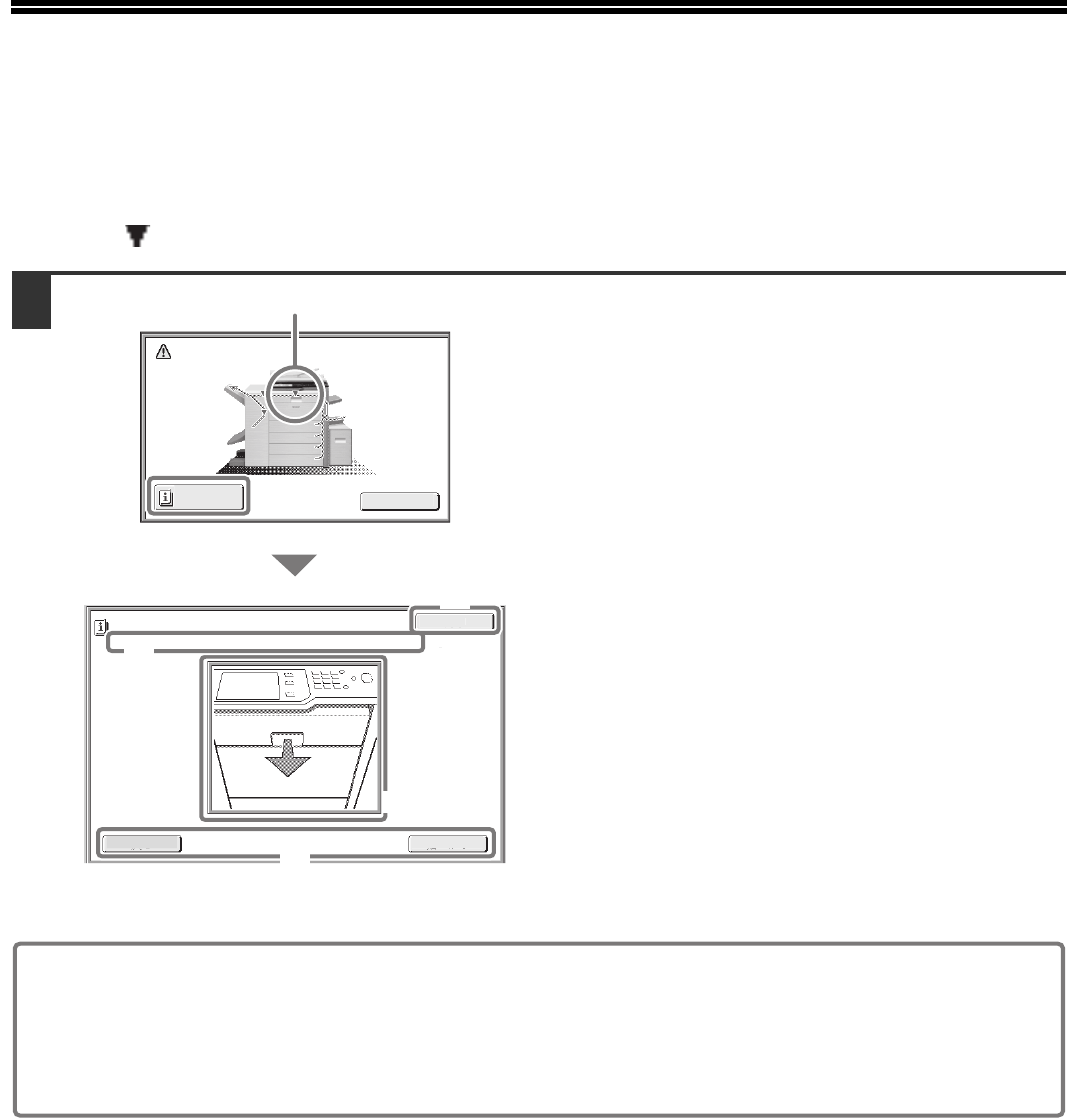
When a paper misfeed occurs, the message "A misfeed has occurred." will appear in the touch panel and printing and
scanning will stop. In this event, touch the [Information] key in the touch panel. When the key is touched, instructions for
removing the misfeed will appear. Follow the instructions. When the misfeed is cleared, the message will automatically
clear.
The blinking
mark in the image at left indicates the approximate position of the misfeed.
For detailed procedures for removing misfeeds, see "REMOVING MISFEEDS" in "8. TROUBLESHOOTING" in the
Operation Guide.
1
Touch the [Information] key to display the following screen.
(A) Instructions for removing the misfeed
appear here.
(B) Animation showing what to do.
(C) Display the previous screen or the next
screen.
(D) This closes the information screen.
The information screen cannot be closed until the misfeed
is removed.
Information
OK
Exit
Open the centre cover and remove the misfed originals.
Misfeed Removal
Back
Next
A misfeed has occurred.
Turning M/C off now causes data loss.
(C)
(B)
(A)
(D)
Misfeed location
• While the message appears, printing and scanning cannot be resumed.
• If the message does not clear even after the misfeed has been removed, the causes below are possible. Check
once again.
• The misfeed was not correctly removed.
• A torn piece of paper remains in the machine.
• A cover or unit that was opened or moved to remove the misfeed was not returned to its original position.
File PDF · ·
Domande su Sharp MX-M362N
Non ci sono ancora domande su questo manuale. Fate la prima.
Prodotti e manuali riguardanti Apparecchi multifunzione Sharp MX-M362N
- Apparecchi multifunzione Sharp MX-LCX3 Specifiche
 (76 pagine)
- Apparecchi multifunzione Sharp AR-FR11 Manuale Utente
(6 pagine)
- Apparecchi multifunzione Sharp MX-M363U Guida di Configurazione
(112 pagine)
- Apparecchi multifunzione Sharp DX-C401FX Manuale Utente
(12 pagine)
- Apparecchi multifunzione Sharp MX-5000N Manuale Utente
(2 pagine)
- Apparecchi multifunzione Sharp AL-2040CS Manuale Utente
 (82 pagine)
- Apparecchi multifunzione Sharp AR-C250 Specifiche
(161 pagine)
- Apparecchi multifunzione Sharp MX-2301N Specifiche
(116 pagine)
- Apparecchi multifunzione Sharp MX-4101N Specifiche
(76 pagine)
- Apparecchi multifunzione Sharp JW-20FLT Manuale Utente
(197 pagine)
- Apparecchi multifunzione Sharp MX-C381 Specifiche
(148 pagine)
- Apparecchi multifunzione Sharp MX-M260 Manuale Utente
(160 pagine)
- Apparecchi multifunzione Sharp MX-4101N Specifiche
(12 pagine)
- Apparecchi multifunzione Sharp MX-M564N Manuale Utente
(8 pagine)
- Apparecchi multifunzione Sharp MX-M564N Manuale Utente
(8 pagine)
- Apparecchi multifunzione Sharp CPD-3830 Manuale Utente
(1 pagine)
- Apparecchi multifunzione Sharp MX-2010U Manuale Utente
(12 pagine)
- Apparecchi multifunzione Sharp MX-B381 Manuale Utente
(12 pagine)
- Apparecchi multifunzione Sharp MX-7500N Manuale Utente
(30 pagine)
- Apparecchi multifunzione Sharp AL-2021 Specifiche
(91 pagine)