Sharp AR-275 Manuale Utente Pagina 56
- Pagina / 130
- Indice
- RISOLUZIONE PROBLEMI
- SEGNALIBRI

- FOR YOUR RECORDS 2
- OUTLINE OF THIS MANUAL 3
- CONTENTS 4
- CHAPTER 1 7
- INTRODUCTION 8
- CAUTIONS 9
- COPIER INSTALLATION 10
- 12" (30 cm) 11
- MAIN FEATURES 12
- Scan once/ Print many 13
- Optional features 13
- PART NAMES AND FUNCTIONS 14
- Interior 15
- Operation panel 16
- POWER ON AND OFF 18
- Initial settings 19
- Power save modes 19
- FUNCTION ICONS 20
- FUNCTION REVIEW 21
- AUDITING ACCOUNTS 22
- Please see your 23
- GETTING STARTED 24
- CHAPTER 2 25
- NORMAL COPYING 26
- Ready to copy 27
- TWO-SIDED COPYING 28
- START key again 30
- EXPOSURE ADJUSTMENT 31
- EXPOSURE 32
- TEXT/PHOTO 32
- REDUCTION/ 33
- ENLARGEMENT/ZOOM 33
- Press the AUTO IMAGE key 34
- Manual selection 35
- Press the OK key 36
- ROTATION COPYING 37
- BYPASS FEED (special 38
- BYPASS FEED (special paper) 39
- Second original 40
- Copy of first original 40
- INTERRUPTING A COPY RUN 41
- CHAPTER 3 43
- SORT/GROUP 44
- Offset stack 46
- MARGIN SHIFT 47
- Center erase 49
- Edge + Center erase 49
- Edge erase 49
- DUAL PAGE COPY 51
- 2 IN 1 OR 4 IN 1 53
- PATTERN 1 55
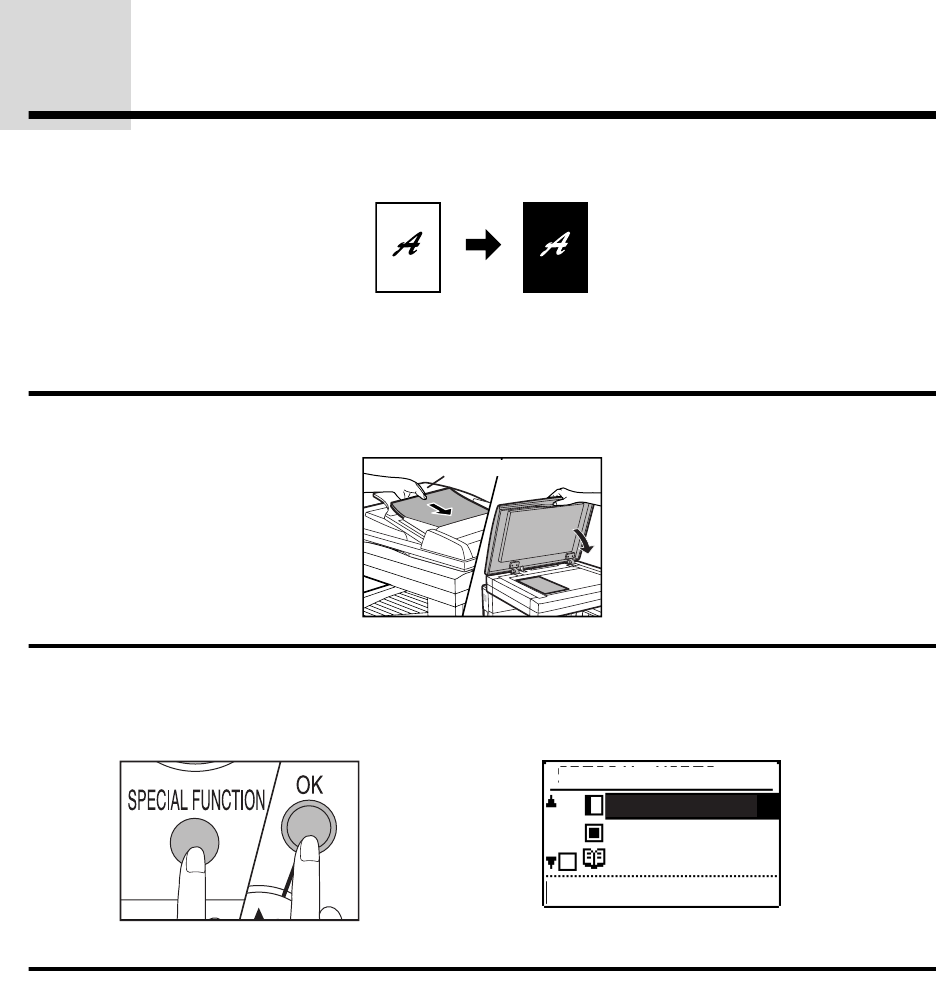
- B/W REVERSE 56
- SPECIAL MODES 58
- [OK]:ADJUST 58
- TRANSPARENCY 61
- JOB MEMORY 63
- Deleting a job program 64
- Recalling a job program 65
- CHAPTER 4 67
- STATUS MESSAGES 68
- MISFEED REMOVAL 69
- Misfeed in the copier 70
- B. Misfeed in the fusing area 71
- Misfeed in the center tray 73
- TROUBLESHOOTING 77
- CHAPTER 5 79
- Types and sizes of copy paper 80
- TONER CARTRIDGE 84
- REPLACEMENT 84
- TONER CARTRIDGE REPLACEMENT 85
- CHECKING THE TONER QUANTITY 86
- AND TOTAL OUTPUT COUNT 86
- CLEANING THE PLATEN 87
- GLASS AND PLATEN COVER 87
- CLEANING THE BYPASS 88
- TRAY PAPER FEED ROLLER 88
- DISPLAY CONTRAST 89
- ADJUSTMENT 89
- STORAGE OF SUPPLIES 90
- SPECIFICATIONS 91
- CHAPTER 6 93
- SYSTEM CONFIGURATION 94
- SINGLE PASS FEEDER (AR 95
- SP4)/REVERSING SINGLE 95
- PASS FEEDER (AR-RP3) 95
- Specifications 96
- Acceptable originals 96
- Unacceptable originals 96
- Press the 2-SIDED COPY key 99
- COPY MODE 101
- BINDING CHANGE OFF 102
- Misfeed removal 103
- Right side cover 104
- FINISHER (AR-FN5) 105
- Approx. 1 inch 106
- Finisher functions 107
- Staple sort 108
- appears in the 109
- Using the SPF or the RSPF 110
- Staple cartridge replacement 111
- Staple jam removal 112
- 500-SHEET PAPER FEED 116
- UNIT (AR-D11)/2x500-SHEET 116
- PAPER FEED UNIT (AR-D12) 116
- Loading copy paper 117
- Remove any misfed paper 118
- Close the paper tray 118
- Close the side cover 118
- MATERIAL SAFETY DATA SHEET 121
- 5. FIRE -FIGHTING MEASURES 122
- 7. HANDLING AND STORAGE 122
- 10. STABILITY AND REACTIVITY 123
- 11. TOXICOLOGICAL INFORMATION 123
- 12. ECOLOGICAL INFORMATION 123
- 13. DISPOSAL CONSIDERATION 123
- 14. TRANSPORT INFORMATION 123
- 15. REGULATORY INFORMATION 124
- 16. OTHER INFORMATION 124
- 3. HAZARDS IDENTIFICATION 125
- 4. FIRST-AID MEASURES 125
- WARNING: 129
- AR-235/AR-275 130
- SHARP CORPORATION 130
Prodotti e manuali riguardandi Stampanti per fotografie Sharp AR-275
 (56 pagine)
 (12 pagine)
© 2020, manymanuals.it. Tutti i diritti riservati | 0.034 s |
 Manymanuals.com
 Manymanuals.de
 Manymanuals.fr
 Manymanuals.it
 Manymanuals.pl
 Manymanuals.cz
 Manymanuals.es
 Manymanuals-pt.com
Commenti su questo manuale