Sharp AR-M355N Manuale Utente Pagina 192
- Pagina / 380
- Indice
- RISOLUZIONE PROBLEMI
- SEGNALIBRI

- AR-M355N 1
- AR-M455N 1
- FOR YOUR RECORDS 2
- Part 1: General Information 3
- PRODUCT CONFIGURATIONS 4
- OPERATION MANUALS 4
- INSTALLATION REQUIREMENTS 5
- CAUTIONS 6
- Laser Information 7
- CHAPTER 1 10
- INTRODUCTION 11
- MAIN FEATURES 12
- Original Copy 13
- See page 3-8 16
- Non-Offset mode 16
- Energy saving features 17
- ENERGY STAR 17
- ENERGY STAR 17
- PART NAMES AND FUNCTIONS 18
- Interior 19
- ■ Other optional equipment 21
- Operation panel 22
- Touch panel 23
- "JOB QUEUE" screen 24
- "COMPLETE" 24
- TURNING THE POWER ON AND OFF 26
- AUDITING MODE 27
- LOADING PAPER 29
- Specifications of paper trays 30
- ■ User type 32
- Tray 2 and the bypass tray 33
- PAPER TYPE REGISTRATION 34
- Printing onto envelopes 36
- ■ Loading transparency film 37
- Upper paper tray: 37
- Middle and lower paper trays: 37
- Lower paper tray: 38
- T 12-HOUR 40
- About the settings 41
- REPLACING THE TONER CARTRIDGE 42
- STORAGE OF SUPPLIES 43
- MISFEED REMOVAL 44
- Roller rotating knob A 45
- Transfer roller 45
- Photoconductive drum 45
- Roller rotating knob B 45
- Fusing unit open tab 45
- Misfeed in the duplex module 46
- ■ Misfeed in paper tray 1 47
- REMOVING AN ORIGINAL MISFEED 49
- DUPLEX MODULE 55
- MAIL-BIN STACKER 58
- Top cover 59
- FINISHER 60
- Finisher functions 61
- Using the finisher functions 62
- Staple cartridge replacement 63
- ■ Checking the staple unit 64
- Misfeed in the finisher 65
- SADDLE STITCH FINISHER 67
- Non-offset mode 68
- <Example> 70
- {Original 2} 70
- {Punch positions} 70
- {Original 1} 70
- Roller rotating 72
- Staple unit 72
- Roller rotating knob D 76
- Part 2: Copier Operation 78
- AUTOMATIC DOCUMENT FEEDER 81
- PLACING ORIGINALS 82
- Document feeder tray 83
- Document glass 83
- [Example 1] 83
- [Example 2] 83
- CHECKING THE SIZE OF A PLACED 84
- STORING, DELETING, AND USING 85
- ORIGINAL SIZES 85
- NORMAL COPYING 86
- 2-SIDED COPY 87
- DED COPY 89
- Original scale 90
- ADJUSTING THE EXPOSURE 93
- REDUCTION/ENLARGEMENT/ZOOM 94
- PAPER SELECT 95
- COPY RATIO 95
- SPECIAL PAPERS 99
- CHAPTER 5 100
- SPECIAL MODES 101
- Margin shift 102
- CANCEL OK 103
- Dual page copy 104
- Pamphlet copy 105
- PRINT ON COVER 106
- Job build 107
- Tandem copy 108
- Press the [START] key 109
- Covers/inserts 110
- COVERS/INSERTS 111
- TRANSPARENCY 111
- CARD SHOTBOOK COPY 111
- (X) (Y) (Z) 113
- Touch the [PAGE LAYOUT] key 114
- Insert sheets 121
- Originals (1-sided) 121
- Originals (2-sided) 121
- Multi shot 122
- Shot number 123
- Book copy 124
- Card shot 125
- SIZE RESET 126
- Mirror image 127
- B/W reverse 127
- CONFIDENTIAL 128
- PRINT MENU 129
- 2-SIDED ORIGINAL TYPE 130
- ■ Printing the date on copies 131
- NUMBERING 132
- Print settings Front 134
- Storing text sequences 138
- SELECTED ITEM? 139
- DELETE MOVE 139
- STORING, USING AND DELETING 140
- JOB PROGRAMS 140
- Calling up a job program 141
- Deleting a stored job program 141
- INTERRUPTING A COPY RUN 142
- CHAPTER 6 144
- USER MAINTENANCE 145
- TROUBLESHOOTING 146
- CHAPTER 7 147
- OVERVIEW 148
- A look at the operation panel 150
- Saving files 150
- Document filing icons 151
- SAVING A DOCUMENT IMAGE FILE 152
- ORIGINAL 153
- EXPOSURE 153
- PASSWORD 154
- Print jobs 155
- Scan Save 156
- HALF TONE 157
- Touch the [SPECIAL MODES] 158
- CALLING UP AND USING A FILE 159
- SEARCH START 160
- FILE FOLDER 161
- QUICK FILE 161
- FILE RETRIEVE 161
- JOB SETTINGS 162
- 8 "x11" 162
- ■ [Send] 163
- ■ [Property change] 164
- Touch the [OK] key 165
- Touch the [MOVE] key 165
- Touch the [CANCEL] key 165
- COMPLETE 166
- CUSTOM SETTINGS 167
- ■ Programming a user name 168
- AMEND/DELETE USER NAME 169
- AMEND/DELETE CUSTOM FOLDER 169
- UVWXYZOPQRSTJKLMNEFGHIABCD 169
- ALL USERS 169
- EFGHI JKLMN OPQRST UVWXYZ 170
- DELETE THE FOLDER? 171
- USER FOLDER 1 171
- ENTERING CHARACTERS 172
- \?/"; : 173
- <> ! * 173
- CHAPTER 8 175
- SPECIFICATIONS 176
- LwA 6.8B or less 5.0B or less 177
- KEY OPERATOR'S 184
- OPERATION MANUAL 185
- Trademark Acknowledgments 186
- Warranty 186
- TABLE OF CONTENTS 187
- SETTING THE PRINTER DRIVER 189
- Click [Help] to display the 190
- Help screen 190
- Printing 191
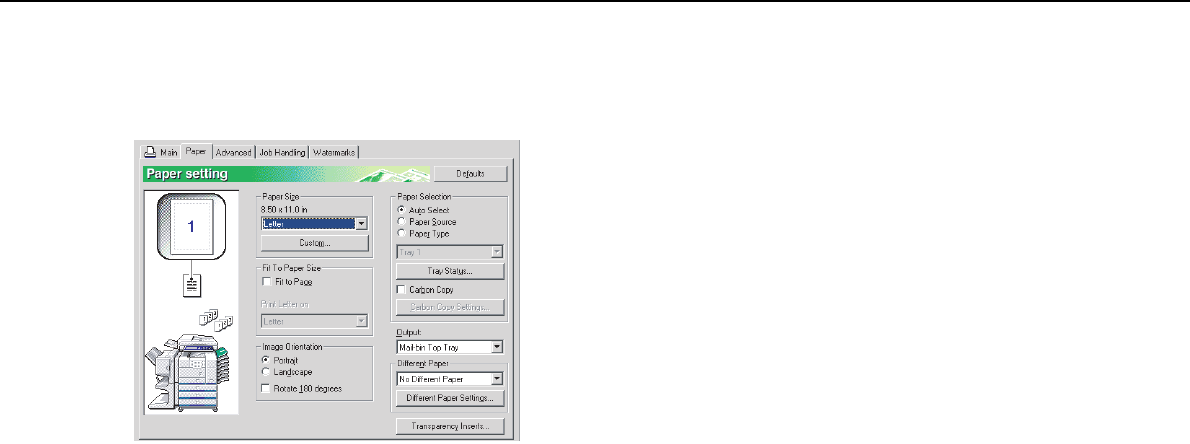
- Click the [Paper] tab 192
- Using options to print 193
- CHAPTER 2 195
- SELECTING PRINTING FUNCTIONS 196
- [Example] 198
- Vertical paper feeding 198
- Horizontal paper feeding* 198
- Offset mode Non-offset mode 199
- Settings in the [Paper] tab 200
- Original 201
- CHAPTER 3 210
- Advanced job settings 213
- ABOUT THE WEB PAGES (FOR THE 214
- ADMINISTRATOR) 214
- ([Passwords]) 215
- Touch the [PRINT] key 217
- E-mail Print 218
- CHAPTER 4 221
- MAKING CONFIGURATION SETTING 222
- (1 999) 223
- Printer Default settings 224
- PCL settings 225
- PostScript settings 225
- KEY OPERATOR PROGRAMS 227
- SETTINGS 228
- KEY OPERATOR 228
- O E H NGE 228
- Key operator program menu 229
- Printer settings 230
- Network settings 232
- Checking the IP address 236
- PRINTER SPECIFICATIONS 238
- NOTICE PAGE PRINTING 239
- PRINT AREA 240
- PURPOSE OF THE KEY OPERATOR 241
- PROGRAMS 241
- KEY OPERATOR PROGRAM LIST 243
- KEY OPERATOR CODE 244
- GENERAL PROGRAMS 247
- Job log control 249
- Energy save 249
- KEYS TOUCH SOUND 250
- Device control 251
- with the 252
- Key operator code change 253
- Product key 253
- PROGRAMS FOR COPY MODE 254
- DOCUMENT FILING PROGRAMS 256
- SOFTWARE SETUP GUIDE 258
- (for printer) 258
- ABOUT THE CD-ROMS 261
- Installation method 1 263
- Installation method 2 269
- Installation method 3 271
- Installation method 4 273
- UNINSTALLING PRINTER DRIVERS 274
- AND PRINTER UTILITIES 274
- INSTALLING PRINTER DRIVERS 275
- CONNECTING THE MACHINE TO 277
- YOUR COMPUTER 277
- CONTENTS 281
- A FACSIMILE 283
- FCC NOTICE TO USERS 284
- IMPORTANT SAFETY INFORMATION 285
- NOTICE FOR USERS IN 286
- AVIS POUR NOS 286
- UTILISATEURS AU CANADA 286
- POINTS TO CHECK AND PROGRAM 289
- AFTER INSTALLATION 289
- CONNECTING AN EXTENSION PHONE 289
- A LOOK AT THE OPERATION PANEL 290
- ■ Condition settings screen 291
- Storing order 292
- (initially selected) 292
- ORIGINALS 293
- LOADING A DOCUMENT 294
- (2 1/2 17) 295
- (2 1/2 11 5/8) 295
- USING A STORED ORIGINAL SIZE 296
- SELECTING THE RESOLUTION 297
- SELECTING THE EXPOSURE 298
- CONVENIENT DIALING METHODS 299
- SENDING A FAX 301
- INAL. (Pg.No.2) 302
- PRESS [READ-END] 302
- TRANSMISSION BY AUTO-DIALING 303
- CANCEL SEARCH 304
- E-MAIL/FTP 305
- MODE SWITCH 305
- INTERNET FAX 305
- FAXING A TWO-SIDED ORIGINAL 306
- CANCELING A FAX TRANSMISSION 308
- RECEIVING FAXES 309
- (BROADCAST TRANSMISSION) 311
- USING BROADCAST TRANSMISSION 312
- USING EDGE ERASE 313
- ■ Selecting Dual Page Scan 314
- AUTOMATIC TRANSMISSION AT A 315
- TRANSMITTING TWO ORIGINAL 316
- PAGES AS A SINGLE PAGE (2in1) 316
- USING CARD SHOT 317
- SEND PAGE 318
- FAXING A LARGE NUMBER OF 319
- PAGES (JOB BUILD MODE) 319
- OWN NUMBER SENDING 320
- PRINTING OUT THE RESULT OF A 321
- TRANSMISSION AND RECEPTION 322
- USING THE POLLING FUNCTION 322
- USING POLLING MEMORY 324
- PUBLIC BOX 325
- USING A PROGRAM 326
- USING THE TRANSFER FUNCTION 327
- Transmission to 328
- TRANSMISSION BETWEEN MACHINES 331
- SUPPORTING F-CODES 331
- ADDRESS AND PASSCODE 332
- F-CODE POLLING MEMORY 333
- PROCEDURE FOR F-CODE POLLING 334
- Your machine 335
- The other machine 335
- CONFIDENTIAL MEMORY BOX 336
- USING AN EXTENSION PHONE 341
- (see page 1-8) 343
- PROGRAMMING 345
- AUTO DIAL KEYS AND PROGRAMS 345
- STORING ONE-TOUCH DIAL KEYS 346
- E-MAIL FAX 347
- [EXIT] key 348
- STORING A GROUP KEY 349
- AMEND/DELETE 350
- DELETE EXIT 350
- STORING A PROGRAM 351
- EDITING AND DELETING PROGRAMS 351
- STORING A GROUP INDEX 352
- PROGRAMMING, EDITING, AND 353
- DELETING F-CODE MEMORY BOXES 353
- (POLLING TIMES) 354
- MEMORY BOXES (PRINT PIN) 355
- BOXES (RECIPIENT) 356
- LIST PRINT 357
- FAX DATA 357
- RECEIVE/FORWARD 357
- VIEWING THE COMMUNICATION 360
- ACTIVITY REPORT 360
- WHEN AN ALARM SOUNDS AND A 360
- WARNING MESSAGE IS DISPLAYED 360
- PROBLEMS AND SOLUTIONS 361
- OPERATION SETTINGS 367
- FAX SETTINGS 368
- Call timer at memory sending 371
- Quick on line sending 371
- Recall in case of line busy 371
- ANTI JUNK FAX SETTING 373
- PRINTING OUT SETTINGS 374
- CHAPTER 9 376
Prodotti e manuali riguardandi Stampanti per fotografie Sharp AR-M355N
 (181 pagine)
(118 pagine)
(181 pagine)
(118 pagine)
© 2020, manymanuals.it. Tutti i diritti riservati | 0.494 s |
 Manymanuals.com
 Manymanuals.de
 Manymanuals.fr
 Manymanuals.it
 Manymanuals.pl
 Manymanuals.cz
 Manymanuals.es
 Manymanuals-pt.com
Commenti su questo manuale