Sharp UX-A255 Manuale Utente Pagina 97
- Pagina / 112
- Indice
- RISOLUZIONE PROBLEMI
- SEGNALIBRI

- FACSIMILE 1
- ENERGY STA R 2
- Introduction 3
- Important safety information 5
- Table of Contents 6
- A Look at the Operation Panel 8
- 1. Installation 10
- Connections 11
- 1 Press once and twice 12
- 2 Press once and twice 12
- 3 Press once 12
- 4 Select the dial mode: 12
- 5 Press to exit 12
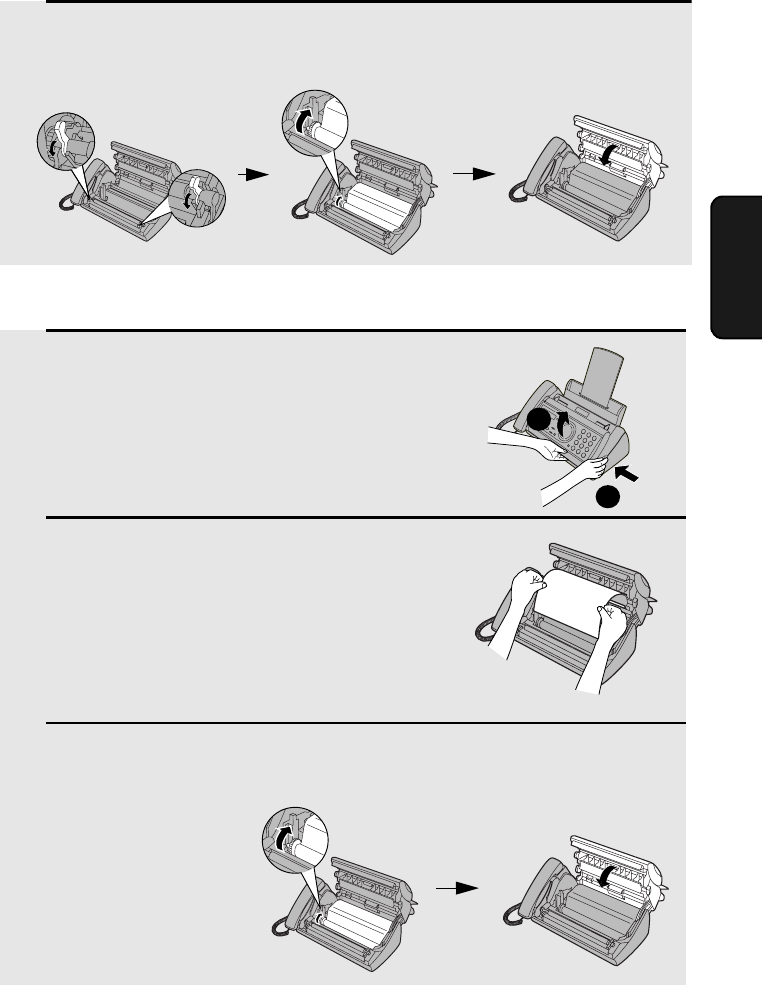
- Loading the Imaging Film 14
- 5 Insert the green gears 15
- Loading Printing Paper 16
- Print contrast setting 17
- Setting the paper size 17
- 1 Press once and 3 times 18
- 2 Press once 18
- 7 Press 19
- Setting the Date and Time 20
- Daylight Saving Time 21
- Setting the Reception Mode 22
- Volume Adjustment 23
- 1 Press or 24
- 2. Setting Up 25
- 2 Press , , and then 26
- 2 Press and then 26
- START/MEMORY 27
- SET OWN NUMBER 27
- 10 DIGITS 27
- JAN-19 02:16 28
- Setting Up and Using OpenLCR 29
- 1 Press once and once 30
- Changing your user profile 31
- 1 Press , 33
- Recording an Outgoing Message 35
- Toll Saver Toll Saver 37
- 1 Press 38
- 2 The messages will play 38
- 2 Press once and once 40
- 3 Press 40
- OGM only mode 41
- Transfer Function 42
- Override Ringing 45
- Remote Operations 47
- Retrieving your messages 48
- Other remote operations 50
- Recording a "Memo" 52
- 4. Sending Faxes 53
- Loading the Document 54
- Resolution settings 55
- 1 Load the document(s) 56
- 4 Press 58
- 6 Press 59
- 1=EDIT, 2=CLEAR 60
- <NEW NUMBER> 60
- 8 Press 61
- Automatic redialing 63
- 2 Press once and 6 times 64
- Sending a Fax From Memory 65
- Memory transmission 66
- If the memory becomes full 66
- 5. Receiving Faxes 67
- Using TEL Mode 68
- Optional Reception Settings 70
- Reception Ratio 71
- 6. Making Copies 73
- 7. Special Functions 75
- How Caller ID operates 76
- Display messages 76
- 1 Press twice 77
- Priority Call 78
- Blocking voice calls 79
- Service) 80
- 7. Special 81
- Functions 81
- 8. Printing Lists 82
- Message List 83
- Caller-ID List 83
- Telephone Number List 83
- Setup List 83
- Transaction Report 84
- 9. Maintenance 86
- Scanning glass and rollers 87
- The housing 88
- 10. Troubleshooting 89
- Problems and Solutions 90
- General problems 92
- Messages and Signals 93
- Audible signals 95
- Clearing Paper Jams 96
- Ordering Parts 98
- FCC Regulatory Information 99
- Section 2. Ingredients 100
- Section 4. First-Aid Measures 100
- Quick Reference Guide 102
- Guía de referencia rápida 103
- REMOTE OPERATION CARD 109
- (Tel. #) 110
- REMOTE COMMANDS 110
- LIMITED WARRANTY 111
- SHARP CORPORATION 112
Prodotti e manuali riguardandi Stampanti per fotografie Sharp UX-A255
 (178 pagine)
(104 pagine)
(311 pagine)
(178 pagine)
(104 pagine)
(311 pagine)
© 2020, manymanuals.it. Tutti i diritti riservati | 0.098 s |
 Manymanuals.com
 Manymanuals.de
 Manymanuals.fr
 Manymanuals.it
 Manymanuals.pl
 Manymanuals.cz
 Manymanuals.es
 Manymanuals-pt.com
Commenti su questo manuale