Sharp FO-2950M Manuale Utente Pagina 62: SPEED DIAL key
 1
 2
 3
 4
 5
 6
 7
 8
 9
 10
 11
 12
 13
 14
 15
 16
 17
 18
 19
 20
 21
 22
 23
 24
 25
 26
 27
 28
 29
 30
 31
 32
 33
 34
 35
 36
 37
 38
 39
 40
 41
 42
 43
 44
 45
 46
 47
 48
 49
 50
 51
 52
 53
 54
 55
 56
 57
 58
 59
 60
 61
 62
 63
 64
 65
 66
 67
 68
 69
 70
 71
 72
 73
 74
 75
 76
 77
 78
 79
 80
 81
 82
 83
 84
 85
 86
 87
 88
 89
 90
 91
 92
 93
 94
 95
 96
 97
 98
 99
 100
 101
 102
 103
 104
 105
 106
 107
 108
 109
 110
 111
 112
 113
 114
 115
 116
 117
 118
 119
 120
 121
 122
 123
 124
 125
 126
 127
 128
 129
 130
 131
 132
 133
 134
 135
 136
 137
 138
 139
 140
 141
 142
 143
 144
 145
 146
 147
 148
 149
 150
 151
 152
Sending a Fax by Automatic Dialing
60
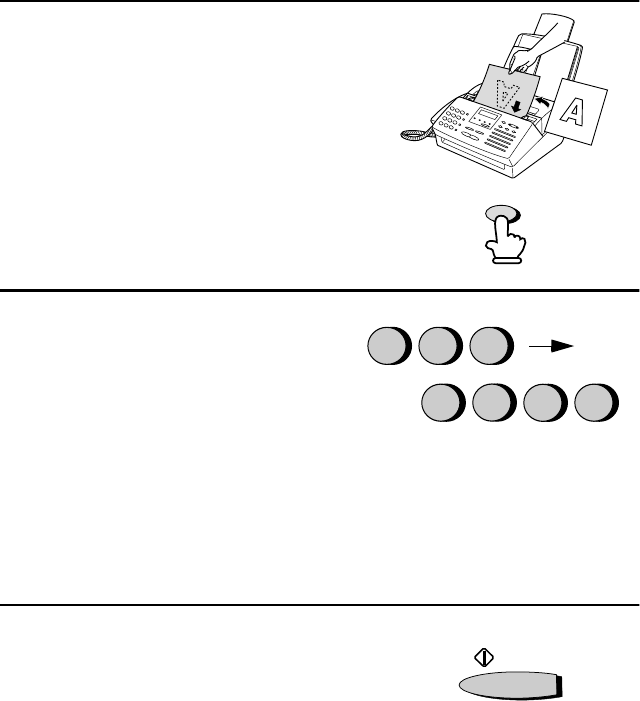
Direct Keypad Dialing
You can also enter a full number with the number keys and then press
the
START
key to begin dialing. You can use this method to dial a full
number when you don’t need to speak to the other party before faxing.
1
Load the document(s). (Note: If
desired, you can load the document
after dialing in Step 2, below.)
•
SEND READY will appear in the
display.
•
Set the resolution and/or contrast if
desired.
2
Enter the number of the receiving
machine by pressing the numeric
keys.
•
If a pause is required between any
of the digits to access a special
service or an outside line, press the
REDIAL
key (two seconds per
pause). The pause will appear as a
hyphen. Several pauses can be
entered in a row.
3
Check the display. If the number of
the receiving machine shown is
correct, press the
START
key.
•
If it is not correct, press the
STOP
key to backspace and clear one
digit at a time, and then re-enter the
correct digit(s).
(Example)
4
6
7
5
3
2
2
START
RESOLUTION
File PDF · ·
Domande su Sharp FO-2950M
Non ci sono ancora domande su questo manuale. Fate la prima.
Prodotti e manuali riguardanti Stampanti Sharp FO-2950M
- Stampanti Sharp AL-1551 Manuale Utente
 (54 pagine)
- Stampanti Sharp AR-275 Manuale Utente
(130 pagine)
- Stampanti Sharp CINSE4653DS51 Manuale Utente
(56 pagine)
- Stampanti Sharp AR-M700N Manuale Utente
(172 pagine)
- Stampanti Sharp FO-3800M Manuale Utente
(6 pagine)
- Stampanti Sharp AR-M237 Manuale Utente
(2 pagine)
- Stampanti Sharp MX-3110N Manuale Utente
 (2 pagine)
- Stampanti Sharp MX-M850 Manuale Utente
(2 pagine)
- Stampanti Sharp AR-M620U Manuale Utente
(2 pagine)