Sharp ZQ-290II Specifiche Pagina 4

  • Scaricare
  • Aggiungi ai miei manuali
  • Stampa
  • Pagina
    / 40
  • Indice
  • SEGNALIBRI
  • Valutato. / 5. Basato su recensioni clienti
Vedere la pagina 3
2
Using the Organizer for the First Time
Be sure to perform the following operations before using the Organizer
for the first time.
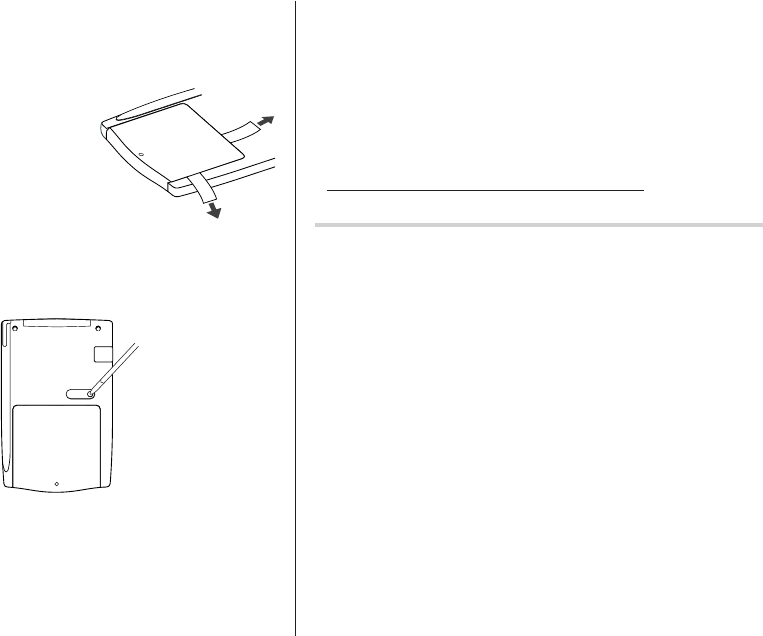
1. Pull out the battery insulation sheets
from the battery compartment on the
back of the unit.
The Organizer starts operation.
(The battery insulation sheets were
inserted at the factory to prevent
battery wear.)
2. Press the RESET switch.
A message, “RESET?” is displayed.
3. Tap
f
, then
x
.
To tap the touch keys, use the touch pen (included in the package).
The message will appear as “RESET!”.
The Organizer is now initialized. Proceed to set the date and time of
the clock (see page 6).
Note:
• Press the RESET switch using the stylus or similar object.
Do not use an object with a breakable or sharp tip.
If a malfunction occurs under abnormal conditions
If the Organizer is subjected to strong extraneous electrical noise or
shock during use, on rare occasions, all the functions will not work
properly and data may be displayed incorrectly. In such cases, follow
the procedures as shown below.
1. Press the RESET switch.
2. When a message, "RESET?" is displayed, press any key EXCEPT
FOR
f
or
x
.
If the first procedure doesn't work, follow the next procedure to
initialize the Organizer's memory. In this case, all the stored data will
be deleted.
1. Press the RESET switch.
2. When a message, "RESET?" is displayed, tap
f
, then press
x
.
RESET
ZQ-290II(En).pm65 03.4.22, 10:51 AM2
Vedere la pagina 3
1 2 3 4 5 6 7 8 9 ... 39 40

Commenti su questo manuale

Nessun commento

Newstar FPMA-D700D manuály

Uživatelské manuály a uživatelské příručky pro Držáky pro ploché obrazovky Newstar FPMA-D700D.
Poskytujeme 1 manuály pdf Newstar FPMA-D700D ke stažení zdarma podle typů dokumentů: Manuál s instrukcemi


Newstar FPMA-D700D Manuál s instrukcemi (2 strany)


Značka: Newstar | Kategorie: Flat panel desk mounts | Velikost: 0.28 MB |


Tabulka s obsahem


Další produkty a příručky pro Držáky pro ploché obrazovky Newstar

Modely Typ Dokumentu
FPMA-D940 Manuál s instrukcemi      Newstar FPMA-D940 flat panel desk mount, 2 stránky
FPMA-D970 Manuál s instrukcemi      Newstar FPMA-D970 flat panel desk mount, 2 stránky
FPMA-D950 Uživatelský manuál   Newstar FPMA-D950 flat panel desk mount, 4 stránky
FPMA-D1130 Manuál s instrukcemi      Newstar LCD/TFT desk mount, 2 stránky
FPMA-D1120 Manuál s instrukcemi      Newstar LCD/TFT desk mount, 2 stránky
FPMA-DTB100 Manuál s instrukcemi      Newstar LCD/TFT toolbar, 2 stránky
FPMA-D940DD Manuál s instrukcemi      Newstar FPMA-D940DD flat panel desk mount, 2 stránky
FPMA-D700D3 Manuál s instrukcemi      Newstar FPMA-D700D3 flat panel desk mount, 2 stránky
FPMA-D960 Manuál s instrukcemi      Newstar FPMA-D960 flat panel desk mount, 2 stránky
FPMA-D700DD4 Manuál s instrukcemi      Newstar FPMA-D700DD4 flat panel desk mount, 2 stránky
FPMA-D960D Manuál s instrukcemi      Newstar LCD/TFT desk mount, 2 stránky
FPMA-D050DBLACK Manuál s instrukcemi      Newstar FPMA-D050DBLACK flat panel desk mount, 2 stránky
FPMA-D1030D-4 Uživatelský manuál   Newstar LCD/TFT desk mount, 2 stránky
FPMA-D1330SILVER Uživatelský manuál   Newstar FPMA-D1330SILVER flat panel desk mount, 4 stránky
FPMA-D200 Manuál s instrukcemi      Newstar FPMA-D200BLACK flat panel desk mount, 2 stránky
FPMA-D935 Manuál s instrukcemi      Newstar LCD/TFT desk mount, 2 stránky
FPMA-D800 Uživatelský manuál   Newstar FPMA-D800 flat panel desk mount, 2 stránky
FPMA-D935D Manuál s instrukcemi      Newstar FPMA-D935D flat panel desk mount, 2 stránky
FPMA-D700D4 Manuál s instrukcemi      Newstar FPMA-D700D4 flat panel desk mount, 2 stránky
FPMA-D910D Manuál s instrukcemi      Newstar FPMA-D910 flat panel desk mount, 2 stránky