Sharp EL-6890S Specifiche Pagina 5
- Pagina / 40
- Indice
- SEGNALIBRI

- EL-6890S 1
- CAUTIONS 2
- Auto Power Off Function 3
- Backlight 3
- Adjusting the LCD Contrast 4
- Freeing Up Memory 4
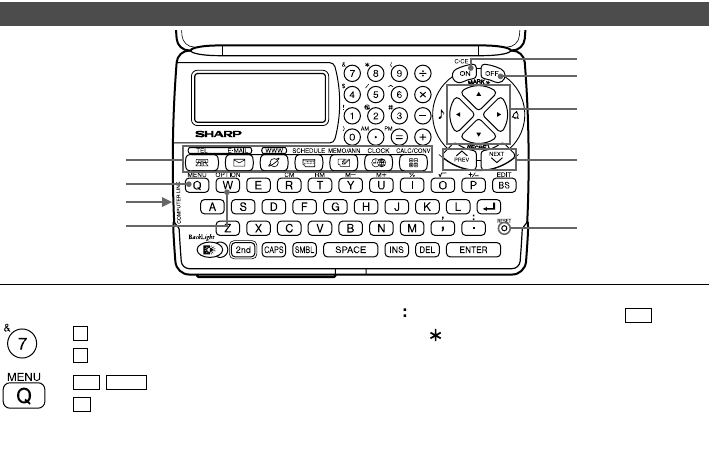
- Part Names 5
- Display Symbols 6
- Entering Characters 6
- Clock Mode 7
- 2.Using the World Clock 9
- (2) World clock 10
- (3) Clearing DST 10
- (1) Home clock 10
- Telephone/E-mail Mode 11
- 2.Storing Telephone Listings 12
- SHARP ELECTRONICS CO 13
- ELECTRONICS 13
- Calendar Mode 14
- <Example> 15
- Lunch with Tom 16
- 11262001 17
- Nancy’s Birthday 18
- Schedule listings 19
- 4.Keyword Search 20
- 5.Date Search 20
- Editing the Listings 21
- Deleting the Listings 21
- Secret Function 22
- Calculator Mode 24
- Currency/Unit Conversion Mode 25
- 1.Setting a Rate 26
- 2.Converting Currency/Unit 26
- Miscellaneous Functions 27
- 3.Adjusting the LCD Contrast 28
- 4.Deleting the Data 28
- 1.Setting the Daily Alarm 28
- 2.Checking the Memory Storage 28
- 8.Freeing Up Memory 30
- Using the Option Function 31
- RECEIVING 32
- UNIT TO UNIT 32
- MODE 32
- WWW mode 33
- Battery Replacement 34
- (1) Battery replacement time 35
- (2) Replacing the batteries 35
- (3) Replacing the battery 36
- Specifications 37
- SHARP CORPORATION 40
Prodotti e manuali riguardandi Pompe d’acqua Sharp EL-6890S
 (88 pagine)

 (21 pagine)
(2 pagine)
(132 pagine)
(28 pagine)
(21 pagine)
(2 pagine)
(132 pagine)
(28 pagine)


 (92 pagine)
 (44 pagine)
(26 pagine)
(1 pagine)
(20 pagine)
(50 pagine)
(68 pagine)
(60 pagine)
(20 pagine)
(88 pagine)
(2 pagine)
(22 pagine)
(13 pagine)
(8 pagine)
(44 pagine)
(26 pagine)
(1 pagine)
(20 pagine)
(50 pagine)
(68 pagine)
(60 pagine)
(20 pagine)
(88 pagine)
(2 pagine)
(22 pagine)
(13 pagine)
(8 pagine)
© 2020, manymanuals.it. Tutti i diritti riservati | 0.073 s |
 Manymanuals.com
 Manymanuals.de
 Manymanuals.fr
 Manymanuals.it
 Manymanuals.pl
 Manymanuals.cz
 Manymanuals.es
 Manymanuals-pt.com
Commenti su questo manuale