Sharp JB960 Specifiche Pagina 24
- Pagina / 39
- Indice
- SEGNALIBRI

- TECHNICAL SERVICE GUIDE 1
- IMPORTANT SAFETY NOTICE 2
- Table of Contents 3
- TrueTemp 4
- COOKTOP CONFIGURATION 6
- GE Profile Performance Series 7
- GE Profile 7
- Acceptable electrical 8
- Preferred electrical 8
- Roughed-in dimensions 8
- Warranty Information 10
- (in inches) 10
- Using the convection oven 11
- Convection roasting guide 13
- Cleaning the glass cooktop 14
- Using the self-cleaning oven 14
- LOWER HINGE ARM 15
- INTO HINGE SLOT 15
- COOKTOP REMOVAL 16
- HIDDEN BAKE ELEMENT 17
- INSULATION 18
- NOTE: TWO LOCATOR 19
- TAB SLOTS 19
- BACK OF RANGE WITH ELECTRICAL 20
- SHIELD AND LAMP SOCKET COVER 20
- OVEN LINER REINSTALLATION 21
- CONTROL PANEL 22
- < 1 Ω 23
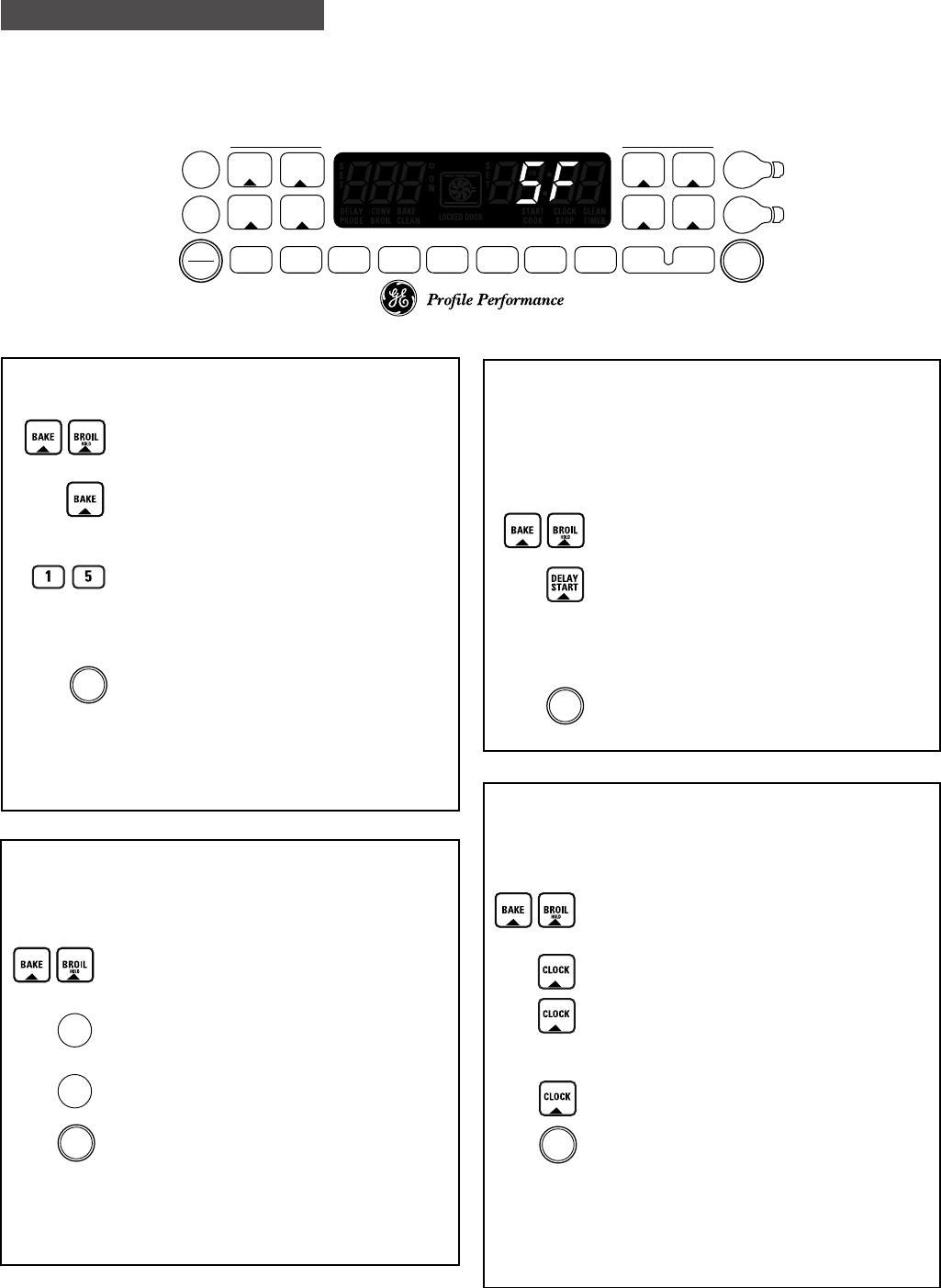
- ERC V SPECIAL FEATURES 24
- ERC FAULT CODE MEMORY TEST 26
- ERC FAULT CODE MEMORY DISPLAY 26
- ERC FAILURE CODES 27
- ERC ON BOARD DIAGNOSTIC TESTS 28
- NUMERIC KEY PADS TEST 29
- ENERGIZE OVEN LIGHT CIRCUIT 29
- LOCK MOTOR CYCLE TEST 30
- TrueTemp™ 31
- RR-BR & LR-O 32
- RF-BU•TR & LF-Y•TR 32
- LF (BRIDGE) & RF (OUTER) 32
- STRIP CIRCUITS 33
- VOLTAGE SENSITIVE 34
- Exploded Parts View 36
- JB960AB1AA 36
- EXPLODED PARTS BREAKDOWN 39
LG HT355SD manuels
Manuels d'utilisation et guides de l'utilisateur pour Systèmes de cinéma à domicile LG HT355SD.
Nous fournissons des manuels en pdf 1 LG HT355SD à télécharger gratuitement par type de document : Manuel du propriétaire
Lg HT355SD Manuel du propriétaire (32 pages)
marque: Lg | Catégorie: Home cinema systems | Taille: 2.28 MB |


Table des matières
Plus de produits et de manuels pour Systèmes de cinéma à domicile LG
| Modèles | Type de document |
|---|---|
| DH3130S |
Manuel du propriétaire
LG DH3130S Owner's manual,
36 pages
|
| BH6220C |
Manuel du propriétaire
LG BH6220C Owner's manual,
66 pages
|
| BH9430PW |
Manuel du propriétaire
LG BH9430PW home cinema system,
84 pages
|
| BH7520TW |
Manuel du propriétaire
LG BH7520TW Owner's manual,
74 pages
|
| DH6520T |
Manuel de l'utilisateur
LG DH6520T Owner's manual,
48 pages
|
| HX806SG |
Manuel de l'utilisateur
LG HX806SG Owner's manual,
60 pages
|
| BH6220S |
Manuel de l'utilisateur
LG BH6320H Owner's manual,
75 pages
|
| BH7540TW |
Manuel de l'utilisateur
LG BH7540TW Owner's manual,
80 pages
|
| HT905TA |
Manuel de l'utilisateur
LG HT905TA Owner's manual,
50 pages
|
| HX806SG |
Manuel de l'utilisateur
LG HX806SG Owner's manual,
60 pages
|
| BH7535TW |
Manuel de l'utilisateur
LG BH7530TW Owner's manual,
80 pages
|
| HX806SH |
Manuel de l'utilisateur
LG HX806SH Owner's manual,
60 pages
|
| BH9530TW |
Manuel de l'utilisateur
LG BH9530TW Owner's manual,
82 pages
|
| BH7540TW |
Manuel de l'utilisateur
LG BH7540TW Owner's manual,
80 pages
|
| BH6330H |
Manuel de l'utilisateur
LG BH6330H Owner’s Manual [en] ,
72 pages
|
| HX806PH |
Manuel de l'utilisateur
LG HX806PH Owner's manual,
62 pages
|
| BH6420P |
Manuel de l'utilisateur
LG BH6420P Owner’s Manual [en] ,
74 pages
|
| DH4430P |
Manuel de l'utilisateur
LG DH4430P Owner’s Manual,
46 pages
|
| HB806PE |
Manuel de l'utilisateur
LG HB806PE Owner's manual,
62 pages
|
| BH6340H |
Manuel de l'utilisateur
LG BH6340H Owner’s Manual,
76 pages
|
© 2020, manymanuals.it. Tutti i diritti riservati | 0.025 s |
 Manymanuals.com
 Manymanuals.de
 Manymanuals.fr
 Manymanuals.it
 Manymanuals.pl
 Manymanuals.cz
 Manymanuals.es
 Manymanuals-pt.com
Commenti su questo manuale