Sharp AL-1633 Specifiche Pagina 59
- Pagina / 84
- Indice
- SEGNALIBRI

- CONTENTS 3
- TROUBLESHOOTING 4
- ROUTINE MAINTENANCE 4
- SUPPLIES 4
- APPENDIX 4
- CAUTIONS 5
- CAUTIONS ON HANDLING 6
- CAUTIONS ON LASER 6
- USING THE MANUAL 7
- DIFFERENCES BETWEEN MODELS 8
- MAIN FEATURES 9
- BEFORE USING THE MACHINE 10
- OPERATION PANEL 12
- CHECKING PACKED COMPONENTS 14
- AND ACCESSORIES 14
- Pressure 15
- INSTALLING THE TD CARTRIDGE 16
- POWER ON AND OFF 17
- LOADING PAPER 18
- Loading the bypass tray 20
- Envelopes 21
- Left guide 22
- Front guide 22
- COPY FUNCTIONS 23
- SELECTING THE TRAY 26
- REDUCTION/ENLAREGMENT/ZOOM 27
- MANUAL RATIO SELECTION 28
- COPY RATIOS SEPARATELY 29
- TWO-SIDED COPYING USING THE 31
- BYPASS TRAY 31
- DUAL PAGE COPYING 32
- INTERRUPTING A COPY RUN 33
- PRINTER/SCANNER FUNCTIONS 34
- USING THE SCANNER MODE 35
- SCANNING FROM YOUR COMPUTER 36
- OPERATION IN COPY, PRINTER 37
- AND SCANNER MODES 37
- USER SETTINGS 38
- ENABLING TONER SAVE MODE 39
- CUSTOMISING SETTINGS 40
- the position 41
- Base settings 42
- SETTINGS FOR AUDITING MODE 43
- READ END 44
- Auditing mode 45
- Account number entry 45
- Account number change 45
- Account number deletion 45
- Number of copies per account 45
- Resetting account 46
- MACHINE/COPYING PROBLEMS 48
- Removing the software 54
- INDICATORS AND DISPLAY 55
- MESSAGES 55
- MISFEED REMOVAL 56
- MISFEED IN THE BYPASS TRAY 57
- MISFEED IN THE MACHINE 58
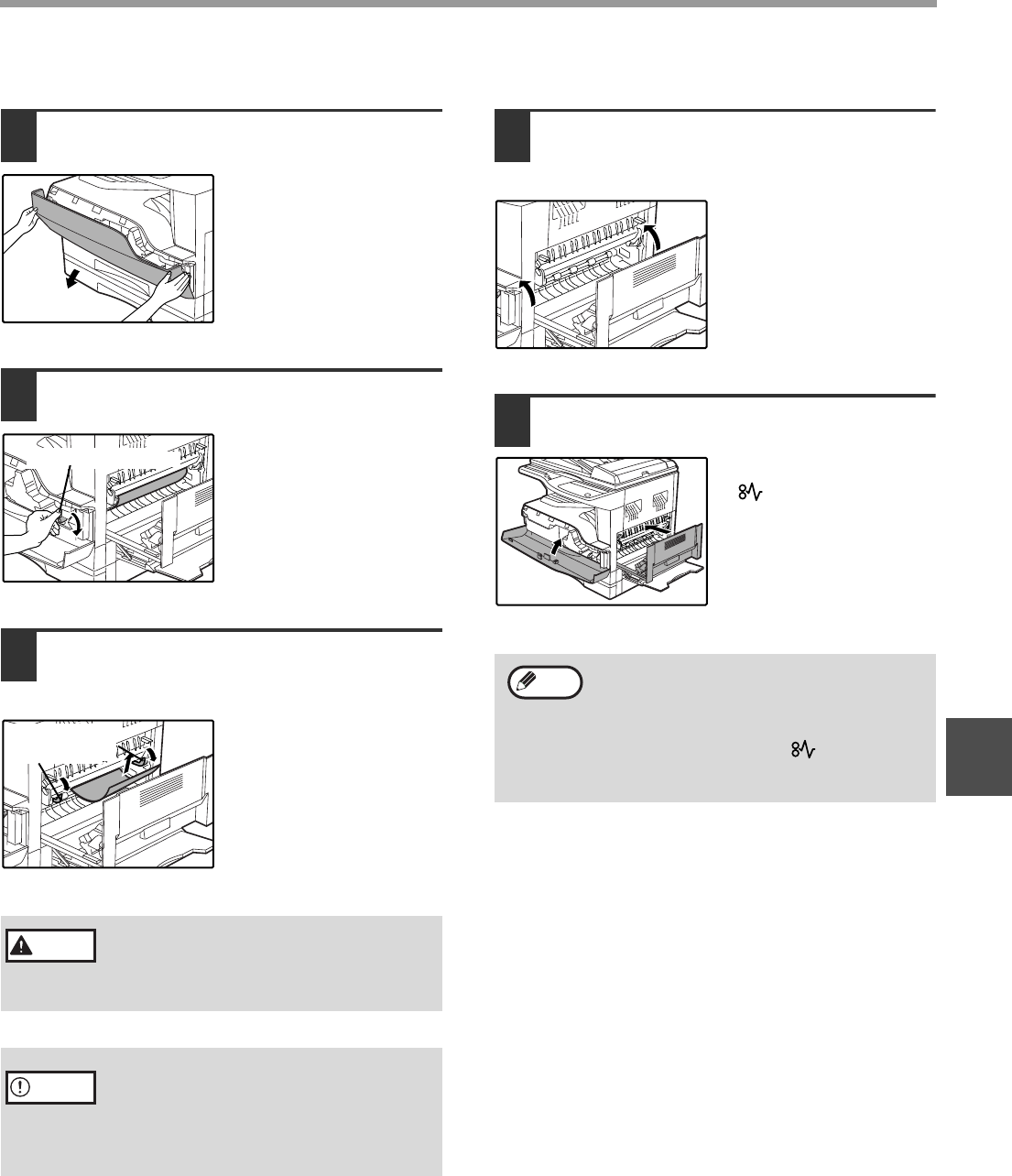
- B. Misfeed in the fusing area 59
- Close the upper paper tray 61
- (Two-tray model only) 62
- REPLACING THE TD CARTRIDGE 63
- REPLACING THE DRUM CARTRIDGE 64
- CHECKING THE TONER LEVEL 67
- AND DRUM CARTRIDGE LIFE 67
- Paper feed roller 68
- CLEANING THE TRANSFER CHARGER 69
- MOVING INSTRUCTIONS 71
- SPF (only on the SPF model) 73
- Specifications 73
- Printer Function 73
- Scanner Function 74
- SOFTWARE LICENSE 75
- LUOKAN 1 LASERLAITE 82
- KLASS 1 LASERAPPARAT 82
- SHARP CORPORATION 84
Prodotti e manuali riguardandi Fotocopiatrice Sharp AL-1633
 (118 pagine)
(16 pagine)
(72 pagine)
(118 pagine)
(16 pagine)
(72 pagine)
 (125 pagine)
(8 pagine)
(12 pagine)
(6 pagine)
(172 pagine)
(32 pagine)
(125 pagine)
(8 pagine)
(12 pagine)
(6 pagine)
(172 pagine)
(32 pagine)
 (100 pagine)
(40 pagine)
(28 pagine)
(8 pagine)
(46 pagine)
(148 pagine)
(173 pagine)
(100 pagine)
(40 pagine)
(28 pagine)
(8 pagine)
(46 pagine)
(148 pagine)
(173 pagine)
© 2020, manymanuals.it. Tutti i diritti riservati | 0.023 s |
 Manymanuals.com
 Manymanuals.de
 Manymanuals.fr
 Manymanuals.it
 Manymanuals.pl
 Manymanuals.cz
 Manymanuals.es
 Manymanuals-pt.com
Commenti su questo manuale