Sharp FO-10 Specifiche Pagina 26
- Pagina / 162
- Indice
- SEGNALIBRI

- FO-11/FO-51/FO-71 1
- Introduction 2
- Important safety information 4
- Table of Contents 5
- A Look at the Operation Panel 7
- Unpacking Checklist 9
- Connections 10
- 3 Remove the packing paper 11
- 1 Press once and once 12
- 2 Press 4 times 12
- 3 Select the dial mode: 12
- 4 Press to exit 12
- Extension phone (optional) 13
- Loading the Thermal Paper 14
- 2 Press twice 17
- 3 Press once 17
- 7 Press 18
- DATE & TIME SET 18
- Setting the Date and Time 19
- Setting the Reception Mode 21
- Volume Adjustment 22
- Transmittable Documents 24
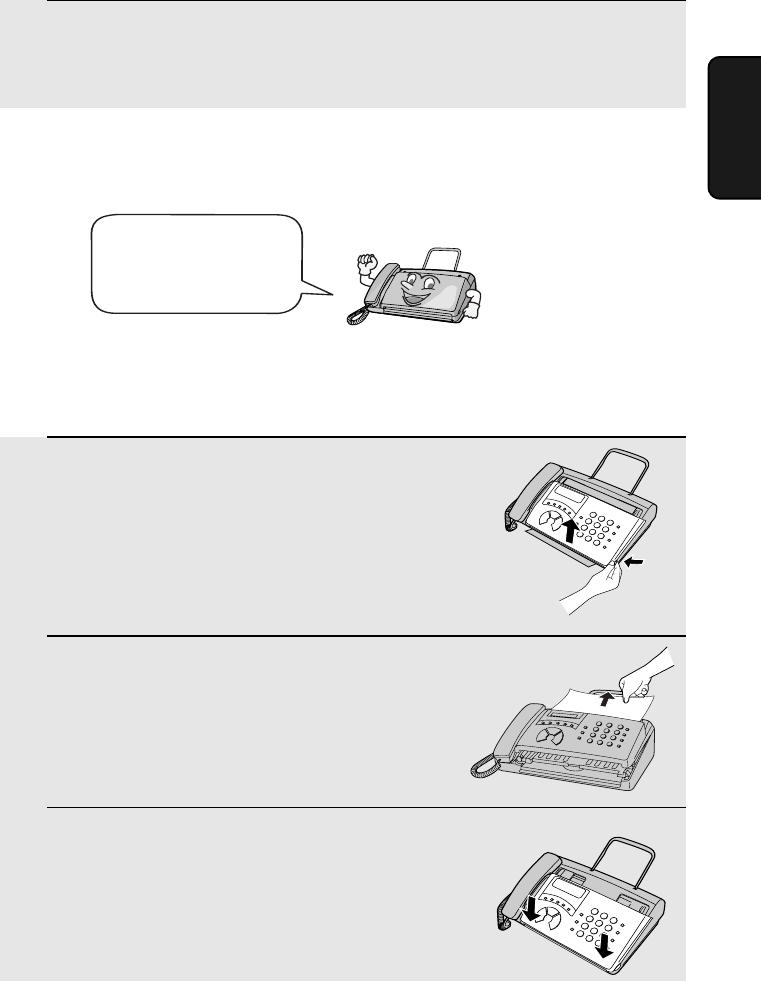
- Loading the Document 25
- 2 Remove the document 26
- 3 Close the operation panel 26
- Resolution settings 27
- Contrast settings 27
- 2. Sending 30
- 8 Press 32
- Clearing auto-dial numbers 33
- Using the REDIAL key 38
- Automatic redialling 38
- 2 Press once 41
- Using TEL Mode 43
- Optional Reception Settings 44
- 5. Making Telephone Calls 47
- Chain Dialling 48
- Changing the outgoing message 50
- Optional A.M. Mode Settings 52
- Quiet Detect Start Time 53
- 2 Press 5 times 54
- 7. Special Functions 55
- Priority Call 58
- Blocking voice calls 59
- Service) 60
- 2 Press 63
- 3 Press to print the list 64
- Transaction Report 65
- 2 Press 3 times 66
- 9. Maintenance 67
- 7 Close the operation pane 68
- Caution! 68
- Problems and Solutions 69
- Answering machine connection 72
- General problems 72
- Messages and Signals 74
- Audible signals 75
- Clearing Paper Jams 76
- 3 Remove the document 76
- 5 Reload the paper 78
- 3 Remove the paper roll 78
- Quick Reference Guide 79
- LMNOPQR1ST 82
- UVWXNYZQR 82
- 1[\]^_` 82
- COPY/HELP 87
- Kþ:;6 97
- û.3 99
- ¬®ð>¬Ð 100
- !û.3 100
- RESOLUTION/ 101
- RECEPTION MODE 101
- ¬®ð>¬3 102
- 4=> 104
- READY TO SEND 109
- 4 110
- FAX/TEL # MODE 111
- ENTRY MODE 111
- :; f ²³6¹w 111
- 透過自動撥號傳送傳真 112
- §24 114
- I½4 115
- -·»³¼µ).® 118
- -²·µ ¼ 119
- )de . 119
- -¼¶)1. 120
- ϯ¿pÀ:;.¹w 121
- -²·µ)de. 122
- ϯ(¾ª²³.¹w 123
- Żx 125
- :> 126
- -1{ 129
- JÁ<ÄÅ 130
- 1J 131
- O-¼¶)1.ë 132
- ¦pD{DÁ<.¹w 133
- ¦pD{D Á<.¹w 134
- JOHN DOE 525-8693 136
- ²¬gß¡ 137
- ²¬ gß¡ 138
- ¢2£gß¡ 140
- ÀÁ{ 141
- ¦[ ߧ:>:; 142
- ¦[ߧ:>:; 143
- FUNCTION 144
- LISTING MODE 144
- -£¤¥¦ 149
- SHARP CORPORATION 162
Prodotti e manuali riguardandi Macchina per mandare i fax Sharp FO-10


 (162 pagine)
(152 pagine)
(162 pagine)
(152 pagine)

 (100 pagine) (108 pagine)
(104 pagine)
(100 pagine) (108 pagine)
(104 pagine)
 (130 pagine)
  (198 pagine)
(107 pagine)
(198 pagine)
(107 pagine)
© 2020, manymanuals.it. Tutti i diritti riservati | 0.039 s |
 Manymanuals.com
 Manymanuals.de
 Manymanuals.fr
 Manymanuals.it
 Manymanuals.pl
 Manymanuals.cz
 Manymanuals.es
 Manymanuals-pt.com
Commenti su questo manuale