Sharp PC-A500 Specifiche Pagina 45
- Pagina / 89
- Indice
- RISOLUZIONE PROBLEMI
- SEGNALIBRI

- Notice for Users in Australia 1
- Safety Precautions 2
- Battery Pack Precautions 3
- About This Manual 5
- Manual Conventions 7
- Table of Contents 8
- Overview of Computer 10
- Memory Module Slot Cover 12
- Battery Pack 12
- Quick Setup 13
- To Wall Outlet 14
- Power Switch 14
- Setting up Windows 98 15
- Shutting Down the System 16
- Basic Operations 17
- Using the AC Adapter 18
- Resetting the System 19
- Reset Switch 19
- Using The Glide Pad 20
- Changing the Configuration 21
- Using The Keyboard 22
- Using Floppy Disks 23
- Projection 25
- Eject Button 25
- Handling Floppy Disks 26
- Formatting a Floppy Disk 27
- Backing Up Data 27
- Using CD 28
- Removing a CD 29
- Changing Units 31
- Battery and Power Management 32
- Checking the Battery Level 33
- Charging the Battery Pack 34
- Projected Parts 35
- Optional Battery Pack 37
- Battery Indicator 37
- Power Management 39
- Disabling Power Management 42
- Battery Alarm 43
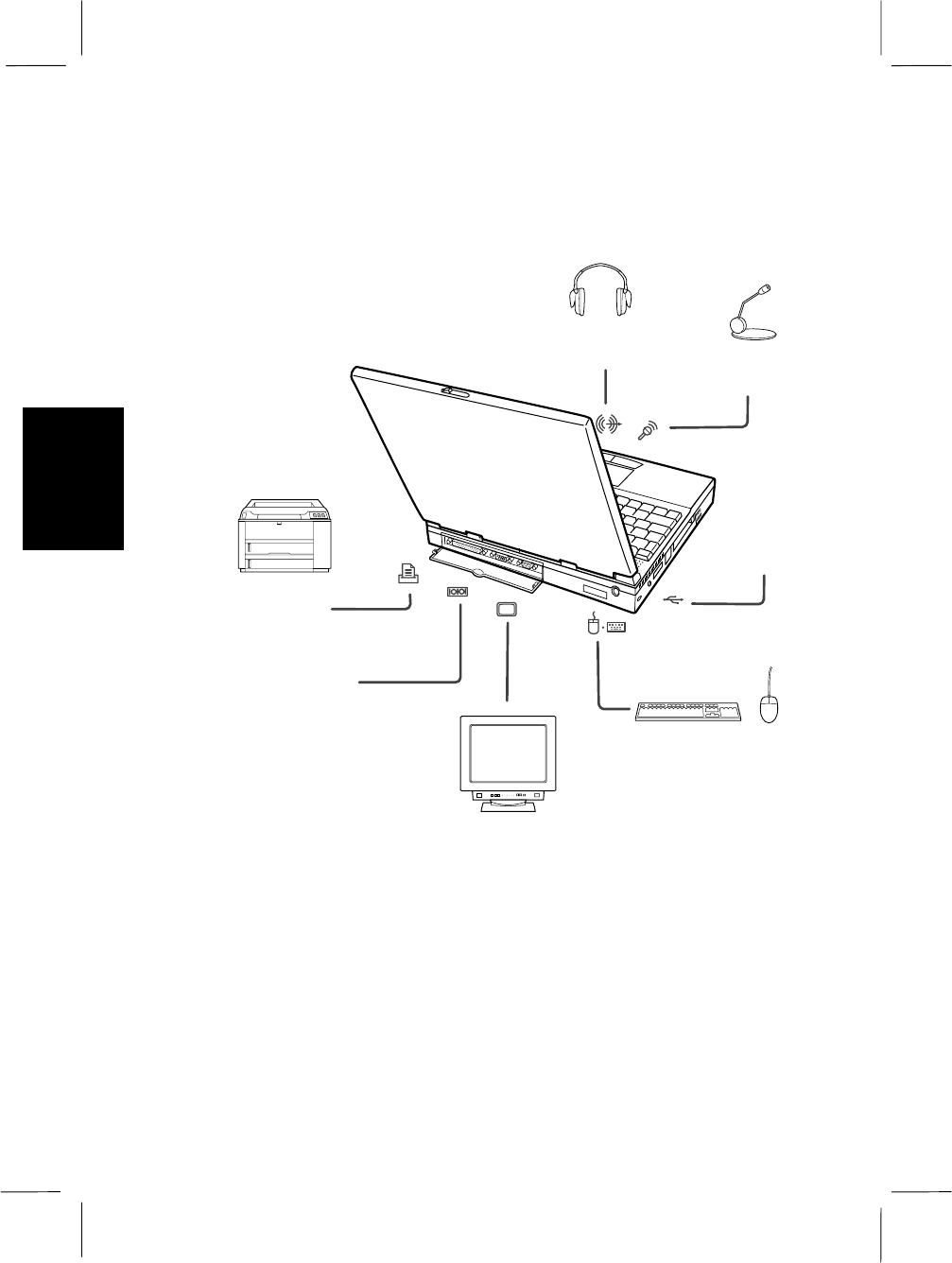
- Peripherals 44
- Setting the Setup Utility 46
- Installing a Printer Driver 46
- Switching the Display 47
- Number of Colors 48
- Resolution 48
- LCD CRT Simultaneous 48
- Display(LCD + CRT) 48
- Keyboard / Mouse 49
- Audio System 50
- RS-232C Device 50
- USB Device 51
- Communication Functions 52
- Modem Jack 54
- Hardware Expansion 56
- Ejecting PC Card 57
- Memory Module 58
- RAM Board Slot Cover 59
- Hard Disk 59
- Notched part 59
- Projected Part 59
- Hard Disk Slot Cover 61
- Security Features 62
- Setting/Changing the Password 63
- Deleting the Password 64
- Security Slot 65
- Setup Utility 66
- Using the Setup Utility 67
- Main menu 68
- Advanced menu 69
- Security menu 70
- Power menu 71
- Exit menu 72
- Appendixes 73
- Traveling with the Computer 74
- Specifications 75
- Troubleshooting 76
- Trouble with Communication 82
- Re-installation Instructions 87
Prodotti e manuali riguardandi Notebook Sharp PC-A500
 (93 pagine)
(97 pagine)
(93 pagine)
(97 pagine)
 (53 pagine)
(160 pagine)
(48 pagine)
(120 pagine)
(123 pagine)
(46 pagine)
(90 pagine)
(296 pagine)
(97 pagine)
(1 pagine)
(76 pagine)
(413 pagine)
(59 pagine)
(53 pagine)
(160 pagine)
(48 pagine)
(120 pagine)
(123 pagine)
(46 pagine)
(90 pagine)
(296 pagine)
(97 pagine)
(1 pagine)
(76 pagine)
(413 pagine)
(59 pagine)
© 2020, manymanuals.it. Tutti i diritti riservati | 0.025 s |
 Manymanuals.com
 Manymanuals.de
 Manymanuals.fr
 Manymanuals.it
 Manymanuals.pl
 Manymanuals.cz
 Manymanuals.es
 Manymanuals-pt.com
Commenti su questo manuale