Sharp FO-K01 Specifiche Pagina 8

  • Scaricare
  • Aggiungi ai miei manuali
  • Stampa
  • Pagina
    / 15
  • Indice
  • SEGNALIBRI
  • Valutato. / 5. Basato su recensioni clienti
Vedere la pagina 7
6
The fax machine is identified
by the number “0”, and the
cordless handset that was
included with the fax is
identified by the number “1”.
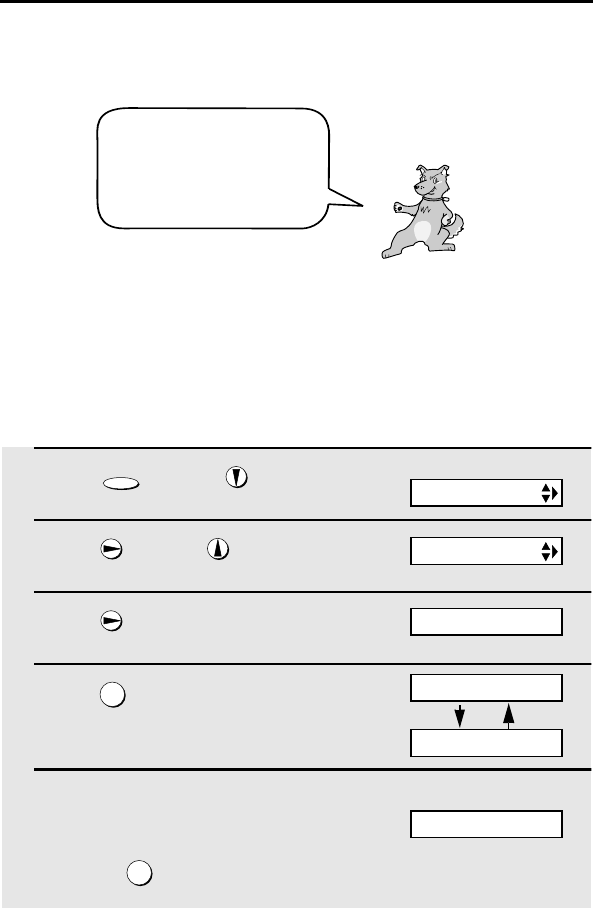
Entering a Name for the Cordless Handset
Enter a name for the cordless handset in the fax machine.
The fax machine will transmit the name that you enter to your cordless
handset. The name will appear in the cordless handsets display.
1 Press once and 3 times on
the fax machine.
2 Press once and once.
3 Press once.
4 Press to select SET.
5 Enter the number of the cordless
handset for which you wish to enter a
name.
Example:
FUNCTION
1
2
Fax machine display:
ENTRY MODE
HS NAME SET
1=SET, 2=CLEAR
HS2 SELECTED
Example: Cordless handset 2
SELECT HS NO.
ENTER (1-4)
Note: If you take no action for one minute during the registration procedure,
the procedure will be canceled. In this case, start from Step 1 again.
all.bookPage6Tuesday,January28,20039:38AM
Vedere la pagina 7
1 2 3 4 5 6 7 8 9 10 11 12 13 14 15

Commenti su questo manuale

Nessun commento