Sharp MX-M362N Specifiche Pagina 36
- Pagina / 56
- Indice
- SEGNALIBRI

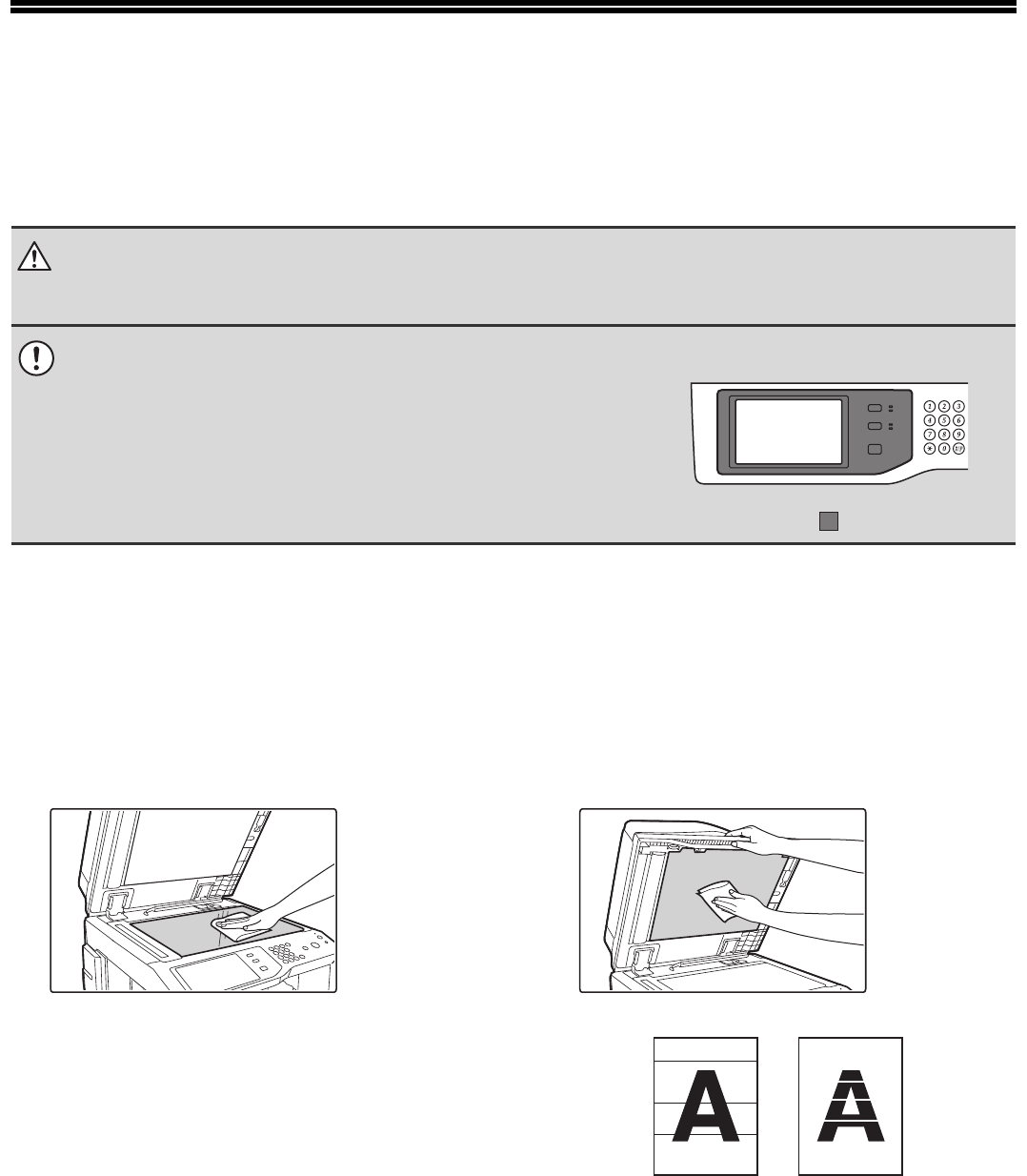
- START GUIDE 1
- Notice for users in the UK 2
- SOFTWARE LICENCE 3
- Contents 4
- CAUTIONS 5
- Installation notes 6
- About consumables 7
- Handling precautions 8
- Laser information 9
- Operation Guide 10
- Opening the Web pages 11
- CHECKING THE IP ADDRESS 12
- PART NAMES AND FUNCTIONS 13
- INTERIOR 15
- (3) (4) (5) (6) (7) 16
- SIDE AND BACK 17
- OPERATION PANEL 18
- Turning on the power 20
- Turning off the power 20
- Restarting the machine 20
- PLACING ORIGINALS 21
- USEABLE PAPER 22
- Paper that cannot be used 23
- Non-recommended paper 23
- LOADING PAPER IN A TRAY 24
- Changing the tray settings 25
- Loading paper in other trays 26
- Large capacity tray 27
- CD-ROMS AND SOFTWARE 28
- • PC-Fax driver 29
- VERIFYING SYSTEM REQUIREMENTS 30
- CONNECTING THE MACHINE 31
- ALL SOFTWARE) 32
- Standard installation 33
- MAINTENANCE 36
- CLEANING THE BYPASS FEED 37
- CLEANING THE ORIGINAL FEED 37
- In copy mode 38
- Open the front cover 39
- Close the front cover 40
- REPLACING THE STAMP CARTRIDGE 43
- Push the stamp unit back in 44
- REMOVING MISFEEDS 45
- GENUINE SUPPLIES 46
- SPECIFICATIONS 47
- Continuous copying speeds* 49
- Ambient environment 49
- A (actual measurement) 50
- TO THE ADMINISTRATOR OF THE 52
- Important safety instructions 53
- INFORMATION ON DISPOSAL 54
- Trademark acknowledgments 55
- PRINTED IN FRANCE 56
Prodotti e manuali riguardandi Apparecchi multifunzione Sharp MX-M362N
 (20 pagine)
 (82 pagine)
 (161 pagine)
(148 pagine)
LG HT355SD manuels
Manuels d'utilisation et guides de l'utilisateur pour Systèmes de cinéma à domicile LG HT355SD.
Nous fournissons des manuels en pdf 1 LG HT355SD à télécharger gratuitement par type de document : Manuel du propriétaire
Lg HT355SD Manuel du propriétaire (32 pages)
marque: Lg | Catégorie: Home cinema systems | Taille: 2.28 MB |

Table des matières
Plus de produits et de manuels pour Systèmes de cinéma à domicile LG
| Modèles | Type de document |
|---|---|
| DH3130S |
Manuel du propriétaire
LG DH3130S Owner's manual,
36 pages
|
| BH6220C |
Manuel du propriétaire
LG BH6220C Owner's manual,
66 pages
|
| BH9430PW |
Manuel du propriétaire
LG BH9430PW home cinema system,
84 pages
|
| BH7520TW |
Manuel du propriétaire
LG BH7520TW Owner's manual,
74 pages
|
| DH6520T |
Manuel de l'utilisateur
LG DH6520T Owner's manual,
48 pages
|
| HX806SG |
Manuel de l'utilisateur
LG HX806SG Owner's manual,
60 pages
|
| BH6220S |
Manuel de l'utilisateur
LG BH6320H Owner's manual,
75 pages
|
| BH7540TW |
Manuel de l'utilisateur
LG BH7540TW Owner's manual,
80 pages
|
| HT905TA |
Manuel de l'utilisateur
LG HT905TA Owner's manual,
50 pages
|
| HX806SG |
Manuel de l'utilisateur
LG HX806SG Owner's manual,
60 pages
|
| BH7535TW |
Manuel de l'utilisateur
LG BH7530TW Owner's manual,
80 pages
|
| HX806SH |
Manuel de l'utilisateur
LG HX806SH Owner's manual,
60 pages
|
| BH9530TW |
Manuel de l'utilisateur
LG BH9530TW Owner's manual,
82 pages
|
| BH7540TW |
Manuel de l'utilisateur
LG BH7540TW Owner's manual,
80 pages
|
| BH6330H |
Manuel de l'utilisateur
LG BH6330H Owner’s Manual [en] ,
72 pages
|
| HX806PH |
Manuel de l'utilisateur
LG HX806PH Owner's manual,
62 pages
|
| BH6420P |
Manuel de l'utilisateur
LG BH6420P Owner’s Manual [en] ,
74 pages
|
| DH4430P |
Manuel de l'utilisateur
LG DH4430P Owner’s Manual,
46 pages
|
| HB806PE |
Manuel de l'utilisateur
LG HB806PE Owner's manual,
62 pages
|
| BH6340H |
Manuel de l'utilisateur
LG BH6340H Owner’s Manual,
76 pages
|
© 2020, manymanuals.it. Tutti i diritti riservati | 0.032 s |
 Manymanuals.com
 Manymanuals.de
 Manymanuals.fr
 Manymanuals.it
 Manymanuals.pl
 Manymanuals.cz
 Manymanuals.es
 Manymanuals-pt.com
Commenti su questo manuale