Sharp AR-C360P Manuale del Proprietario Pagina 99
- Pagina / 115
- Indice
- SEGNALIBRI

- Copyright 2
- 3Copyright 3
- 4Copyright 4
- 5Copyright 5
- 6Copyright 6
- Contents 7
- Index 112 9
- 10 About the Documentation 10
- 11 About this manual 11
- Key features of ColorWise 12
- 13 Key features of ColorWise 13
- Managing color on the Fiery 14
- RGB data 15
- CMYK data 15
- Spot color data 15
- 1-16 Fiery Color Management 16
- (CRD) to RGB data 18
- Spot Color Matching 19
- Rendering Style 20
- Pure Black Text/Graphics 21
- Black Overprint 22
- RGB Source Profile 25
- CMYK Simulation Profile 26
- CMYK Simulation Method 27
- RGB Separation 28
- Output profile 29
- Combine Separations 30
- Choose Color Matching 35
- Color/Grayscale 35
- 1-36 Fiery Color Management 36
- Choose Printer Features 37
- Choose ColorWise 1 37
- ColorWise 2, and 37
- ColorWise 3 37
- Calibration 38
- An overview of calibration 39
- Understanding calibration 40
- Scheduling calibration 41
- Checking calibration status 42
- Using Calibrator 44
- 2-45 Using Calibrator 45
- 2. Click Calibrator 45
- Expert Mode 46
- 2-47 Using Calibrator 47
- 2-48 Color Calibration 48
- Setting up the ES-1000 49
- Sample aperture 50
- Measure button 50
- White tile 50
- Calibration cradle 50
- Setting up the ED-100 53
- ColorWise 63
- Pro Tools 63
- Profile Manager 64
- Setting the default profiles 65
- Downloading profiles 66
- Editing profiles 68
- Managing profiles 68
- Defining profiles 69
- Custom profile 70
- Color Editor 70
- 3-75 Color Editor 75
- Note:When you edit 75
- Undoing CMYK simulation edits 80
- Checking edited profiles 80
- Using Spot-On 81
- Using the Spot-On main window 82
- Working with existing colors 84
- Creating custom colors 85
- Uploading custom color groups 87
- Editing color 88
- The current color 89
- Color Setup 95
- 3-96 ColorWise Pro Tools 96
- 1. Turn off the computer 97
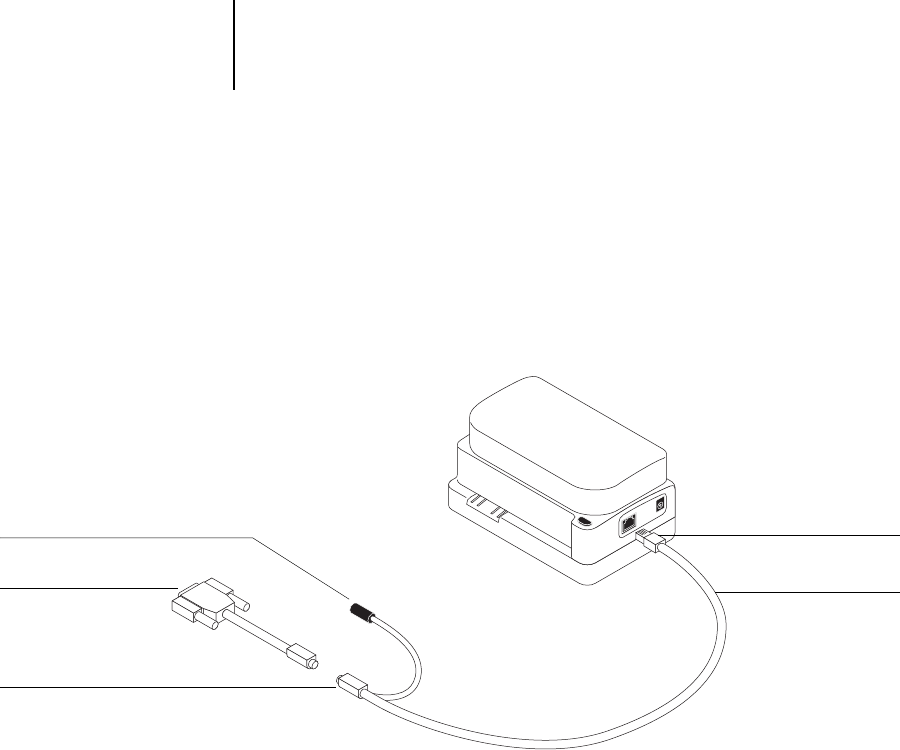
- X-Rite DTP41 98
- Unused connector 100
- Connect to serial port 100
- Calibrating the DTP41 101
- Setting up the DTP32 105
- Calibrating the DTP32 107
- MAIN MENU 108
Prodotti e manuali riguardandi Software Sharp AR-C360P
 (117 pagine)
(63 pagine)
(39 pagine)
(117 pagine)
(63 pagine)
(39 pagine)


 (148 pagine)
(96 pagine)
(38 pagine)
(2 pagine)
(16 pagine)
(12 pagine)
(420 pagine)
(43 pagine)
(8 pagine)
(152 pagine)
(148 pagine)
(96 pagine)
(38 pagine)
(2 pagine)
(16 pagine)
(12 pagine)
(420 pagine)
(43 pagine)
(8 pagine)
(152 pagine)
 (1 pagine)
(29 pagine)
(1 pagine)
(29 pagine)
© 2020, manymanuals.it. Tutti i diritti riservati | 0.064 s |
 Manymanuals.com
 Manymanuals.de
 Manymanuals.fr
 Manymanuals.it
 Manymanuals.pl
 Manymanuals.cz
 Manymanuals.es
 Manymanuals-pt.com
Commenti su questo manuale