Sharp MX-7001 Manuale Utente Pagina 5
- Pagina / 710
- Indice
- SEGNALIBRI

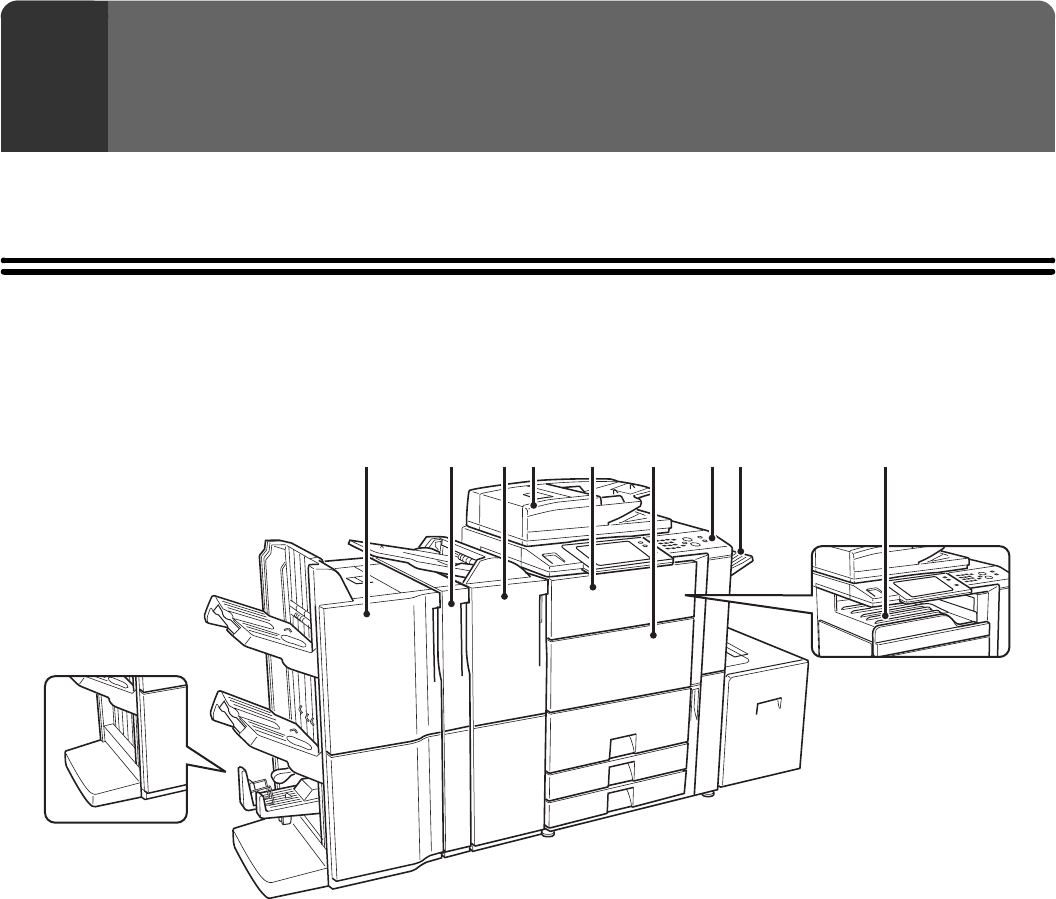
- User's Guide 1
- TABLE OF CONTENTS 2
- (10) (11)(12) (14) (15) 6
- INTERIOR 7
- (1) (5) (6) (7)(2) (3) (4) 8
- SIDE AND BACK 9
- OPERATION PANEL 10
- ☞ [POWER SAVE] KEY (page 17) 11
- TOUCH PANEL 12
- Example 4 13
- SYSTEM BAR 14
- TURNING THE POWER ON AND OFF 16
- ENERGY SAVE FUNCTIONS 17
- [POWER SAVE] KEY 17
- USER AUTHENTICATION 18
- Select the user name 20
- Touch the [Password] key 21
- HOME SCREEN 23
- LOADING PAPER 24
- USEABLE PAPER 25
- Paper that cannot be used 26
- Non-recommended paper 26
- CHANGING THE PAPER SIZE 28
- Take out the tab paper guide 31
- Loading transparency film 32
- CAPACITY TRAY) 33
- LOADING PAPER (MX-LCX3) 34
- Set the paper size 40
- Inserting paper 41
- Inserting tab paper 41
- Inserting transparency film 41
- Loading envelopes 42
- ORIGINALS 44
- Placing a thick book 47
- PERIPHERAL DEVICES 48
- PART NAMES 49
- SUPPLIES 50
- Close the front cover 52
- PUNCH MODULE 57
- INSERTER 58
- Load paper in the inserter 60
- Alarm display 61
- SHARP OSA 62
- External authentication mode 63
- If login fails 64
- External count mode 64
- MAINTENANCE 65
- Scanning area 66
- Replace the glass cleaner 67
- PHOTOCONDUCTIVE DRUM 68
- CLEANING THE LASER UNIT 70
- Clean the laser unit 72
- Replace the cleaning tool 73
- Open the front cover (upper) 75
- REPLACING THE WASTE TONER BOX 77
- ENTERING TEXT 79
- Copier Guide 82
- AS A COPIER 87
- ☞ PAPER TRAYS (page 14) 88
- ☞ OUTPUT (page 36) 88
- COPYING SEQUENCE 90
- Start copying 92
- PAPER TRAYS 95
- BASIC PROCEDURE FOR 96
- MAKING COPIES 96
- 8½x118½x11 98
- AUTOMATIC 2-SIDED COPYING 100
- Special Modes 101
- 2-Sided Copy 101
- DOCUMENT GLASS 102
- Read-End 104
- COPY COLOR MODES 105
- Selecting 2 color copying 106
- IMAGE TYPE 107
- Adjust the exposure level 108
- Touch the [OK] key 108
- REDUCTION/ENLARGEMENT/ZOOM 109
- Set the ratio 110
- SEPARATELY (XY Zoom) 112
- ORIGINAL SIZES 113
- Enter the original size 114
- Touch the [Custom Size] key 114
- Store the original size 115
- OUTPUT MODES 119
- Punch function 121
- Place the original 122
- Touch the [Paper Select] key 122
- (2 1/2~17) 123
- (2 1/2~11 5/8) 123
- Select the bypass tray 124
- SPECIAL MODES 125
- (1) (2) (3) 126
- (4) (5) (6) 126
- [OK] key and [Cancel] key 127
- ADDING MARGINS (Margin Shift) 128
- Select the special modes 130
- Select the erase settings 130
- 11" x 17" 132
- Select Dual Page Copy 133
- ☞ SPECIAL MODES (page 44) 133
- (Pamphlet Copy) 134
- Select cover settings 135
- COPYING A LARGE NUMBER OF 137
- ORIGINALS AT ONCE (Job Build) 137
- Select tandem copy 139
- COVERS (Covers/Inserts) 142
- Touch the [Front Cover] key 143
- (Insert Settings) 146
- Select insert settings 147
- (1) (5)(2) 148
- (B) (C)(3) 148
- Touch the [Page Layout] key 150
- TRANSPARENCY FILM 153
- (Transparency Inserts) 153
- ONE SHEET (Multi Shot) 155
- (2) Select the layout 156
- (3) Select the border 156
- (4) Touch the [OK] key 156
- Select book copy settings 158
- (Tab Copy) 161
- Set the tab width 162
- Load the tab paper 163
- SHEET OF PAPER (Card Shot) 164
- (1) Enter the original size 165
- (2) Touch the [OK] key 165
- COPIES (Stamp) 167
- Select the print position 168
- (3) Touch the [OK] key 169
- Set the date format 171
- Change] key 172
- STAMPING COPIES (Stamp) 173
- (Page Numbering) 175
- Touch the [Print Color] key 176
- Select page number settings 176
- Touch the [Recall] key 179
- Touch the [Store/Delete] key 181
- Touch the [Back] key 182
- [Image Edit] KEY 185
- Enlargement) 188
- (2) (A) (1)(3) 189
- Inch system 189
- B systemA system 189
- ☞ [Image Edit] KEY (page 104) 192
- Select 11x17 Full Bleed 192
- Select Centering 194
- To cancel B/W reverse 197
- [Color Adjustments] KEY 198
- Adjust red, green, or blue 199
- Adjust the image 200
- Background) 201
- 12345678 203
- Adjust the color balance 204
- Adjust the brightness 205
- Adjust the intensity 206
- (Proof Copy) 207
- Change the settings 209
- Touch the [End] key 209
- (Mixed Size Original) 210
- Indicator 212
- CONVENIENT COPY FUNCTIONS 214
- JOB STATUS SCREEN 216
- Job key display 218
- Copy2 002/000 Waiting 218
- IN THE QUEUE 219
- Press the [#/P] key ( ) 221
- Touch the [Store/Delete] tab 221
- Touch a numeric key 221
- [OK] key 222
- APPENDIX 223
- Cover copying condition 224
- Resulting copies 224
- Front cover Back cover 224
- 1st page 2nd page 3rd page 226
- SHARP ELECTRONICS CORPORATION 229
- Facsimile Guide 230
- ABOUT THIS MANUAL 233
- Icons used in the manuals 234
- BEFORE USING THE MACHINE 235
- AS A FAX 235
- BASE SCREEN OF FAX MODE 236
- Customizing displayed keys 237
- ADDRESS BOOK SCREEN 238
- THE ADDRESS BOOK SCREEN 239
- System Settings: Custom Index 240
- Index tabs 240
- FAX TRANSMISSION SEQUENCE 241
- Begin transmission 243
- ENTERING DESTINATIONS 244
- ADDRESS BOOK 245
- Touch the [Address Book] key 246
- Select the destination 246
- To delete a destination 247
- Touch the [YES] key 247
- A DESTINATION 248
- GLOBAL ADDRESS BOOK 249
- USING THE RESEND FUNCTION 251
- CHAIN DIALING 252
- BASIC TRANSMISSION 253
- Address Book 254
- Address Review 254
- Sub Address 254
- Direct TX 254
- TRANSMITTABLE ORIGINAL SIZES 256
- WHEN THE LINE IS BUSY 257
- USING THE AUTOMATIC DOCUMENT 258
- FEEDER FOR TRANSMISSION 258
- USING THE DOCUMENT GLASS FOR 261
- TRANSMISSION 261
- Place next original 262
- Press [Start] 262
- (Pg.No.x) 262
- Configure Read-End 262
- DIRECT TRANSMISSION MODE 263
- JOB STATUS 269
- (1) Touch the [Failed] tab 270
- (2) Touch the [Retry] key 270
- COMPUTER (PC-Fax) 271
- IMAGE SETTINGS 272
- ORIGINAL (2-Sided Original) 273
- (Enlarge/Reduce Transmission) 274
- Touch the [Original] key 275
- Touch the [Scan Size] key 275
- Specify the scan size 275
- Touch the [Size Input] key 277
- Enter the scan size 277
- Touch the [Send Size] key 279
- Specify the send size 279
- CHANGING THE EXPOSURE 281
- CHANGING THE RESOLUTION 282
- Resolution settings 283
- FAX RECEPTION 284
- RECEIVING A FAX 285
- RECEIVING A FAX MANUALLY 286
- FORWARDING RECEIVED FAXES 287
- (Fax Data Forward) 287
- Settings) 288
- USING A PROGRAM TO SEND A FAX 292
- IMAGE (Erase) 294
- Touch the [Read-End] key 298
- (2) Touch the [Timer] key 299
- Set the time with the keys 300
- SINGLE PAGE (Card Shot) 305
- Specify the original size 306
- (Job Build) 308
- ( ) to scan the first set 309
- SIZES (Mixed Size Original) 311
- Select slow scan mode 313
- ☞ SPECIAL MODES (page 60) 313
- FAXES (Own number sending) 315
- INFORMATION (Own Name Select) 316
- RECEPTION (Polling) 317
- Receive the fax 319
- SENDING A FAX WHEN ANOTHER 320
- MACHINE POLLS YOUR MACHINE 320
- (Polling Memory) 320
- To cancel printing 323
- Touch the [Delete Data] key 324
- Touch the [Public Box] key 324
- Touch the [Yes] key 324
- PERFORMING F-CODE 325
- COMMUNICATION 325
- XXXXXXXX 326
- CONFIDENTIAL RECEPTION 329
- Enter PIN via the 10-key 330
- Select polling 331
- (3), (5) 332
- F-CODE POLLING TRANSMISSION 333
- POLLING TRANSMISSION 336
- RELAY BROADCAST TRANSMISSION 340
- USING F-CODES 340
- USING AN EXTENSION PHONE 341
- Replace the extension phone 342
- CHECKING THE STATUS OF FAX 343
- ☞ Job key display (page 116) 344
- COMPLETED 347
- PROGRESS 348
- CHECKING COMPLETED JOBS 349
- RESERVED FAX 350
- PRINTING A TRANSACTION 353
- REPORT / IMAGE SENDING 353
- ACTIVITY REPORT 353
- Message Explanation 355
- IMAGE SENDING ACTIVITY REPORT 356
- IF THE MACHINE IS MOVED 357
- "ON" POSITION 358
- CHECKING THE DATE AND TIME 359
- Scanner Guide 361
- AS A NETWORK SCANNER 366
- USB memory mode 367
- Internet fax mode 367
- PC scan mode 367
- Data entry mode 367
- STORING SENDER INFORMATION 369
- SCAN MODE IN THE ADDRESS BOOK 369
- ADDING DESTINATIONS 370
- BASE SCREEN 371
- Index display 376
- SCAN SEND SEQUENCE 377
- RETRIEVING A DESTINATION 381
- DESTINATIONS 382
- ENTERING AN ADDRESS MANUALLY 384
- TRANSMITTING AN IMAGE 388
- (1) Touch the [Scan] tab 389
- (2) Touch the [Original] key 389
- Specify the destination 390
- AND BODY TEXT 393
- Enter the subject 394
- Name] key 394
- [Reply-To] key 394
- ENTERING A FILE NAME 401
- [Subject] key 405
- [Body Text] key 406
- INTERNET FAX DESTINATIONS 411
- (2) Touch the [Detail] key 412
- COMPUTER (PC-I-Fax) 413
- SIZE (Enlarge/Reduce) 416
- (ORIGINAL IMAGE TYPE) 422
- (1) Touch the [Manual] key 423
- CHANGING THE FILE FORMAT 425
- Set the format 426
- Select the file format 428
- CHANGING THE COLOR MODE 429
- (2) Touch the [Program] key 433
- SCANNING AN ORIGINAL AS TWO 437
- Select Dual Page Scan 438
- (Timer Transmission) 439
- (Suppress Background) 442
- A SINGLE PAGE (Card Shot) 444
- [COLOR START] key ( ) or the 446
- (3) Touch the [To] key 448
- Read-EndConfigure 449
- ☞ SPECIAL MODES (page 70) 452
- SPECIAL MODES (page 70) 455
- Select print conditions 457
- CHECKING THE STATUS OF 459
- TRANSMISSION/RECEPTION 459
- ☞ Job key display (page 101) 460
- STOPPING A SCAN JOB BEING 465
- TRANSMITTED OR WAITING TO BE 465
- TRANSMITTED 465
- GIVING PRIORITY TO A SCAN 466
- TRANSMISSION JOB 466
- INTERNET FAX RECEPTION 468
- FUNCTIONS 468
- Received data is stored 470
- FORWARDING RECEIVED INTERNET 471
- FAXES TO AN E-MAIL ADDRESS 471
- (Inbound Routing Settings) 471
- SCANNING FROM A COMPUTER 472
- (PC Scan Mode) 472
- [At your computer] 473
- (2) Select scan settings 474
- Click the [Scan] button 475
- [At the machine] 476
- METADATA DELIVERY 477
- PREPARATIONS FOR METADATA 478
- TRANSMITTING METADATA 479
- METADATA FIELDS 481
- Printer Guide 483
- PRINTING WITHOUT THE PRINTER 485
- USEFUL INFORMATION 485
- PRINTER DRIVER SPECIFICATIONS 485
- PRINTING FROM WINDOWS 489
- (1) Click the [Paper] tab 490
- (2) Select the paper size 490
- (3) Click the [OK] button 490
- SELECTING THE PAPER 491
- PRINTING WHEN THE USER 492
- VIEWING PRINTER DRIVER HELP 494
- SAVING FREQUENTLY USED PRINT 495
- SETTINGS 495
- Check and save the settings 496
- Click the [OK] button 496
- Start printing 496
- USING SAVED SETTINGS 497
- CHANGING THE PRINTER DRIVER 498
- DEFAULT SETTINGS 498
- [OK] button 499
- PRINTING FROM A MACINTOSH 500
- Mac OS 9 501
- PRINTING 502
- Select print settings 504
- Click the [Print] button 504
- (2) Click the [Print] button 507
- FREQUENTLY USED FUNCTIONS 509
- BLACK AND WHITE PRINTING 510
- Macintosh 510
- TWO-SIDED PRINTING 511
- Letter or A4 Ledger or A3 513
- Staple function 516
- CONVENIENT PRINTING 518
- ORIENTATION OF THE IMAGE 522
- (Zoom/XY-Zoom) 523
- THE IMAGE (Color Adjustment) 526
- ABCD ABCD 527
- TYPE (Advanced Color) 528
- (Watermark) 530
- (Image Stamp) 531
- (1) Click the [Advanced] tab 532
- (2) Click the [Edit] button 532
- (3) Create an overlay file 532
- (2) Select the overlay file 532
- PRINT FUNCTIONS FOR SPECIAL 533
- PURPOSES 533
- (1) Select [Paper Feed] 534
- (1) Select [General] 534
- (Tab Printing) 537
- CONVENIENT PRINTER FUNCTIONS 539
- SAVING AND USING PRINT FILES 540
- (Retention/Document Filing) 540
- (1) Select [Job Handling] 541
- PRINTING WITHOUT THE 542
- PRINTER DRIVER 542
- Access the FTP server 543
- Print the selected file 544
- Access the USB memory device 544
- (1) Select print conditions 545
- (2) Touch the [Print] key 545
- SUBMIT PRINT JOB 546
- FTP PRINT 546
- E-MAIL PRINT 547
- (1) (2)(3) 548
- CANCELING A PRINT JOB 550
- PRINTING WHEN PAPER RUNS OUT 551
- SPECIFICATIONS 552
- Document Filing Guide 555
- DOCUMENT FILING 559
- USES OF DOCUMENT FILING 560
- BEFORE USING DOCUMENT FILING 561
- User Name: Name 1 563
- File Name: Meeting handout 563
- Password: 12345678 563
- Copy mode 564
- Image Send mode 564
- Scan to HDD mode 565
- IMAGE SEND 566
- DOCUMENT 566
- SAVING FILES WITH DOCUMENT 567
- Touch the [File] key 569
- FILE INFORMATION 571
- Assigning a file name 572
- Specifying the folder 572
- (2) Touch the [Password] key 573
- ☞ FILE INFORMATION (page 17) 574
- ☞ [Original] key (page 21) 574
- ☞ [Color Mode] key (page 22) 574
- [Original] key 575
- [Exposure] key 575
- [Color Mode] key 576
- (3)(1)(2)(4) 578
- USING STORED FILES 579
- Select the operation 580
- FOLDER SELECTION SCREEN 581
- FILE SELECTION SCREEN 582
- SELECTING A FILE 583
- JOB SETTINGS SCREEN 584
- PRINTING A STORED FILE 585
- PRINT SETTINGS SCREEN 586
- BATCH PRINTING 587
- (1) (3)(2) 588
- SENDING A STORED FILE 589
- SEND SETTINGS SCREEN 590
- PROPERTIES OF STORED FILES 591
- MOVING A STORED FILE 593
- Touch the [Move] key 594
- DELETING A STORED FILE 595
- SEARCHING FOR A STORED FILE 597
- Using the user name to search 598
- Touch the [Start Search] key 599
- Searching within a folder 600
- Start searching 602
- System Settings Guide 604
- Table of Contents 605
- SYSTEM SETTINGS FOR FAX 606
- About This Manual 607
- SYSTEM SETTINGS 609
- Common Operation Methods 610
- SYSTEM SETTINGS (GENERAL) 611
- ■ Total Count 612
- ■ Default Settings 612
- ■ List Print (User) 612
- ■ Paper Tray Settings 613
- ■ Address Control 613
- ■ Fax Data Receive/Forward 613
- ■ Printer Condition Settings 614
- ■ Document Filing Control 615
- ■ USB-Device Check 615
- ■ User Control 615
- Total Count 616
- Default Settings 617
- List Print (User) 618
- Paper Tray Settings 619
- Tray Settings 620
- Paper Type Registration 621
- Auto Tray Switching 621
- Address Control 622
- Settings 623
- Custom Index 624
- Fax Data Receive/Forward 626
- Printer Condition Settings 627
- PCL Settings 628
- PostScript Setting 628
- Document Filing Control 629
- USB-Device Check 630
- User Control 631
- (ADMINISTRATOR) 632
- Touch the [Admin Login] key 633
- User Authentication 634
- Admin Login 634
- ■ Energy save 636
- ■ Operation Settings 636
- ■ Device Control 637
- ■ Copy Function Settings 638
- ■ Network Settings 639
- ■ Printer Settings 640
- ■ Image Send Settings 640
- ■ Document Filing Settings 643
- ■ List Print (Administrator) 645
- ■ Security Settings 645
- ■ Enable/Disable Settings 646
- ■ Product Key 648
- ■ Sharp OSA Settings 648
- Other Settings 650
- User List 651
- Page Limit Group List 653
- Authority Group List 654
- Item Description 655
- Favorite Operation Group List 657
- Home Screen List 658
- User Count 659
- Resetting user counts 660
- Energy Save 661
- Operation Settings 662
- Customize Key Setting 663
- Home Screen Settings 663
- MFP Display Pattern Setting 663
- Device Control 664
- Registration Adjustment 665
- Optimization of a Hard Disk 665
- Clear All Job Log Data 665
- Disabling of Devices 667
- Fusing Control Settings 667
- Copy Function Settings 668
- Color Adjustments 671
- Network Settings 672
- Printer Settings 673
- Interface Settings 674
- Auto Color Calibration 675
- Image Send Settings 676
- Scan Settings 679
- I-Fax Settings 681
- I-Fax Output Setting 684
- Anti Junk Mail/Domain Name 684
- Document Filing Settings 685
- Document Output Options 687
- List Print (Administrator) 688
- Security Settings 689
- Enable/Disable Settings 690
- Change Administrator Password 693
- Product Key 693
- Restore Factory Defaults 694
- Store Current Configuration 694
- Restore Configuration 694
- Sharp OSA Settings 695
- F-Code Memory Box 699
- Fax Polling Security 709
Prodotti e manuali riguardandi Stampanti per fotografie Sharp MX-7001
 (181 pagine)
(118 pagine)
(181 pagine)
(118 pagine)
© 2020, manymanuals.it. Tutti i diritti riservati | 0.070 s |
 Manymanuals.com
 Manymanuals.de
 Manymanuals.fr
 Manymanuals.it
 Manymanuals.pl
 Manymanuals.cz
 Manymanuals.es
 Manymanuals-pt.com
Commenti su questo manuale