Sharp PG-A20X Manuale di Servizio Pagina 22
- Pagina / 124
- Indice
- SEGNALIBRI

- SERVICE MANUAL 1
- SERVICE-ANLEITUNG 1
- CONTENTS 2
- Specifications 3
- SAFETY NOTICE 4
- AVIS POUR LA SECURITE 4
- NOTE POUR LE PERSONNEL 5
- D’ENTRETIEN 5
- NOTE TO SERVICE 5
- PERSONNEL 5
- Lamp Replacement 6
- Remplacement de la lampe 6
- ATTENTION 7
- PRECAUTION 7
- Operation Manual 9
- Projector (Rear View) 10
- Remote Control (Front View) 11
- 2 Insert the batteries 12
- PC control 13
- Communication conditions 13
- Basic format 13
- Commands 13
- Connection Pin Assignments 14
- DIMENSIONS 15
- REMOVING OF MAJOR PARTS 16
- 3.Removing the main PWB unit 17
- Cleaning and Replacing 20
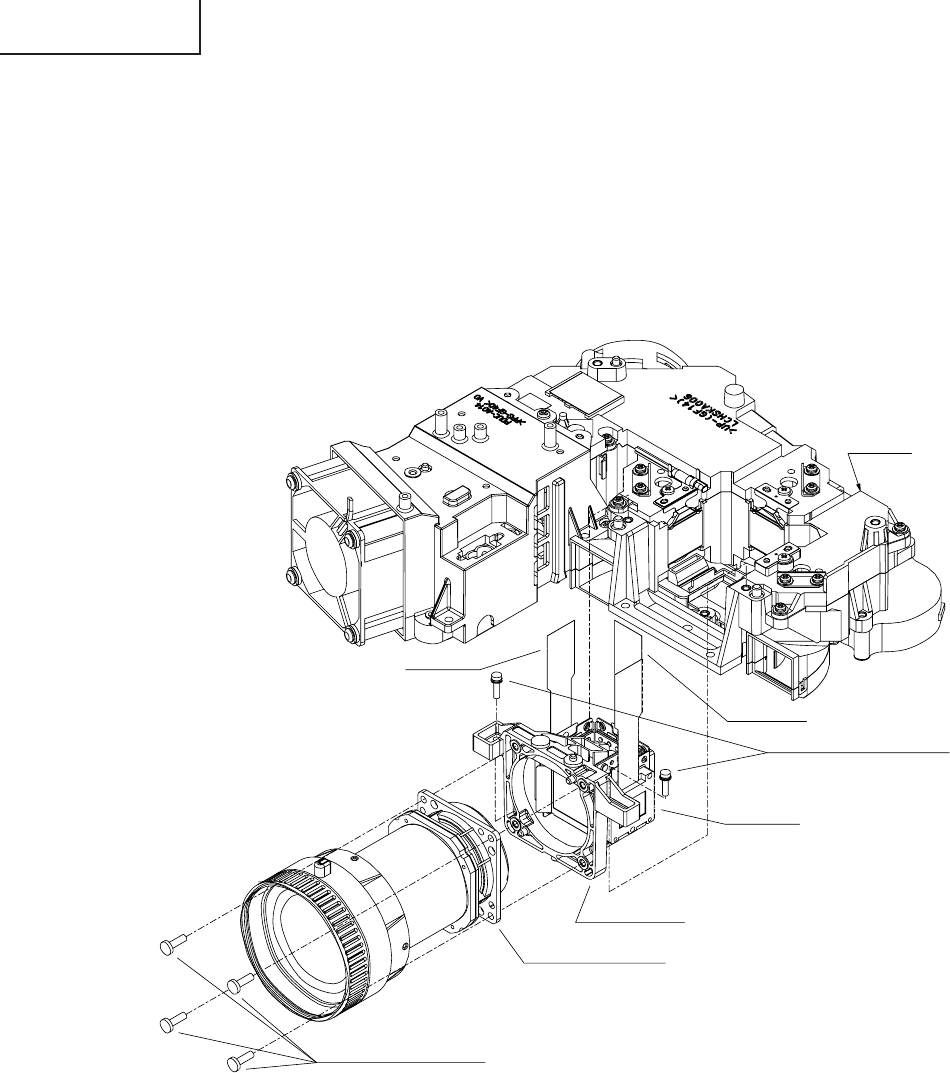
- THE OPTICAL UNIT OUTLINE 21
- ELECTRICAL ADJUSTMENT 23
- White-to-White 24
- Amplitude 24
- Process menu1 29
- Process menu2 30
- TROUBLE SHOOTING TABLE 31
- Technische Daten 38
- HINWEISE FÜR DAS 39
- WARTUNGSPERSONAL 39
- Projektor (Hintersicht) 42
- Fernbedienung (Vordersicht) 43
- Einlegen der Batterien 44
- Reichweite 44
- PC-Steuerung 45
- Kommunikationsbedingungen 45
- Grundformat 45
- ABMESSUNGEN 47
- ENTFERNEN DER HAUPTTEILE 48
- Reinigung und Austausch 52
- G-Reflektor 53
- ELEKTRISCHE EINSTELLUNG 55
- Prozeßmenü 1 61
- Prozeßmenü 2 62
- FEHLERSUCHTABELLE 63
- DESCRIPTION OF 76
- SCHEMATIC DIAGRAM 76
- BESCHREIBUNG DES 76
- SCHEMATISCHEN SCHALTPLANS 76
- WAVEFORMS / WELLENFORMEN 77
- MAIN UNIT / HAUPTEINHEIT-1/12 78
- MAIN UNIT / HAUPTEINHEIT-2/12 80
- MAIN UNIT / HAUPTEINHEIT-3/12 82
- MAIN UNIT / HAUPTEINHEIT-4/12 84
- MAIN UNIT / HAUPTEINHEIT-5/12 86
- MAIN UNIT / HAUPTEINHEIT-6/12 88
- MAIN UNIT / HAUPTEINHEIT-7/12 90
- MAIN UNIT / HAUPTEINHEIT-8/12 92
- MAIN UNIT / HAUPTEINHEIT-9/12 94
- 1716 1918151413121110 101
- POWER UNIT / NETZTEILEINHEIT 102
- LEITERPLATTENEINHEITEN 105
- ERSATZTEILLISTE 108
- PARTS LIST 108
- DUNTKB979FE01 109
- RDENCA029WJN1 117
- CABINET AND MECHANICAL PARTS 118
- OPTICS MECHANISM PARTS 120
- SUPPLIED ACCESSORIES 122
- PACKING PARTS 122
- SERVICE JIGS 122
- Design : Japan 124
- Production : Japan 124
Prodotti e manuali riguardandi Proiettori Sharp PG-A20X
 (137 pagine)
 (2 pagine)
(27 pagine)
(2 pagine)
(2 pagine)
(27 pagine)
(2 pagine)
 (71 pagine)
(110 pagine)
(71 pagine)
(110 pagine)
 (24 pagine)
(40 pagine)
(37 pagine)
(165 pagine)
(122 pagine)
(24 pagine)
(40 pagine)
(37 pagine)
(165 pagine)
(122 pagine)
 (66 pagine)
(142 pagine)
(73 pagine)
(26 pagine)
(66 pagine)
(142 pagine)
(73 pagine)
(26 pagine)
© 2020, manymanuals.it. Tutti i diritti riservati | 0.044 s |
 Manymanuals.com
 Manymanuals.de
 Manymanuals.fr
 Manymanuals.it
 Manymanuals.pl
 Manymanuals.cz
 Manymanuals.es
 Manymanuals-pt.com
Commenti su questo manuale