Sharp MX-2301N Specifiche Pagina 22: BASE SCREEN OF COPY MODE
 1
 2
 3
 4
 5
 6
 7
 8
 9
 10
 11
 12
 13
 14
 15
 16
 17
 18
 19
 20
 21
 22
 23
 24
 25
 26
 27
 28
 29
 30
 31
 32
 33
 34
 35
 36
 37
 38
 39
 40
 41
 42
 43
 44
 45
 46
 47
 48
 49
 50
 51
 52
 53
 54
 55
 56
 57
 58
 59
 60
 61
 62
 63
 64
 65
 66
 67
 68
 69
 70
 71
 72
 73
 74
 75
 76
 77
 78
 79
 80
 81
 82
 83
 84
 85
 86
 87
 88
 89
 90
 91
 92
 93
 94
 95
 96
 97
 98
 99
 100
 101
 102
 103
 104
 105
 106
 107
 108
 109
 110
 111
 112
 113
 114
 115
 116
20
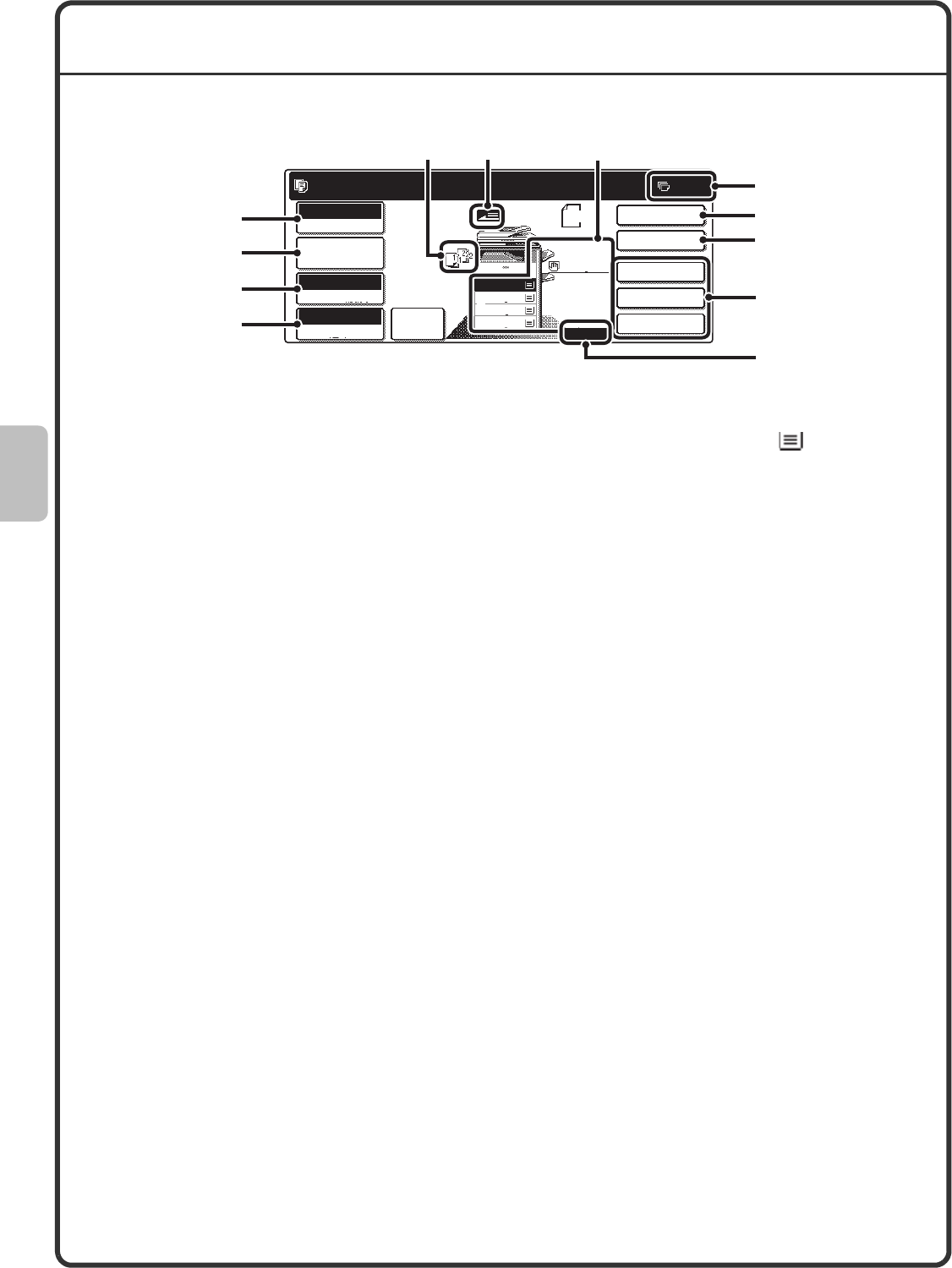
BASE SCREEN OF COPY MODE
Press the [COPY] key in the Operation panel to open the base screen of copy mode.
Select copy settings in the base screen.
(1) [Colour Mode] key
Touch this key to change the colour mode.
(2) [Job Detail Settings] key
Touch this key to select original settings, paper
settings, and special modes.
(3) [Exposure] key
This shows the current copy exposure and exposure
mode settings. Touch this key to change the
exposure or exposure mode setting.
(4) [Copy Ratio] key
This shows the current copy ratio. Touch this key to
adjust the copy ratio.
(5) Output display
When one or more output functions such as sort,
group, or staple sort have been selected, this shows
the icons of the selected functions.
(6) Original feed display
This appears when an original is inserted in the
automatic document feeder.
(7) Paper select display
This shows the size of paper loaded in each tray and
the amount of paper remaining
.
The selected tray is highlighted.
For the bypass tray, the paper type appears above
the paper size.
(8) Number of copies display
This shows the number of copies set.
(9) [2-Sided Copy] key
Touch this key to select the 2-sided copying function.
(10) [Output] key
Touch this to select an output function such as sort,
group, offset, staple sort, or punch.
(11) Customized keys
The keys that appear here can be changed to show
settings or functions that you prefer.
(12) [Heavy 1] display
This appears when one of trays 1 to 4 is selected and
the paper type set for that tray is "Heavy 1".
Ready to scan for copy.
2-Sided Copy
0
Output
Special Modes
File
Quick File
Full Colour
Colour Mode
2.
3.
4.
Auto
Exposure
100%
Copy Ratio
Job Detail
Settings
Auto
Image
A3
B4
A4R
1
A4
A4
A4
Plain
Original
Heavy 1
(2)
(1)
(3)
(4)
(7)
(6)
(8)
(5)
(11)
(12)
(9)
(10)
File PDF · ·
Domande su Sharp MX-2301N
Non ci sono ancora domande su questo manuale. Fate la prima.
Prodotti e manuali riguardanti Apparecchi multifunzione Sharp MX-2301N
- Apparecchi multifunzione Sharp MX-4101N Specifiche
 (76 pagine)
- Apparecchi multifunzione Sharp JW-20FLT Manuale Utente
(197 pagine)
- Apparecchi multifunzione Sharp MX-C381 Specifiche
(148 pagine)
- Apparecchi multifunzione Sharp MX-M260 Manuale Utente
 (160 pagine)
- Apparecchi multifunzione Sharp MX-4101N Specifiche
(12 pagine)
- Apparecchi multifunzione Sharp MX-M564N Manuale Utente
(8 pagine)
- Apparecchi multifunzione Sharp MX-M564N Manuale Utente
(8 pagine)
- Apparecchi multifunzione Sharp CPD-3830 Manuale Utente
(1 pagine)
- Apparecchi multifunzione Sharp MX-2010U Manuale Utente
(12 pagine)
- Apparecchi multifunzione Sharp MX-B381 Manuale Utente
(12 pagine)
- Apparecchi multifunzione Sharp MX-7500N Manuale Utente
(30 pagine)
- Apparecchi multifunzione Sharp AL-2021 Specifiche
(91 pagine)
- Apparecchi multifunzione Sharp MX-B402 Manuale Utente
(50 pagine)
- Apparecchi multifunzione Sharp FO-155 Specifiche

 (165 pagine)
- Apparecchi multifunzione Sharp MX-4140N Manuale di Installazione
(19 pagine)
- Apparecchi multifunzione Sharp JW-50FL Manuale Utente
(201 pagine)
- Apparecchi multifunzione Sharp MX-4140N Manuale Utente
(12 pagine)
- Apparecchi multifunzione Sharp CPD-3830 Manuale Utente
(12 pagine)
- Apparecchi multifunzione Sharp CD600 - B/W - Fax Manuale Utente
(23 pagine)
- Apparecchi multifunzione Sharp AR-810 Manuale delle Istruzioni
(178 pagine)