Sharp MX-2301N Specifiche Pagina 46: PRINTING
 1
 2
 3
 4
 5
 6
 7
 8
 9
 10
 11
 12
 13
 14
 15
 16
 17
 18
 19
 20
 21
 22
 23
 24
 25
 26
 27
 28
 29
 30
 31
 32
 33
 34
 35
 36
 37
 38
 39
 40
 41
 42
 43
 44
 45
 46
 47
 48
 49
 50
 51
 52
 53
 54
 55
 56
 57
 58
 59
 60
 61
 62
 63
 64
 65
 66
 67
 68
 69
 70
 71
 72
 73
 74
 75
 76
 77
 78
 79
 80
 81
 82
 83
 84
 85
 86
 87
 88
 89
 90
 91
 92
 93
 94
 95
 96
 97
 98
 99
 100
 101
 102
 103
 104
 105
 106
 107
 108
 109
 110
 111
 112
 113
 114
 115
 116
44
PRINTING
This section explains the basic procedures for printing.
The following example explains how to print a A4 size document from WordPad, which is a standard accessory
program in Windows.
To install the printer driver and configure settings in a Windows environment, see "2. SETUP IN A WINDOWS
ENVIRONMENT" in the Safety guide / Software Setup Guide.
For information on the available printer drivers and the requirements for their use, see "PRINTER FUNCTION OF
THE MACHINE" in "3. PRINTER" in the Operation Guide.
Windows
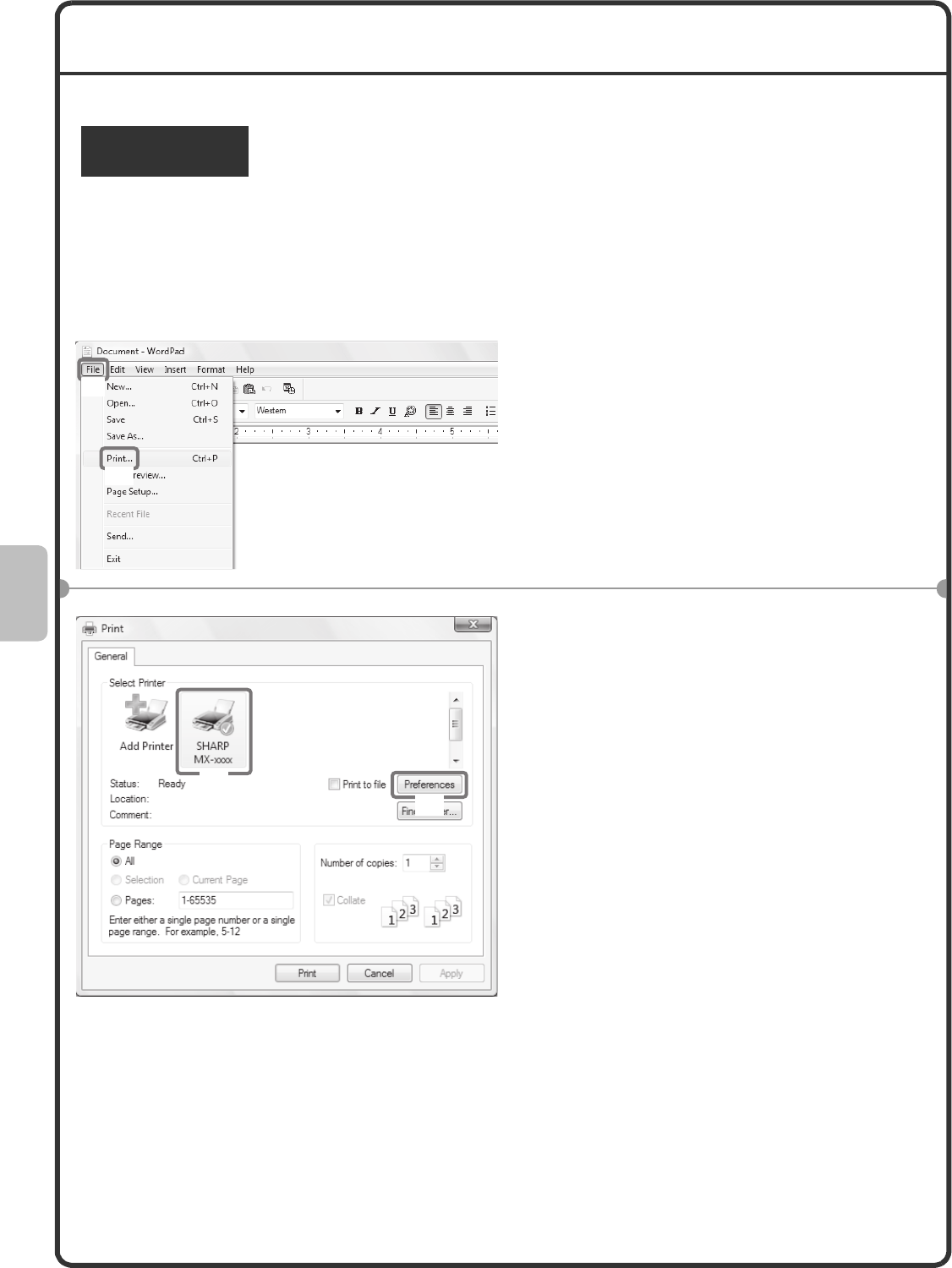
1
Select the print command in the
application.
(1)
Open the [File] menu.
(2)
Select [Print].
2
Open the printer driver properties
window.
(1)
Select the printer driver of the
machine.
(2)
Click the [Preferences] button.
In Windows 2000, the [Preferences]
button does not appear. Click the tabs in
the "Print" dialog box to adjust the
settings on the tabs.
(1)
(2)
(1)
(2)
File PDF · ·
Domande su Sharp MX-2301N
Non ci sono ancora domande su questo manuale. Fate la prima.
Prodotti e manuali riguardanti Apparecchi multifunzione Sharp MX-2301N
- Apparecchi multifunzione Sharp MX-4101N Specifiche
 (76 pagine)
- Apparecchi multifunzione Sharp JW-20FLT Manuale Utente
(197 pagine)
- Apparecchi multifunzione Sharp MX-C381 Specifiche
(148 pagine)
- Apparecchi multifunzione Sharp MX-M260 Manuale Utente
 (160 pagine)
- Apparecchi multifunzione Sharp MX-4101N Specifiche
(12 pagine)
- Apparecchi multifunzione Sharp MX-M564N Manuale Utente
(8 pagine)
- Apparecchi multifunzione Sharp MX-M564N Manuale Utente
(8 pagine)
- Apparecchi multifunzione Sharp CPD-3830 Manuale Utente
(1 pagine)
- Apparecchi multifunzione Sharp MX-2010U Manuale Utente
(12 pagine)
- Apparecchi multifunzione Sharp MX-B381 Manuale Utente
(12 pagine)
- Apparecchi multifunzione Sharp MX-7500N Manuale Utente
(30 pagine)
- Apparecchi multifunzione Sharp AL-2021 Specifiche
(91 pagine)
- Apparecchi multifunzione Sharp MX-B402 Manuale Utente
(50 pagine)
- Apparecchi multifunzione Sharp FO-155 Specifiche

 (165 pagine)
- Apparecchi multifunzione Sharp MX-4140N Manuale di Installazione
(19 pagine)
- Apparecchi multifunzione Sharp JW-50FL Manuale Utente
(201 pagine)
- Apparecchi multifunzione Sharp MX-4140N Manuale Utente
(12 pagine)
- Apparecchi multifunzione Sharp CPD-3830 Manuale Utente
(12 pagine)
- Apparecchi multifunzione Sharp CD600 - B/W - Fax Manuale Utente
(23 pagine)
- Apparecchi multifunzione Sharp AR-810 Manuale delle Istruzioni
(178 pagine)