Sharp MX-2301N Specifiche Pagina 87: SPECIAL SCAN MODES
 1
 2
 3
 4
 5
 6
 7
 8
 9
 10
 11
 12
 13
 14
 15
 16
 17
 18
 19
 20
 21
 22
 23
 24
 25
 26
 27
 28
 29
 30
 31
 32
 33
 34
 35
 36
 37
 38
 39
 40
 41
 42
 43
 44
 45
 46
 47
 48
 49
 50
 51
 52
 53
 54
 55
 56
 57
 58
 59
 60
 61
 62
 63
 64
 65
 66
 67
 68
 69
 70
 71
 72
 73
 74
 75
 76
 77
 78
 79
 80
 81
 82
 83
 84
 85
 86
 87
 88
 89
 90
 91
 92
 93
 94
 95
 96
 97
 98
 99
 100
 101
 102
 103
 104
 105
 106
 107
 108
 109
 110
 111
 112
 113
 114
 115
 116
85
SPECIAL SCAN MODES
The special modes can be used for a variety of special-purpose scan send jobs.
The following pages show the types of scan send jobs that can be performed. (The procedures for using each
special mode are not explained.)
Each special mode has its own settings and steps, however, the basic procedure is the same for all modes. The
basic procedure for selecting a special mode is explained on the next page using "Suppress Background" as an
example.
For the procedures for using the special modes, see "SPECIAL MODES" in "5. SCANNER / INTERNET
FAX" in the Operation Guide.
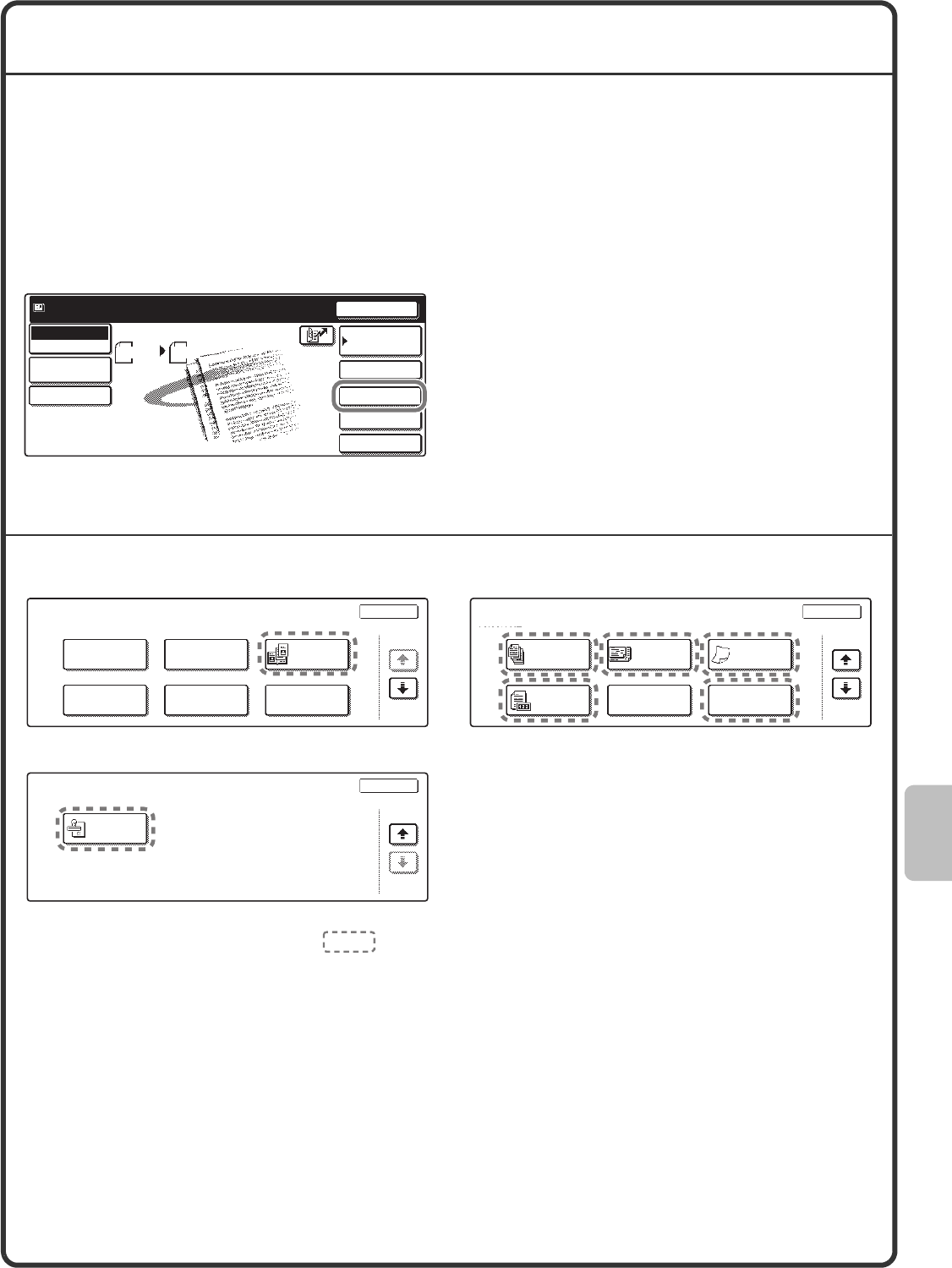
To use a special mode, open the special modes
menu and touch the key of mode that you wish to
use.
The menu varies depending on whether scan mode,
Internet fax mode, or USB memory scan mode is
selected.
Touch the [Special Modes] key in the base screen to
open the special modes menu. (You can also open
the special modes menu by touching the [Special
Modes] key that appears after the [Job Detail
Settings] key is touched.)
When a special mode key encircled by
is touched, the key is highlighted and the setting is completed.
When any other special mode key is touched, a screen appears to let you select settings for that mode.
The keys that appear vary by country and region and the peripheral devices that are installed.
Ready to send.
Resend
Special Modes
File
Quick File
Scan
Mode Switch
Send Settings
Job Detail
Settings
Address Book
Address Entry
Scan
Send
Auto
A4
Scan mode
1st screen
2nd screen
3rd screen
Scan
Special Modes
OK
1/3
Program
Timer
Erase
Dual Page
Scan
Card Shot
Suppress
Background
Scan
Special Modes
OK
2/3
Job
Build
File
Mixed Size
Original
Original
Count
Slow Scan
Mode
Quick File
Verif.
Stamp
Scan
Special Modes
OK
3/3
File PDF · ·
Domande su Sharp MX-2301N
Non ci sono ancora domande su questo manuale. Fate la prima.
Prodotti e manuali riguardanti Apparecchi multifunzione Sharp MX-2301N
- Apparecchi multifunzione Sharp MX-4101N Specifiche
 (76 pagine)
- Apparecchi multifunzione Sharp JW-20FLT Manuale Utente
(197 pagine)
- Apparecchi multifunzione Sharp MX-C381 Specifiche
(148 pagine)
- Apparecchi multifunzione Sharp MX-M260 Manuale Utente
 (160 pagine)
- Apparecchi multifunzione Sharp MX-4101N Specifiche
(12 pagine)
- Apparecchi multifunzione Sharp MX-M564N Manuale Utente
(8 pagine)
- Apparecchi multifunzione Sharp MX-M564N Manuale Utente
(8 pagine)
- Apparecchi multifunzione Sharp CPD-3830 Manuale Utente
(1 pagine)
- Apparecchi multifunzione Sharp MX-2010U Manuale Utente
(12 pagine)
- Apparecchi multifunzione Sharp MX-B381 Manuale Utente
(12 pagine)
- Apparecchi multifunzione Sharp MX-7500N Manuale Utente
(30 pagine)
- Apparecchi multifunzione Sharp AL-2021 Specifiche
(91 pagine)
- Apparecchi multifunzione Sharp MX-B402 Manuale Utente
(50 pagine)
- Apparecchi multifunzione Sharp FO-155 Specifiche

 (165 pagine)
- Apparecchi multifunzione Sharp MX-4140N Manuale di Installazione
(19 pagine)
- Apparecchi multifunzione Sharp JW-50FL Manuale Utente
(201 pagine)
- Apparecchi multifunzione Sharp MX-4140N Manuale Utente
(12 pagine)
- Apparecchi multifunzione Sharp CPD-3830 Manuale Utente
(12 pagine)
- Apparecchi multifunzione Sharp CD600 - B/W - Fax Manuale Utente
(23 pagine)
- Apparecchi multifunzione Sharp AR-810 Manuale delle Istruzioni
(178 pagine)