Sharp MX-2301N Specifiche Pagina 67: Speed dialling
 1
 2
 3
 4
 5
 6
 7
 8
 9
 10
 11
 12
 13
 14
 15
 16
 17
 18
 19
 20
 21
 22
 23
 24
 25
 26
 27
 28
 29
 30
 31
 32
 33
 34
 35
 36
 37
 38
 39
 40
 41
 42
 43
 44
 45
 46
 47
 48
 49
 50
 51
 52
 53
 54
 55
 56
 57
 58
 59
 60
 61
 62
 63
 64
 65
 66
 67
 68
 69
 70
 71
 72
 73
 74
 75
 76
 77
 78
 79
 80
 81
 82
 83
 84
 85
 86
 87
 88
 89
 90
 91
 92
 93
 94
 95
 96
 97
 98
 99
 100
 101
 102
 103
 104
 105
 106
 107
 108
 109
 110
 111
 112
 113
 114
 115
 116
65
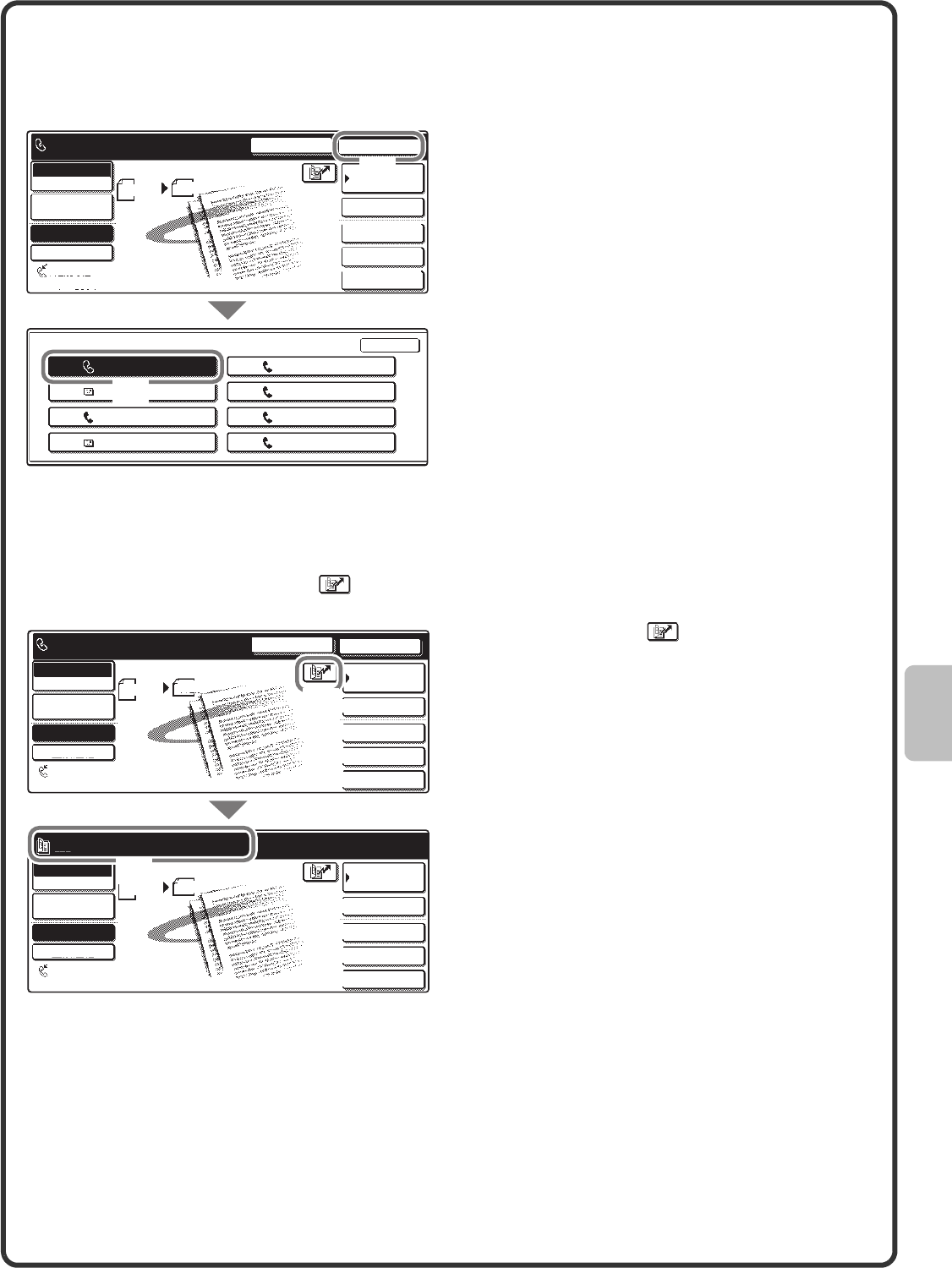
Resending
The [Resend] key can be touched to transmit to one of the eight most recent destinations used for transmission.
Resending is not possible in some cases, such as when an image is sent using a one-touch key for a group.
Speed dialling
When you store an individual key or a group key, a 3-digit search number is assigned to the key.
You can select a destination using the
key and the 3-digit search number.
To check a search number, print the appropriate list in the sending address list menu in the system settings.
(1)
Touch the [Resend] key.
(2)
Touch the key of the desired
destination.
The destinations that appear also include
Scan to E-mail and Internet fax
destinations.
(1)
Touch the
key.
(2)
Enter the 3-digit search number with
the numeric keys.
Cancel
NO.01
NO.03
NO.05
NO.07
NO.02
NO.04
NO.06
NO.08
Ready to send.
Speaker
Resend
Special Modes
File
Quick File
Fax
Mode Switch
Job Detail
Settings
Memory TX
Direct TX
Auto Reception
Fax Memory:100%
Address Book
Sub Address
Scan
Send
Auto
A4
AAA AAA
EEE EEE
CCC CCC
BBB BBB
DDD DDD
FFF FFF
GGG GGG
HHH HHH
(1)
(2)
Ready to send.
Speaker
Resend
Special Modes
File
Quick File
Fax
Mode Switch
Job Detail
Settings
Memory TX
Direct TX
Auto Reception
Auto Reception
Fax Memory:100%
Address Book
Sub Address
Enter search number.(001-999)
Special Modes
File
Quick File
Fax
Mode Switch
Job Detail
Settings
Memory TX
Direct TX
Fax Memory:100%
Address Book
Sub Address
Scan
Send
Auto
A4
Scan
Send
Auto
A4
(1)
(2)
File PDF · ·
Domande su Sharp MX-2301N
Non ci sono ancora domande su questo manuale. Fate la prima.
Prodotti e manuali riguardanti Apparecchi multifunzione Sharp MX-2301N
- Apparecchi multifunzione Sharp MX-4101N Specifiche
 (76 pagine)
- Apparecchi multifunzione Sharp JW-20FLT Manuale Utente
(197 pagine)
- Apparecchi multifunzione Sharp MX-C381 Specifiche
(148 pagine)
- Apparecchi multifunzione Sharp MX-M260 Manuale Utente
 (160 pagine)
- Apparecchi multifunzione Sharp MX-4101N Specifiche
(12 pagine)
- Apparecchi multifunzione Sharp MX-M564N Manuale Utente
(8 pagine)
- Apparecchi multifunzione Sharp MX-M564N Manuale Utente
(8 pagine)
- Apparecchi multifunzione Sharp CPD-3830 Manuale Utente
(1 pagine)
- Apparecchi multifunzione Sharp MX-2010U Manuale Utente
(12 pagine)
- Apparecchi multifunzione Sharp MX-B381 Manuale Utente
(12 pagine)
- Apparecchi multifunzione Sharp MX-7500N Manuale Utente
(30 pagine)
- Apparecchi multifunzione Sharp AL-2021 Specifiche
(91 pagine)
- Apparecchi multifunzione Sharp MX-B402 Manuale Utente
(50 pagine)
- Apparecchi multifunzione Sharp FO-155 Specifiche

 (165 pagine)
- Apparecchi multifunzione Sharp MX-4140N Manuale di Installazione
(19 pagine)
- Apparecchi multifunzione Sharp JW-50FL Manuale Utente
(201 pagine)
- Apparecchi multifunzione Sharp MX-4140N Manuale Utente
(12 pagine)
- Apparecchi multifunzione Sharp CPD-3830 Manuale Utente
(12 pagine)
- Apparecchi multifunzione Sharp CD600 - B/W - Fax Manuale Utente
(23 pagine)
- Apparecchi multifunzione Sharp AR-810 Manuale delle Istruzioni
(178 pagine)